





Latest Version
Latest
September 05, 2026
DOSA Apps
BUSINESS
Android
2
Free
com.meeting.onlinemeetingsvideomeeting
Report a Problem
More About Meeting – Video Conference
What is Meeting – Video Conference?
Meeting – Video Conference is a free Android application that lets you start or join video calls quickly. Designed for both personal chats and professional meetings, it focuses on delivering clear audio‑video quality while keeping the process simple and private.
Main features
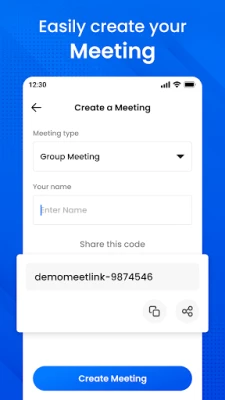
- Instant access – Create or join a meeting with a single tap; no account or password is required.
- High‑definition video and audio – The app adapts to the available network to maintain a stable, crisp connection.
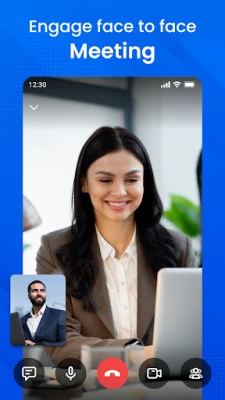
- One‑to‑one and group calls – Host a private conversation or invite multiple participants to a shared meeting room.
- Meeting codes – Generate a short alphanumeric code that can be shared via any messaging platform.
- Cross‑device flexibility – Works on smartphones and tablets, allowing participants to move between devices during a call.
How it works
When you launch the app, you are presented with two primary options: start a new meeting or enter an existing meeting code. Selecting “Start” generates a unique code that you can copy or share. Participants who have the app can enter the same code to join the session instantly. The interface includes basic controls for muting the microphone, toggling the camera, and switching between front and rear cameras. A simple chat window is also available for sending text messages during the call.
Practical uses
- Family catch‑ups – Connect with relatives across different time zones without scheduling a formal account.
- Remote work – Hold quick stand‑up meetings, screen‑share presentations, or brainstorm with teammates.
- Study groups – Students can create a virtual room to discuss assignments or conduct peer tutoring.
Installation information
The app can be downloaded from the Appitika store. After tapping the install button, Android will handle the download and installation process automatically. No additional configuration is required before the first use.
Things to know before installing
- The app requires a stable internet connection (Wi‑Fi or mobile data) for optimal video quality.
- Camera and microphone permissions are requested at runtime; they are essential for video and audio transmission.
- Meeting codes are temporary and expire after the session ends, enhancing privacy.
Who may find it useful?
Anyone who needs a quick, no‑login video meeting solution can benefit from Meeting – Video Conference. It is especially handy for users who prefer a lightweight app without the overhead of large enterprise platforms.
Frequently asked questions
Do I need to create an account?
No. Meetings can be started and joined without registering.
Is the communication encrypted?
The app uses standard transport encryption for data streams, providing a baseline level of privacy.
Can I share my screen?
Screen sharing is not listed among the core features, so the app focuses on video and audio interaction.
What is the maximum number of participants?
The exact limit is not disclosed, but the app is designed to support small‑to‑medium group calls.
Rate the App
User Reviews














Popular Apps










 Games
Games Entertainment
 Communication
 E-mail
 Security
 Tools
Tools Media
Media Internet
 Finance
 Design
 Education
 IT Tools
 Travel & Local
 Android
 Windows
 Linux
Linux