
Latest Version
Latest
August 29, 2026
Intuit Inc
BUSINESS
Android
101
Free
com.mailchimp.mailchimp
Report a Problem
More About Mailchimp Email Marketing – Mobile Campaign Manager
What is Mailchimp Email Marketing?
Mailchimp Email Marketing is the Android companion to the Mailchimp platform, a widely used service for creating and managing email newsletters, automated messages, and audience insights. The app lets you stay connected to your contacts and campaigns without needing a desktop browser.
Main Features
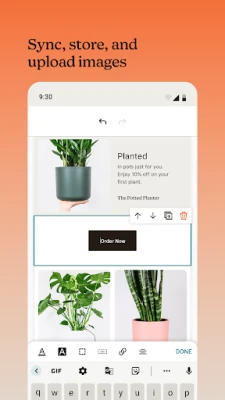
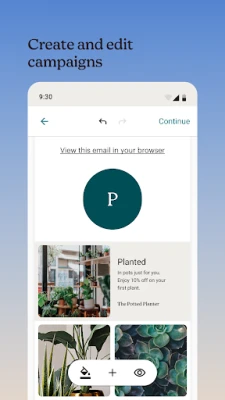
- Campaign creation and editing – Build new email newsletters or edit drafts directly from your phone using Mailchimp’s drag‑and‑drop templates.
- Automation management – Activate, pause, or adjust automated series such as welcome emails, birthday greetings, or cart‑abandonment reminders.
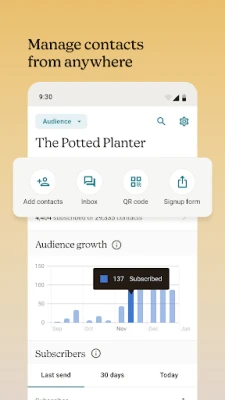
- Audience overview – View subscriber counts, recent sign‑ups, and basic engagement metrics like opens and clicks.
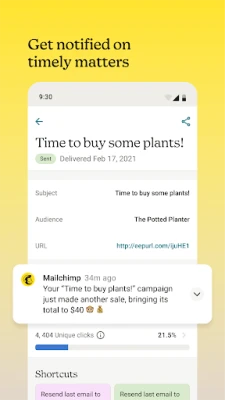
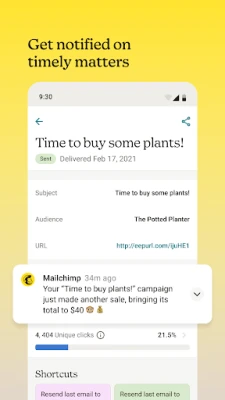
- Real‑time notifications – Receive alerts when a campaign is sent, when a contact replies, or when key performance thresholds are reached.
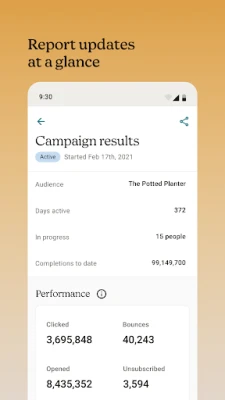
- Reporting snapshots – Access concise summaries of campaign performance, including open rates, click‑through rates, and revenue generated.
- Contact interaction – Call, text, or email a subscriber directly from the app, then add notes or tags to keep track of the conversation.
How It Works
After installing the app, you sign in with the same credentials you use on the web version of Mailchimp. The dashboard presents a quick view of recent campaigns, upcoming scheduled sends, and a summary of audience growth. From there you can:
- Tap Create Campaign to start a new email, choose a template, and customize content with your phone’s keyboard.
- Use the Automation tab to enable pre‑built workflows or edit existing ones.
- Open the Audience section to add new contacts manually, import from a CSV file stored on your device, or scan a business card using the phone’s camera.
- Check the Reports area for up‑to‑date statistics on each sent campaign.
Practical Uses
The app is especially handy for small business owners who need to:
- Launch a flash promotion while away from the office.
- Respond quickly to a subscriber’s reply or inquiry.
- Monitor a time‑sensitive automation, such as a cart‑abandonment reminder, and make adjustments on the fly.
- Check daily performance metrics during a product launch.
Installation Information
Search for “Mailchimp Email Marketing” in the Google Play Store, then tap Install. The app requires a Google account for download and will request permission to access your contacts and storage if you choose to import lists.
Things to Know Before Installing
- The app mirrors the functionality of the web platform but does not replace the full desktop experience; advanced design work may still be easier on a larger screen.
- All campaign data is stored in your Mailchimp account; the app does not retain copies locally.
- Internet connectivity is required for sending campaigns and retrieving reports.
Who May Find It Useful?
Entrepreneurs, freelancers, nonprofit organizers, and any marketer who already uses Mailchimp for email outreach will benefit from the mobile app’s ability to manage campaigns on the go.
Frequently Asked Questions
Do I need a paid Mailchimp plan to use the app?
No. The app works with both free and paid Mailchimp accounts. Feature availability follows the limits of your existing subscription.
Can I edit an existing campaign that was started on the desktop?
Yes. Drafts and scheduled campaigns appear in the app, and you can make changes before they are sent.
Is my subscriber data secure?
All data is transmitted over encrypted connections to Mailchimp’s servers, which handle storage and compliance according to their privacy policy.
What if I lose internet connectivity while editing?
Changes are saved locally and synced once the device reconnects.
Rate the App
User Reviews















Popular Apps










 Games
 Entertainment
 Communication
 E-mail
 Security
 Tools
 Media
 Internet
 Finance
 Design
 Education
 Android Firmwares
 Travel & Local
 Android
 Windows
 Linux