



Latest Version
September 06, 2026
Byveya Tech
BUSINESS
Android
11
Free
com.kundahouse.jobquote
Report a Problem
More About JobQuote – Mobile Tool for Property Service Management
What is JobQuote?
JobQuote is a free Android app developed by Byveya Tech that brings core business functions for property‑service teams onto a mobile device. It is designed for tradespeople, maintenance crews and small property‑management firms who need a simple way to plan work, generate quotes and keep records while moving between sites.
Main features
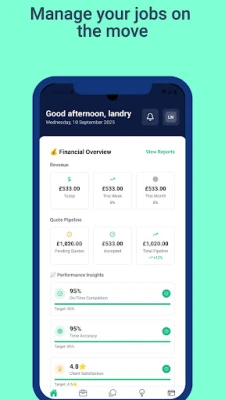
- Job planning and tracking – Create a new job, add tasks, set deadlines and monitor progress from start to finish.
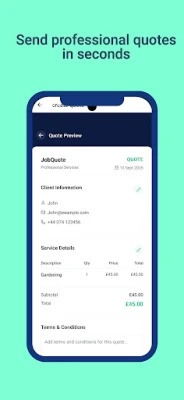
- Quote creation – Build estimates with line‑item pricing, add optional notes and export the quote as a PDF for client review.
- Client records – Store basic contact details, service history and any relevant notes for each client.
- Communication hub – Exchange messages with team members, attach photos or documents, and keep a history of conversations linked to each job.
- Offline capability – Work without an active internet connection; data syncs when the device reconnects.
How it works
After installing JobQuote, users create a profile for their business and add clients manually or by importing contacts. When a service request arrives, a new job entry can be opened, tasks are listed, and estimated material or labour costs are entered. The built‑in calculator totals the amount, and the user can generate a quote document directly from the app. Throughout the job, photos and notes can be attached, and any messages with the client or crew are stored alongside the job record. When the work is complete, the same entry can be used to produce an invoice or simply close the job for future reference.
Practical uses
- Plumbers and electricians can log service calls, estimate parts, and send a professional quote to homeowners.
- Facilities‑management teams can schedule routine inspections, track completion, and keep a searchable archive of reports.
- Independent contractors can maintain a client list, record past jobs and quickly generate new estimates without leaving the job site.
Installation information
JobQuote is available for free on the Google Play Store. Search for the package name com.kundahouse.jobquote or the app title, then tap Install. The app requires standard Android permissions for storage access and network connectivity to sync data.
Things to know before installing
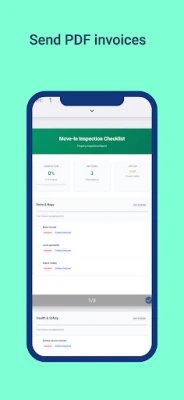
- The app does not include a built‑in payment gateway; invoicing is limited to PDF generation.
- All data is stored locally on the device until a network connection is available for backup.
- Because the version and size details are not published, ensure your device has sufficient free space before downloading.
Who may find JobQuote useful?
Any small‑to‑medium property‑service operation that needs a mobile‑first solution for job scheduling, quoting and client communication will benefit from JobQuote. It is especially handy for professionals who spend most of their time on‑site and require offline access.
Frequently asked questions
Is JobQuote free to use?
Yes, the application is offered at no cost.
Can I export data from JobQuote?
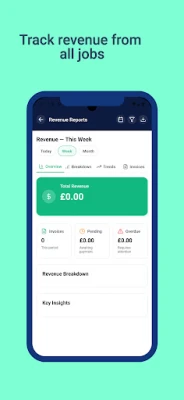
Quotes and reports can be saved as PDF files, which can then be shared via email or other messaging apps.
Does the app support multiple users?
JobQuote is intended for single‑device use; sharing data across multiple devices would require manual export or a separate synchronization solution.
Rate the App
User Reviews















Popular Apps










 Games
Games Entertainment
 Communication
 E-mail
 Security
 Tools
Tools Media
Media Internet
 Finance
 Design
 Education
 IT Tools
 Travel & Local
 Android
 Windows
 Linux
Linux