
Latest Version
Latest
August 23, 2026
Zoho Corporation
BUSINESS
Android
112
Free
com.zoho.invoicegenerator
Report a Problem
More About Invoice Generator – Zoho
What is Invoice Generator – Zoho?
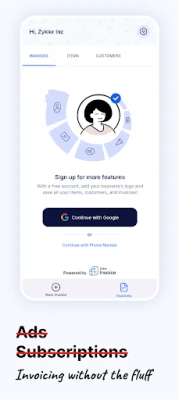
Invoice Generator – Zoho is a lightweight Android app from Zoho Corporation that lets freelancers, small businesses, and anyone who needs to bill for services or products produce professional‑looking invoices directly from a mobile device. The app focuses on a straightforward workflow, allowing users to enter essential details and obtain a ready‑to‑send PDF without dealing with complex accounting software.
Main capabilities
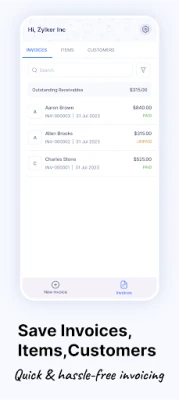
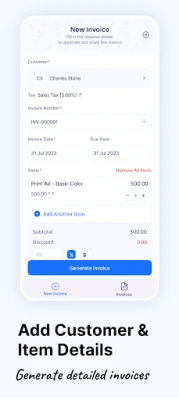
- Three‑step invoice creation: Add your business information, fill in customer and product details, and generate the invoice.
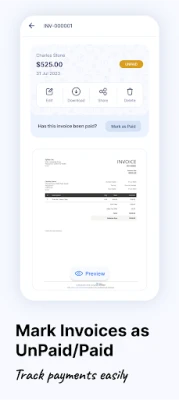
- Preview before finalising: Review the completed invoice to confirm amounts, tax calculations, and formatting.
- Export options: Save the invoice as a PDF file or share it via email directly from the app.
- Offline operation: All functions work without an internet connection, making it useful in field work or locations with limited connectivity.
How it works
The process is intentionally simple. After launching the app, you start a new invoice and are prompted to enter your business name, address, and contact details. Next, you add the client’s information and list the items or services being billed, including quantity, rate, and applicable taxes. Once the data is entered, the app compiles a formatted invoice that can be previewed on screen. If everything looks correct, you tap a button to generate a PDF file, which can then be saved locally or sent via the device’s email client.
Practical uses
This tool is handy for:
- Freelancers who need to bill hourly or project‑based work quickly.
- Small retailers or service providers who issue receipts on the go.
- Consultants traveling to client sites who want to avoid paperwork delays.
Installation and requirements
The app is distributed as a free download from the Google Play Store. No specific Android version is listed, but the app targets standard Android devices that support basic PDF handling. Installation follows the usual Play Store process: tap “Install,” wait for the download, and open the app once the installation completes.
Things to consider before installing
- The app does not include full accounting features such as expense tracking or payment reconciliation.
- All invoice data is stored locally on the device; users should back up PDFs manually if long‑term storage is needed.
- Since the app is free, it may display occasional promotional messages from Zoho, but no in‑app purchases are required.
Who will benefit most?
Anyone who needs to produce a clean invoice without learning a full‑featured accounting suite will find this app useful. It is especially suited for independent contractors, boutique service providers, and small shops that prefer a mobile‑first approach.
Frequently asked questions
Can I customize the invoice layout?
The app provides a fixed template designed for clarity and professionalism. Custom branding options are not part of the free version.
Is my data secure?
All information entered stays on the device unless you choose to share it. The app does not automatically upload data to external servers.
Do I need an internet connection to send invoices?
Sending via email requires an active internet connection, but creating and saving the PDF can be done offline.
Rate the App
User Reviews















Popular Apps










 Games
 Entertainment
 Communication
 E-mail
 Security
 Tools
 Media
 Internet
 Finance
 Design
 Education
 Android Firmwares
 Travel & Local
 Android
 Windows
 Linux