

Latest Version
Latest
August 27, 2026
Tango Ventures Inc
BUSINESS
Android
102
Free
com.bestmate.pro
Report a Problem
More About Bestmate: Small Business App – Free Business Management Tool
What is Bestmate?
Bestmate is a free Android application developed by Tango Ventures Inc. It is designed for owners of small businesses who need a simple way to keep track of everyday tasks such as invoicing, appointment scheduling, payment collection and basic customer communication. The app brings together several common business functions into one mobile‑friendly interface, allowing users to work from anywhere without juggling multiple separate tools.
Main features
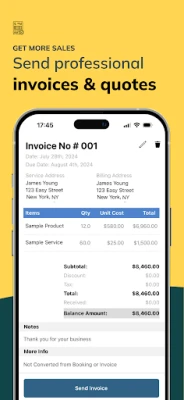
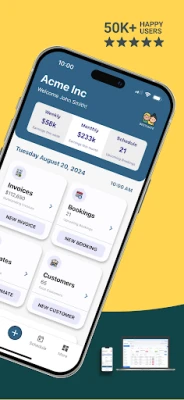
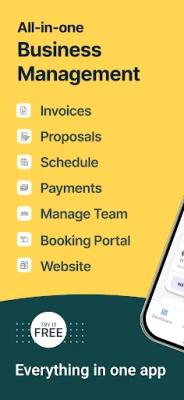
- Invoice creation and tracking – Generate professional invoices quickly, assign them to customers and monitor their status.
- Estimates and orders – Draft estimates or sales orders and convert them to invoices when approved.
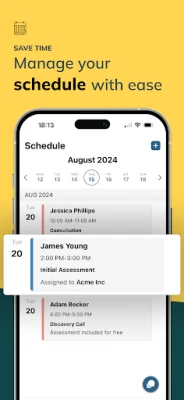
- Appointment scheduling – Set up bookings, view them on a calendar and receive automatic reminders.
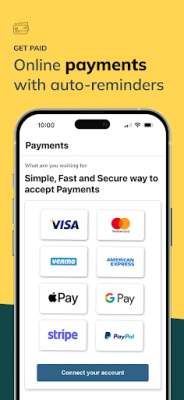
- Payment processing – Record cash, card or bank payments and keep a single ledger of all transactions.
- Customer and supplier records – Store basic contact details, notes and transaction history for each client or vendor.
- Two‑way text messaging – Send and receive short messages to customers directly from the app, useful for confirming appointments or sharing invoice links.
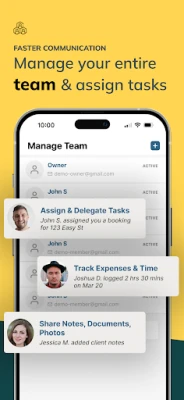
- Team collaboration – Assign tasks, share schedules and track time spent on jobs with team members.
How it works
After installing Bestmate, users create a profile for their business and can immediately start adding customers, products or services. The interface guides users through common workflows: a new invoice is built by selecting a client, adding line items and setting payment terms. Once saved, the invoice can be emailed or shared via text. Scheduling follows a similar pattern—choose a client, pick a date and time, and the app adds the entry to a built‑in calendar view. All data is stored locally on the device and synchronized with the cloud, so information remains accessible across multiple devices.
Practical uses
- Freelancers can issue invoices and receive payment confirmations without leaving their phone.
- Service‑based businesses such as salons or repair shops can manage bookings and send reminder texts to reduce no‑shows.
- Small retail operations can keep a simple ledger of cash and card sales, helping with end‑of‑day reconciliation.
- Teams with a few members can assign tasks and track time, making it easier to bill clients for labor.
Installation information
The app is available through the Google Play Store under the package name com.bestmate.pro. Installation follows the standard Android process: tap “Install,” grant the requested permissions, and launch the app. Because the app is free, there is no purchase or subscription required to access the core features.
Compatibility
Bestmate runs on Android devices that meet the minimum system requirements set by Google Play. Specific version numbers are not disclosed, but the app is built for modern Android releases and should work on most smartphones and tablets released in the last several years.
Things to know before installing
- The app stores business data in the cloud, so an internet connection is needed for synchronization.
- Permissions requested are limited to storage (to save invoices) and messaging (for text communication).
- Because the app is free, it may include optional in‑app purchases for advanced features, though the core functionality remains usable without additional payment.
Who may find Bestmate useful?
Bestmate is aimed at solo entrepreneurs, freelancers, small service providers and micro‑enterprises that need a lightweight, all‑in‑one solution for everyday business tasks. It is especially helpful for users who prefer managing their operations from a mobile device rather than a desktop‑only system.
Frequently asked questions
- Is my data secure? Bestmate uses cloud storage with standard encryption for data transmission. Users should review the privacy policy within the app for details.
- Can I export my invoices? The app provides options to share invoices as PDF files or email them directly to clients.
- Does the app support multiple currencies? Basic currency selection is available, but advanced multi‑currency accounting may require additional tools.
- Is there a desktop version? Bestmate focuses on the Android platform; a separate web or desktop client is not listed.
Rate the App
User Reviews















Popular Apps










 Games
 Entertainment
 Communication
 E-mail
 Security
 Tools
 Media
 Internet
 Finance
 Design
 Education
 Android Firmwares
 Travel & Local
 Android
 Windows
 Linux