


Latest Version
September 04, 2026
Bestimate Solutions
BUSINESS
Android
4
Free
com.bestimate.expert.app
Report a Problem
More About Bestimate Pro – Find and Quote Local Jobs
What is Bestimate Pro?
Bestimate Pro is a mobile marketplace that links independent contractors, tradespeople, and service providers with customers looking for reliable help. The app lets professionals view posted job requests, evaluate the details, and decide which opportunities to pursue.
Main features
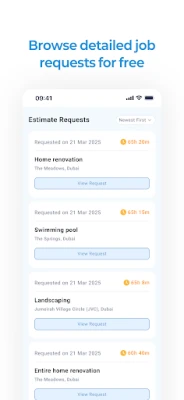
- Job listings with full details – Each request includes location, scope of work, and any photos the customer has added.
- Selective engagement – Users can choose which jobs to respond to, focusing on projects that match their skills and availability.
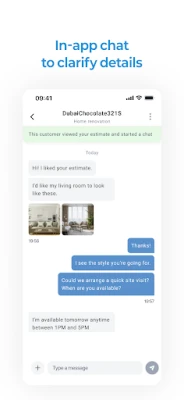
- In‑app communication – A built‑in chat lets you ask follow‑up questions, clarify requirements, and share images before submitting a quote.
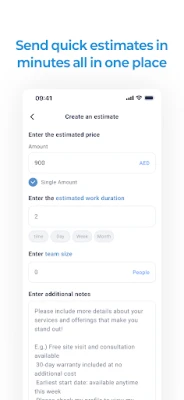
- Estimate creation – Draft and send a clear, itemised quote directly through the app.
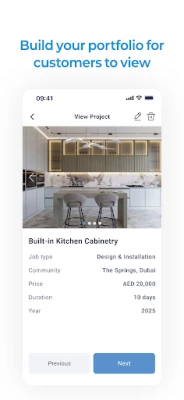
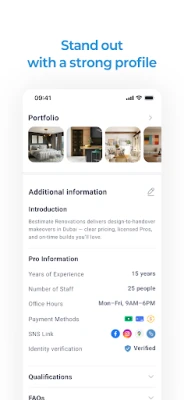
- Profile building – Add qualifications, a portfolio of past work, and verify your trade license or ID to increase credibility with potential clients.
How it works
- Sign up with your professional details and, if desired, verify your credentials.
- Browse the feed of new job requests that appear in your area.
- Review each posting’s description, location, and any attached images.
- Use the chat function to ask the customer for clarification or additional information.
- Prepare an estimate within the app and send it to the customer.
- If the customer accepts, you arrange the work directly with them.
Practical uses
Bestimate Pro is useful for a range of service providers, including electricians, plumbers, carpenters, landscapers, and other skilled trades. By centralising lead generation and quoting in one place, the app helps professionals spend less time searching for work and more time completing jobs.
Who may find it useful?
- Freelance tradespeople looking to expand their client base.
- Small service businesses that want a simple way to receive and manage job requests.
- Newly licensed professionals seeking their first paid projects.
Things to know before installing
The app is free to download and use. While it provides a platform for connecting with customers, the contractual relationship and payment terms are handled directly between the professional and the client. Users should ensure they have the appropriate licences and insurance for the work they undertake.
Frequently asked questions
Do I need to pay to view job requests?
Viewing posted requests is free. Some interactions, such as sending a quote, may involve a credit system managed within the app.
Can I verify my credentials?
Yes, the app offers an optional verification step where you can upload a trade licence or identification to enhance your profile.
How do I receive payments?
Payments are arranged directly with the customer. Bestimate Pro does not process transactions; you should discuss payment methods and terms with each client.
Rate the App
User Reviews















Popular Apps










 Games
Games Entertainment
 Communication
 E-mail
 Security
 Tools
Tools Media
Media Internet
 Finance
 Design
 Education
 IT Tools
 Travel & Local
 Android
 Windows
 Linux
Linux