

Latest Version
Latest
September 05, 2026
Allied Benefit Systems
HEALTH AND FITNESS
Android
4
Free
com.alliedbenefit.alliedbenefit
Report a Problem
More About My Allied Portal – Manage Your Healthcare Benefits
What is My Allied Portal?
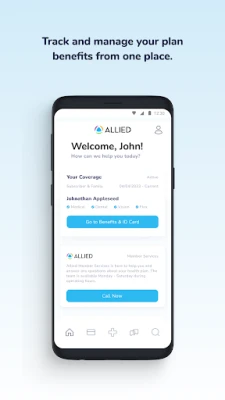
My Allied Portal is a mobile tool created by Allied Benefit Systems for members of its health plans. The app serves as a personal dashboard that brings key benefit information into the palm of your hand, letting you stay informed about coverage, spending, and provider options without logging into a web portal.
Main Features
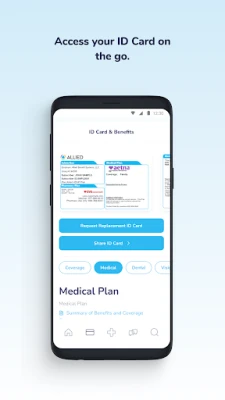
- Digital ID Card – View your member ID card instantly, making it easy to present proof of coverage at doctors’ offices or pharmacies.
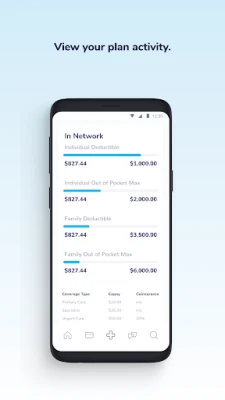
- Deductible & Out‑of‑Pocket Tracker – See how much you have spent toward your annual deductible and out‑of‑pocket maximum, with visual cues that highlight remaining amounts.
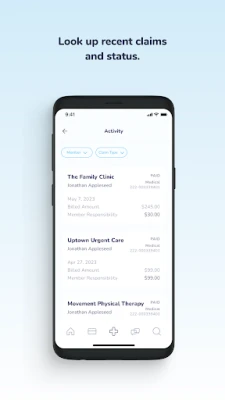
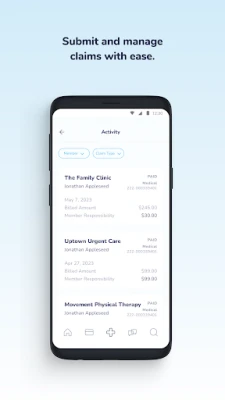
- Claims Overview – Review recent claim submissions, check status updates, and understand any amounts you may owe.
- Provider Search – Locate doctors, specialists, and facilities that are in‑network for your plan, helping you avoid unexpected costs.
- Benefit Details – Browse the specifics of your health plan, including covered services, pharmacy tiers, and preventive‑care options.
- Member Service Connection – Initiate contact with a Member Service associate directly from the app for personalized assistance.
How It Works
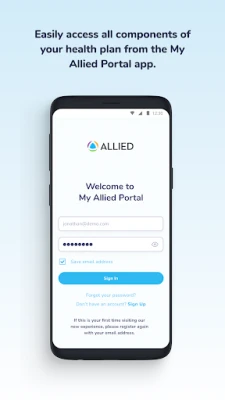
After downloading the app from the Play Store, you sign in using the credentials associated with your health plan. The app then pulls your enrollment data from Allied Benefit Systems’ secure servers. All information is presented in a clean, tab‑based interface that separates cards, spending, claims, and provider tools. Data updates automatically when you open the app, ensuring you always see the latest figures.
Practical Uses
- Doctor Visits – Show your digital ID card at the front desk and verify that the clinician is in‑network before the appointment.
- Expense Management – Monitor how each medical service impacts your deductible, helping you plan for upcoming procedures.
- Claim Follow‑Up – Quickly check whether a recent claim has been processed and whether any balance is due.
- Finding Care – Use the provider search to locate nearby specialists that accept your plan, reducing the time spent on phone calls.
Installation Information
The app is listed as free on the Google Play Store. Installation follows the standard Android process: tap “Install,” wait for the download, and open the app once the installation completes. An active internet connection is required for the initial sign‑in and for subsequent data refreshes.
Things to Know Before Installing
- The app requires a Google account for Play Store access.
- You will need your member login credentials (username/password) to sign in.
- Data usage is minimal, but a cellular or Wi‑Fi connection is needed to sync claim and benefit information.
Who May Find It Useful?
Anyone enrolled in an Allied Benefit Systems health plan can benefit from the app—particularly those who prefer mobile access to their coverage details, frequent travelers who need a digital ID, or members who want to keep a close eye on deductible progress throughout the year.
Frequently Asked Questions
Do I need an internet connection to use the app?
Yes, an internet connection is required for sign‑in and for updating benefit information. Once data is loaded, you can view previously synced details offline.
Is my personal health information secure?
The app communicates with Allied Benefit Systems’ servers over encrypted connections. Standard Android security practices apply, and the app does not store sensitive data on the device beyond what is needed for offline viewing.
Can I add multiple family members?
Each member logs in with their own credentials. If you manage a family plan, you can switch between members by signing out and signing in with the appropriate account.
What should I do if I forget my login details?
Use the “Forgot password” link on the sign‑in screen to start the password‑reset process, which follows the standard procedure set by Allied Benefit Systems.
Rate the App
User Reviews















Popular Apps










 Games
Games Entertainment
 Communication
 E-mail
 Security
 Tools
Tools Media
Media Internet
 Finance
 Design
 Education
 IT Tools
 Travel & Local
 Android
 Windows
 Linux
Linux