

Latest Version
September 08, 2026
Farazy MaxIT
HEALTH AND FITNESS
Android
126
Free
com.farazymaxit.open_mrs_mobileapp
Report a Problem
More About Health Connect – Farazy Hospital Mobile App
What is Health Connect?
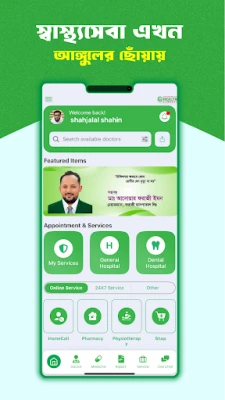
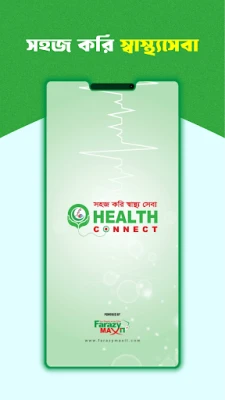
Health Connect is a mobile application developed by Farazy MaxIT for patients of Farazy Hospital Ltd. It provides a digital gateway to core hospital services, allowing users to interact with their health care providers without leaving their device.
Main features
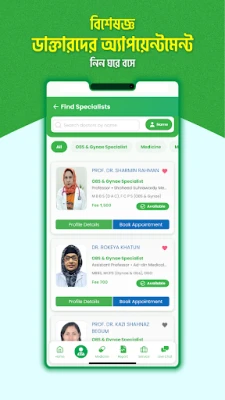
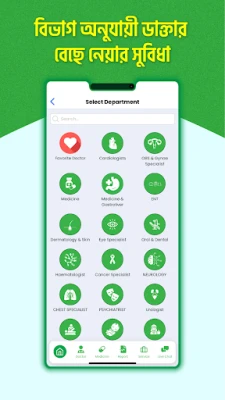
- Appointment scheduling – Browse doctors by specialty or department and reserve a time slot that fits your calendar.
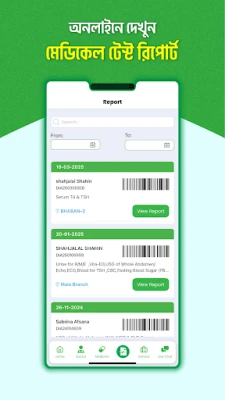
- Medical record access – View and download lab results, prescriptions and other reports directly within the app.
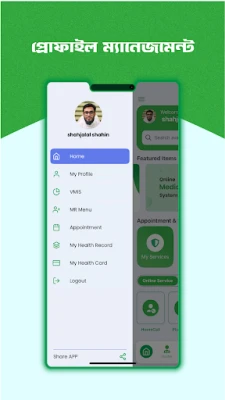
- Digital health card – Store your patient card electronically and use it for faster check‑in and potential discounts.
- Home‑care requests – When available, request a home visit from qualified medical staff.
- Pharmacy ordering – Order prescribed medicines for delivery or pick‑up through an integrated pharmacy service.
- History archive – Keep a personal log of past visits, treatments and medication histories in one secure place.
- Support channel – Access help via in‑app messaging or contact numbers provided by the hospital.
How it works
After installing the app, users create a personal profile using basic contact information. The profile is linked to the hospital’s patient database, which enables the app to pull appointment slots, test results and other data that belong to the user. All interactions are performed inside the app, and any changes (such as a new appointment) are synchronized with the hospital’s scheduling system in real time.
Practical uses
- Schedule a routine check‑up without calling the clinic.
- Check blood test results as soon as they are posted.
- Keep a single, searchable record of all prescriptions.
- Arrange a nurse’s visit for wound care or physiotherapy at home.
- Order medication and have it delivered to your doorstep.
Installation information
The app is distributed as a free download from the Google Play Store. Search for the package name com.farazymaxit.open_mrs_mobileapp or the title “Health Connect” and tap Install. The download size and minimum Android version are not specified, so the Play Store will indicate compatibility with your device during installation.
Things to know before installing
- The app requires an active internet connection for most functions, such as booking appointments or retrieving reports.
- Personal health data is stored locally on the device and synchronized with the hospital’s secure servers; a password or biometric lock is recommended to protect the app.
- Features like home‑care requests or pharmacy delivery may be limited to certain geographic areas.
Who may find it useful?
Patients who regularly visit Farazy Hospital, families managing the health of children or elderly relatives, and anyone who prefers digital management of medical information will benefit from Health Connect. The bilingual interface (Bangla and English) makes it accessible to a broad audience in Bangladesh.
Frequently asked questions
Is the app free to use?
Yes, Health Connect is offered at no cost. Some optional services, such as medication delivery, may involve separate fees.
How is my privacy protected?
The app encrypts personal health information and follows local data‑protection guidelines. Only the registered user can view their records.
Can I use the app on any Android device?
Compatibility depends on the Android version required by the app. The Play Store will prevent installation on devices that do not meet the minimum requirements.
What should I do if I encounter an error?
Use the in‑app support option to contact the hospital’s help desk, or refer to the “Help” section for troubleshooting steps.
Rate the App
User Reviews











Popular Apps










 Games
Games Entertainment
 Communication
 E-mail
 Security
 Tools
Tools Media
Media Internet
 Finance
 Design
 Education
 Android Firmwares
 Travel & Local
 Android
 Windows
 Linux
Linux