

Latest Version
Latest
August 26, 2026
Google LLC
HEALTH AND FITNESS
Android
138
Free
com.google.android.apps.healthdata
Report a Problem
More About Health Connect – Centralize Your Fitness and Wellness Data
What is Health Connect?
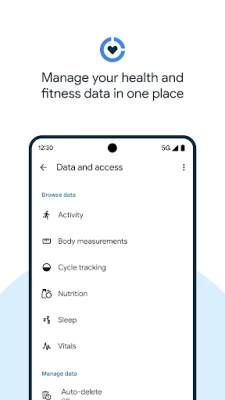
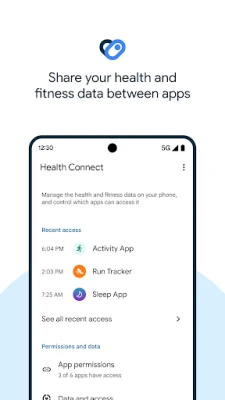
Health Connect is a free utility from Google that acts as a hub for the health‑related information generated by the apps you already use. Instead of each app maintaining its own separate record of steps, sleep, nutrition, or vital signs, Health Connect provides a single place on your device where that data can be stored and accessed.
Main capabilities
- Data aggregation – Collects activity, sleep, nutrition, heart rate, and other metrics from participating apps.
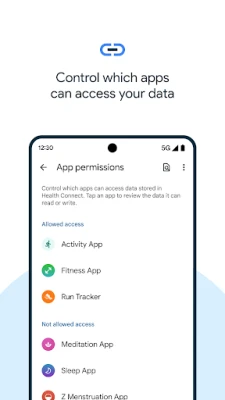
- Selective sharing – You decide which pieces of information each app may read or write.
- Offline storage – All data remains on your phone unless you explicitly grant an app permission to sync elsewhere.
- Privacy dashboard – A concise view shows recent access and lets you modify permissions in a few taps.
How it works
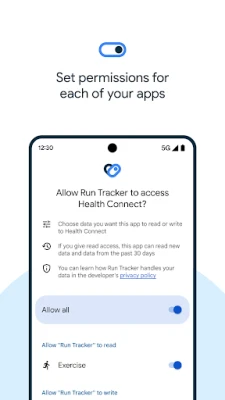
When you install Health Connect, it registers as a data provider on your device. Compatible apps can request permission to read from or write to the hub. The first time an app asks for access, Health Connect presents a clear prompt describing the specific data types involved. You can approve, deny, or limit the scope. After permission is granted, the app can automatically sync its measurements with the hub, and any other app with matching permission can read that data.
Practical uses
- Unified view of activity – See total steps, distance, and calories from multiple trackers in one place.
- Sleep analysis across apps – Combine data from a sleep‑tracking app and a meditation app to get a fuller picture of rest quality.
- Nutrition logging – Allow a diet app to pull calorie counts while keeping your workout logs separate.
- Health monitoring – Let a blood‑pressure app write readings that a wellness dashboard can display alongside heart‑rate trends.
Installation information
Search for “Health Connect” in the Google Play Store, install the app, and follow the on‑screen setup wizard. The app does not require additional configuration to start receiving data; it will appear in the list of available health data sources for any compatible app you already have installed.
Things to know before installing
- Health Connect only interacts with apps that have been built to use its API. If an app does not appear in the permission list, it does not yet support the hub.
- The app stores data locally; it does not automatically back up to a cloud service unless you enable that feature in a connected app.
- Because the hub centralizes data, revoking an app’s permission removes its future access but does not delete data it previously wrote.
Who may find it useful?
Anyone who uses more than one health‑related app can benefit from a single source of truth. This includes fitness enthusiasts tracking workouts and sleep, users managing chronic conditions who need to share vitals with a medical‑grade app, and anyone who wants tighter control over which apps see personal health information.
Frequently asked questions
Do I need an internet connection for Health Connect to work?
No. The core functionality—storing and sharing data between apps—operates entirely on the device. An internet connection is only required if a connected app chooses to sync data to its own cloud service.
Can I delete data that has been written to Health Connect?
Yes. Within the app’s settings you can view each data type and remove individual entries or clear all records for a given category.
Is my data safe?
Health Connect keeps data on your device and requires explicit permission before any other app can read it. The permission prompts are designed to be transparent about what is being shared.
Rate the App
User Reviews










Popular Apps










 Games
 Entertainment
 Communication
 E-mail
 Security
 Tools
 Media
 Internet
 Finance
 Design
 Education
 Android Firmwares
 Travel & Local
 Android
 Windows
 Linux