

Latest Version
Latest
September 05, 2026
Cigna
HEALTH AND FITNESS
Android
0
Free
com.cigna.mobile.IOHspark
Report a Problem
More About Cigna Health Benefits+ – Your Cigna Plan at a Glance
What is Cigna Health Benefits+?
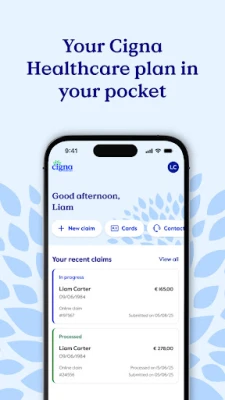
Cigna Health Benefits+ is a mobile companion for members of Cigna group health plans. It lets you view core information about your insurance, manage routine tasks, and locate health‑care providers without needing to log into a desktop portal.
Main features
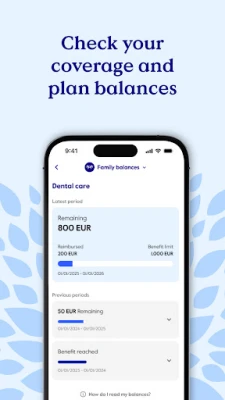
- Coverage overview – See a summary of your plan, including deductible status, out‑of‑pocket limits and remaining balances.
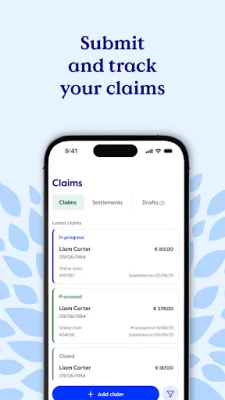
- Claims submission – Upload photos or PDFs of receipts and submit a claim directly from the app. Track the progress of pending submissions.
- Provider search – Search for doctors, hospitals or facilities that accept your Cigna plan, with filters for location and specialty.
- Digital membership card – Download an electronic version of your ID card that can be shown at the point of care or shared with family members.
- Profile management – Update personal details such as address, phone number or emergency contacts.
- Contact support – Reach Cigna assistance with a few taps, using in‑app messaging or phone links.
How it works
After installing the app, you sign in with the credentials provided in your Cigna welcome email. The app authenticates against Cigna’s secure servers, then presents a personalized dashboard. From there you can navigate to any of the features listed above. All data is transmitted over encrypted connections, and the app stores only the information needed for your session.
Practical uses
- Checking coverage before a visit – Quickly verify whether a planned procedure is covered and how much of your deductible remains.
- Submitting a claim on the go – Capture a receipt with your phone camera, attach it to a claim, and send it without waiting to return home.
- Finding a nearby provider – Use the built‑in search to locate an in‑network doctor while traveling.
- Showing your ID at the pharmacy – Present the digital card instead of a paper copy.
Installation information
The app is available for free on the Google Play Store. Search for "Cigna Health Benefits+" or use the package name com.cigna.mobile.IOHspark to locate it. Tap Install and follow the standard Android installation prompts.
Things to know before installing
- The app is intended for members of Cigna group plans that are sponsored by an international organization (IGO/NGO). If your plan does not fall into this category, some features may be unavailable.
- You will need the login details that were sent to you by Cigna, typically found in a welcome email.
- Internet connectivity is required for most functions, such as claim submission and provider lookup.
Who may find it useful?
Anyone enrolled in a qualifying Cigna group health plan can benefit from quick access to coverage information, claim management and provider directories. The app is especially handy for frequent travelers, busy professionals, and families who need to share a digital membership card.
Frequently asked questions
Do I need a separate Cigna account?
Use the credentials provided in your Cigna welcome email. The app does not create a new account.
Can I use the app on any Android device?
The app runs on devices that meet the minimum Android version required by Cigna’s backend. Specific version details are listed on the Play Store page.
Is my personal data safe?
Cigna employs standard encryption for data transmission. The app stores only temporary session data on the device.
What if I forget my login information?
Contact Cigna support through the app’s help section or use the password‑reset link provided in your original welcome email.
Rate the App
User Reviews















Popular Apps










 Games
Games Entertainment
 Communication
 E-mail
 Security
 Tools
Tools Media
Media Internet
 Finance
 Design
 Education
 IT Tools
 Travel & Local
 Android
 Windows
 Linux
Linux