


Latest Version
September 14, 2026
UsmanPervez
Education
Android
70
Free
com.atq.quranemajeedapp.org.taiseer
Report a Problem
More About Tafseer Taiseer‑ur‑Rahman – Urdu Quran Translation & Commentary
What is Tafseer Taiseer‑ur‑Rahman?
Tafseer Taiseer‑ur‑Rahman is a mobile application that brings the Urdu translation (Tarjuma) and commentary (Tafseer) of the Holy Quran to Android devices. Developed by UsmanPervez, the app offers the complete work of scholar Muhammad Luqman Salafi, allowing readers to explore the Quranic text alongside its explanation in Urdu.
Main features
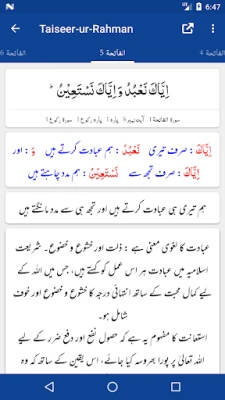
- Full Quran with Urdu translation and Tafseer – every ayah is presented with the original Arabic, a word‑by‑word Urdu translation, and the accompanying commentary.
- Multiple font options – users can choose from several Arabic and Urdu fonts to suit personal reading preferences.
- Adjustable font size and colors – both the Arabic script and Urdu text can be resized and recolored for comfortable reading.
- Theme support – light, dark and night themes help reduce eye strain in different lighting conditions.
- Bookmarking and resume – unlimited bookmarks let you mark favorite verses, and the app remembers the last read ayah for a seamless continuation.
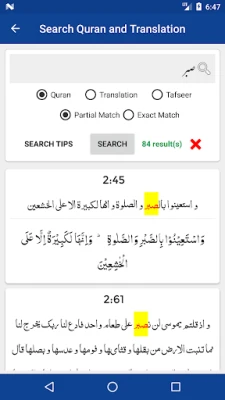
- Search functionality – quickly locate verses, words or specific topics within the Quran, its translation, or the Tafseer.
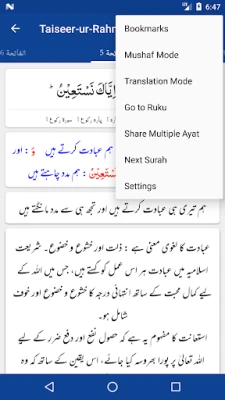
- Navigation shortcuts – jump directly to any ayah, ruku or para using built‑in quick‑jump tools.
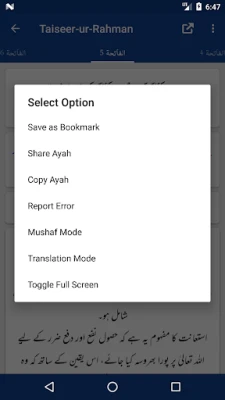
- Sharing options – share individual verses with or without the accompanying translation and commentary through standard Android sharing.
How it works
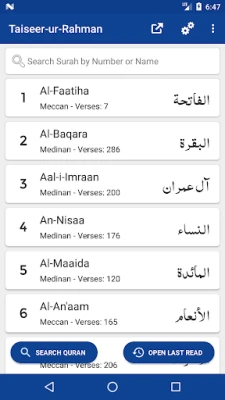
When you open the app, the Quran is displayed in a scrollable list. Each entry shows the Arabic verse, the Urdu word‑by‑word translation, and the Tafseer beneath it. You can switch between a combined view (Arabic + Urdu + Tafseer) or a translation‑only mode using the layout controls. The search bar at the top lets you type keywords in Arabic or Urdu; results are highlighted and can be opened directly.
Practical uses
- Daily reading – follow a structured plan or read at your own pace, with the app remembering where you left off.
- Study sessions – use the searchable commentary to deepen understanding of specific verses.
- Teaching and discussion – share verses with students or peers, including the explanatory notes.
- Nighttime reading – activate the dark theme to reduce glare while reading after sunset.
Installation information
The application is offered as a free download. Install it from the Appitika store, then grant the standard permissions required for storage access so that bookmarks and settings can be saved locally.
Things to know before installing
- The app does not require an internet connection for core reading functions; all Quranic text, translation and Tafseer are stored on the device.
- Because the content is provided in Urdu, users should be comfortable with the language to benefit fully.
- Customization settings (fonts, colors, themes) are saved per device; reinstalling the app will reset them.
Who may find it useful?
Anyone seeking an Urdu‑language resource for Quran study will benefit, including students of Islamic studies, teachers, and casual readers who prefer a mobile format. The flexible display options also make it suitable for users with visual preferences or those who read primarily at night.
Frequently asked questions
Is the content updated regularly?
The Tafseer and translation are static works by Muhammad Luqman Salafi, so the textual content does not change. The developer may release updates for UI improvements or bug fixes.
Can I use the app offline?
Yes. All Quranic text, translation and commentary are stored locally, allowing full offline access after installation.
How do I change the font size?
Open the settings menu, select “Font Settings,” and adjust the sliders for Arabic and Urdu fonts independently.
Is there a way to export my bookmarks?
Bookmarks are saved within the app for personal use. Exporting is not currently supported.
Rate the App
User Reviews















Popular Apps










 Games
 Entertainment
 Communication
 E-mail
 Security
 Tools
 Media
 Internet
 Finance
 Design
 Education
 Android Firmwares
 Travel & Local
 Android
 Windows
 Linux