


Latest Version
September 18, 2026
TriNoor Apps
Education
Android
84
Free
com.islamicduas.app
Report a Problem
More About Islamic Duas – Daily Supplications for Every Moment
What is Islamic Duas?
Islamic Duas is a free Android application developed by TriNoor Apps that brings a collection of authentic supplications (duas) to your device. The app is designed for Muslims who want quick, reliable access to prayers for everyday situations, from morning blessings to travel safety.
Main Features
- Authentic content – Each dua is taken from recognized sources such as the Qur’an and major hadith collections.
- Multiple languages – Arabic text is provided with proper diacritics, alongside English and Urdu translations.
- Audio playback – Text‑to‑speech lets you listen to the Arabic recitation, as well as English and Urdu renditions.
- Adjustable font size – Choose from several Arabic font sizes for comfortable reading.
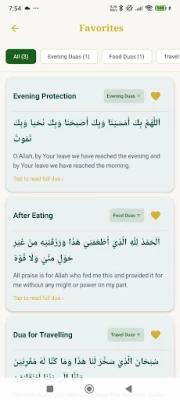
- Favorites – Tap to save any dua for quick retrieval later.
- Search and filter – Find a specific dua by keyword or browse by the 12 predefined categories.
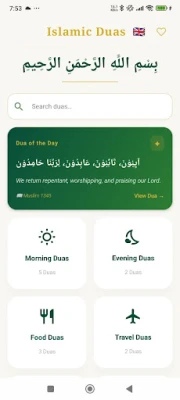
- Daily highlight – A new “Dua of the Day” is shown each time you open the app.
- Offline use – All content is stored locally, so you can pray without an internet connection.
How It Works
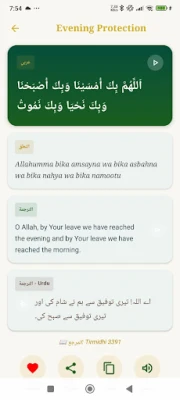
When you launch the app, the home screen presents the current Dua of the Day and quick links to the main categories. Selecting a category displays a list of related duas. Tapping a dua opens a detail view where you can read the Arabic text, see the transliteration, and read the English and Urdu translations side by side. From this screen you can play the audio, adjust the font size, copy the text, or add the dua to your favorites.
Practical Uses
- Morning routine – Start the day with the recommended morning duas.
- Travel preparation – Access travel‑related supplications before a journey.
- Health concerns – Find duas for healing and comfort during illness.
- Everyday activities – Use short prayers for moments such as eating, dressing, or entering a bathroom.
Who May Find It Useful?
The app is suitable for anyone who wants a convenient, offline reference for authentic Islamic prayers. It is especially helpful for:
- Students and professionals who need quick access during a busy day.
- Travelers seeking protection prayers before trips.
- People learning Arabic pronunciation through transliteration and audio.
- Families wanting to incorporate daily duas into their routine.
Things to Know Before Installing
Islamic Duas does not require an internet connection after installation, making it ideal for use in areas with limited connectivity. The app does not collect personal data for advertising or tracking purposes. As a free application, it may include optional in‑app prompts for sharing a dua via messaging apps, but these are not required for core functionality.
Frequently Asked Questions
Is the content verified?
Yes. All duas are sourced from established Qur’anic verses and hadith collections such as Sahih Bukhari, Sahih Muslim, Abu Dawud, and Tirmidhi.
Can I use the app without internet?
All prayers, translations, and audio files are stored locally, so the app works fully offline after the initial download.
How do I change the language?
From the home screen, tap the language icon to switch between English, Urdu, and Arabic interfaces instantly.
Is there a way to save my favorite duas?
Yes. Tap the star icon on any dua to add it to your Favorites list, which you can access from the main menu.
Rate the App
User Reviews















Popular Apps










 Games
Games Entertainment
 Communication
 E-mail
 Security
 Tools
Tools Media
Media Internet
 Finance
 Design
 Education
 Android Firmwares
 Travel & Local
 Android
 Windows
 Linux
Linux