



Latest Version
Latest
August 14, 2026
Valve Corporation
Entertainment
Android
241
Free
com.valvesoftware.android.steam.community
Report a Problem
More About Steam – Valve’s Mobile Companion for Your Gaming Community
What is Steam for Android?
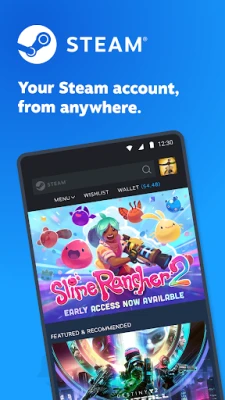
Steam’s Android app is the official companion from Valve Corporation that lets you interact with your Steam account from a smartphone. It provides a streamlined way to keep up with game news, manage your library, and handle community activities without needing a PC.
Main Features
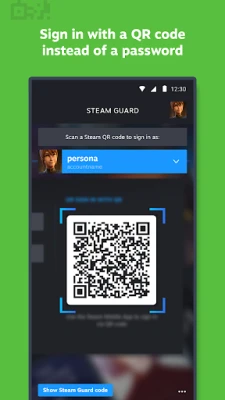
- Account security: Two‑factor authentication and QR‑code sign‑in help protect your account.
- Library overview: Browse your owned games, see recent activity, and read community guides.
- Market and trade confirmations: Approve or deny trades and market listings directly from the device.
- Community access: Join discussions, view groups, and watch broadcasts.
- Personalized news feed: Get updates about games in your library, upcoming sales, and developer announcements.
How It Works
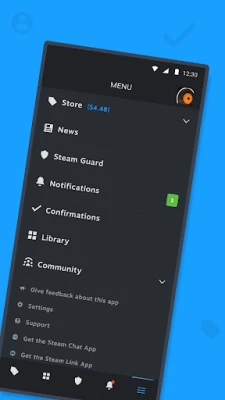
After installing the app, you sign in with your Steam credentials. If you have two‑factor authentication enabled, you’ll receive a code or can scan a QR code displayed on your PC. Once logged in, the home screen presents a news feed tailored to your library, while the navigation tabs let you switch between Store, Library, Community, and Settings.
Practical Uses
- Stay informed: Receive push notifications for sales, friend requests, and community events.
- Secure your account: Quickly approve login attempts or trade offers without opening a browser.
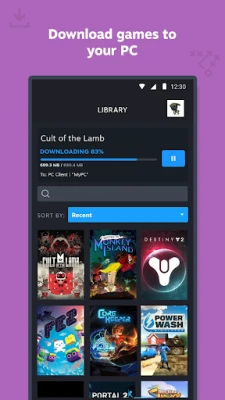
- Manage downloads: Initiate or pause PC game downloads remotely.
- Engage with friends: Chat, view friend activity, and share screenshots.
Installation Information
The app is distributed through the Google Play Store. Search for “Steam” by Valve Corporation, then tap Install. The download size varies with device and network conditions; ensure you have sufficient storage and a stable internet connection.
Things to Know Before Installing
- The app requires a Steam account; you cannot create a new account within the mobile client.
- Some features, such as purchasing games, redirect to the web version of the Store.
- Push notifications depend on the device’s notification settings; you may need to enable them manually.
Who May Find It Useful?
Gamers who already own a Steam library and want to keep up with community activity while away from their PC will benefit most. It’s also handy for users who frequently trade items or need to confirm market transactions on short notice.
Frequently Asked Questions
Do I need a separate subscription for the app?
No. The app is free to download and use; it works with any existing Steam account.
Can I buy games directly from the mobile app?
Purchasing is supported, but the experience may redirect to the web Store for final checkout.
Is my account safe when I use the app?
The app includes two‑factor authentication and QR‑code sign‑in, which add layers of security to the login process.
Can I manage multiple Steam accounts?
Yes, you can sign out and sign in with a different account, though the app does not store multiple accounts simultaneously.
Rate the App
User Reviews















Popular Apps










 Games
Games Entertainment
 Communication
 E-mail
 Security
 Tools
Tools Media
Media Internet
 Finance
 Design
 Education
 Android Firmwares
 Travel & Local
 Android
 Windows
 Linux
Linux