




Latest Version
Latest
September 11, 2026
Online Azan Innovation Lab
Entertainment
Android
8
Free
in.etwenty.nfa
Report a Problem
More About OnlineAzan – Live Mosque Call to Prayer
What is OnlineAzan?
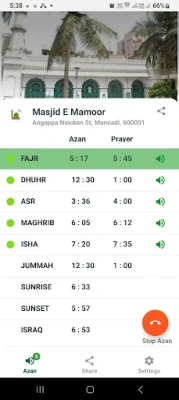
OnlineAzan is a free Android application developed by Online Azan Innovation Lab that lets users receive the call to prayer (azan) directly from their own mosque. The app connects to a mosque’s broadcast and streams the azan to the phone, providing a convenient way to stay aware of prayer times wherever you are.
Main Features
- Live mosque azan streaming – Hear the exact call used by your local masjid.
- Automatic wake‑up – The app can trigger the phone’s alarm at azan time without user interaction.
- Toggle automatic alerts – Users can enable or disable the auto‑wake feature in the settings.
- Simple chat support – A built‑in chat option lets you contact the developer for assistance.
How It Works
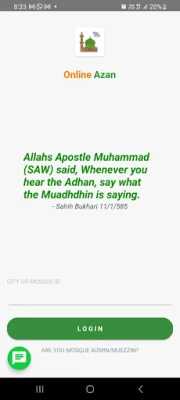
After installing the app, you need to link it with your mosque. The mosque must have an online azan feed that the app can access. Once linked, the app checks the scheduled prayer times and streams the live azan at each moment. If the automatic wake‑up option is turned on, the phone’s alarm will sound at the exact time the azan begins.
Practical Uses
- Replace a generic alarm tone with the authentic call to prayer for the pre‑dawn (Fajr) prayer.
- Stay informed of prayer times while traveling, commuting, or working away from the mosque.
- Help family members who may not hear the mosque’s loudspeaker due to distance, noise, or hearing difficulties.
- Encourage timely prayer by providing an audible reminder even when you are engaged in other activities.
Installation Information
Download the APK from a trusted source, install it on your Android device, and grant the necessary permissions for network access and alarm scheduling. Open the app, follow the prompts to select or enter your mosque’s online azan feed, and configure the automatic wake‑up setting according to your preference.
Things to Know Before Installing
- The app requires an internet connection to stream the live azan.
- Automatic wake‑up relies on the device’s alarm system; ensure your phone’s volume is set appropriately.
- Compatibility depends on the Android version that supports background network access and alarm scheduling.
Who May Find It Useful?
Muslims who travel frequently, work away from their local masjid, or prefer a personalized prayer reminder will benefit from OnlineAzan. It is also helpful for households where the mosque’s external speaker may not be audible.
Frequently Asked Questions
Do I need a specific Android version?
The app works on Android versions that support standard network and alarm APIs. If you encounter issues, check that your device is running a recent update.
Can I use the app without an internet connection?
Streaming the live azan requires an active internet connection. The automatic wake‑up feature also depends on the app’s ability to retrieve the schedule, which is internet‑based.
How do I disable the automatic alarm?
Open the app’s settings and toggle the “Automatic Wake‑up” option off. The app will continue to stream the azan when you open it manually.
What if my mosque does not have an online feed?
OnlineAzan requires a live stream URL from the mosque. If your mosque does not provide one, you may contact them to request an online azan service.
Rate the App
User Reviews















Popular Apps










 Games
Games Entertainment
 Communication
 E-mail
 Security
 Tools
Tools Media
Media Internet
 Finance
 Design
 Education
 IT Tools
 Travel & Local
 Android
 Windows
 Linux
Linux