

Latest Version
Latest
September 17, 2026
PlayStation Mobile Inc.
Entertainment
Android
9
Free
com.playstation.remoteplay
Report a Problem
More About PS Remote Play – Play your PlayStation on Android
What is PS Remote Play?
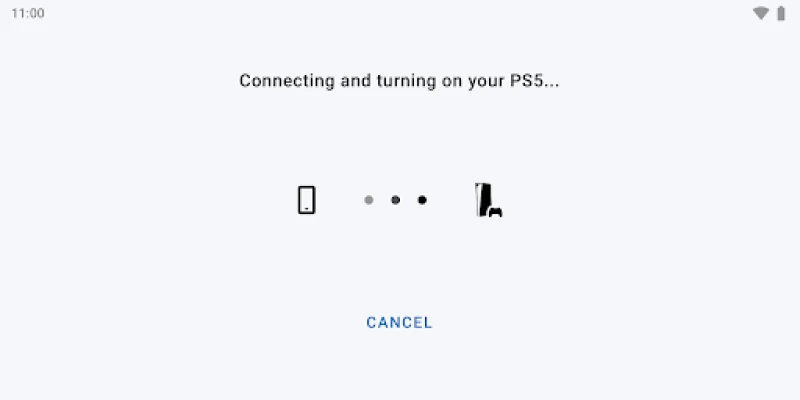
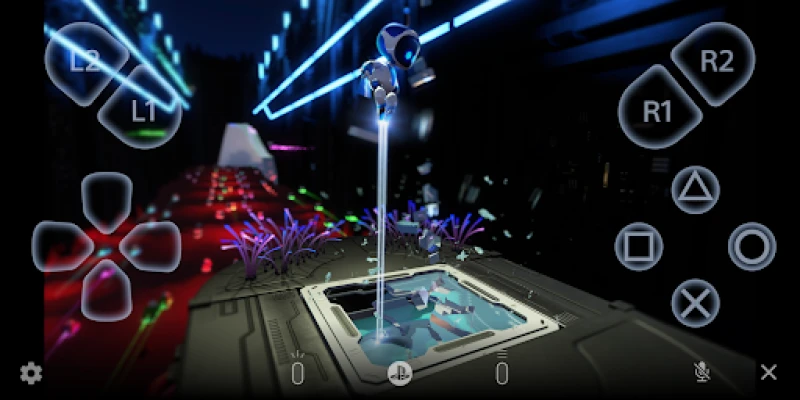
PS Remote Play is an official app from PlayStation Mobile Inc. that lets you extend your PlayStation console experience to an Android device. When a console and a compatible phone are on the same network, the app mirrors the console’s screen and forwards input, turning your mobile device into a portable gaming station.
Main capabilities
- Live screen streaming – View the exact output of a PS5 or PS4 on your phone or tablet.
- On‑screen controls – A virtual controller appears when no physical gamepad is attached, giving you access to buttons, sticks and touch‑pad functions.
- Bluetooth controller support – Pair a DualShock 4, DualSense, DualSense Edge, or compatible third‑party controller for a more traditional gaming feel.
- Voice chat integration – Use the device’s microphone to join party chats without needing a headset.
- Keyboard input – Type messages or passwords with the device’s on‑screen keyboard.
How it works
After installing the app, you sign in with your PlayStation Network account and link the app to a console that has the latest system software. The app then establishes a direct connection over Wi‑Fi (or a fast mobile network) and begins transmitting video frames from the console to the device while sending controller data back to the console. The experience depends on network stability and bandwidth; a wired Ethernet connection for the console and a strong Wi‑Fi signal for the phone usually give the smoothest results.
Practical uses
- Play in another room when the TV is occupied.
- Take a break from the couch and continue a session on the couch‑side table.
- Travel with a lightweight controller and your phone instead of a full console setup.
- Use voice chat while gaming on the go without extra hardware.
Installation guide
- Open the Google Play Store on your Android device.
- Search for "PS Remote Play" and tap Install.
- Launch the app and sign in with your PlayStation Network credentials.
- Follow the on‑screen prompts to pair the app with your PS5 or PS4.
- Connect a supported Bluetooth controller if you prefer physical buttons.
Compatibility notes
The app requires Android 11 or newer. Certain controller features, such as the DualSense touch‑pad, are only available on devices running Android 12 or later. The DualSense Edge support starts with Android 14. While the app works on most modern smartphones, PlayStation lists a few verified devices for optimal performance; other models may still function but could experience occasional latency or visual artifacts.
Things to consider before installing
- Network demands – Remote Play streams high‑definition video, so a stable, high‑speed Wi‑Fi connection (or a generous mobile data plan) is recommended.
- Battery usage – Continuous streaming can drain the device’s battery quickly; keep a charger handy for long sessions.
- Game compatibility – Most titles run fine, but a small number of games that rely on specialized hardware may not display correctly.
Who will benefit?
Anyone who already owns a PlayStation console and wants flexible access to their library will find PS Remote Play useful. It’s especially handy for households with shared TV space, frequent travelers, or players who enjoy gaming from a couch‑side seat.
Frequently asked questions
Do I need a PlayStation account?
Yes, the app requires a signed‑in PlayStation Network account to link with your console.
Can I use the app over cellular data?
Technically it works, but the high data consumption and variable latency make Wi‑Fi the preferred option.
What controllers are supported?
DualShock 4, DualSense, DualSense Edge, and any Bluetooth controller that the Android OS recognizes can be used. Some features depend on the Android version.
Is there a limit to how far I can be from the console?
Remote Play works best on the same local network. Remote connections over the internet are possible but may introduce noticeable lag.
Rate the App
User Reviews














Popular Apps










 Games
Games Entertainment
 Communication
 E-mail
 Security
 Tools
Tools Media
Media Internet
 Finance
 Design
 Education
 IT Tools
 Travel & Local
 Android
 Windows
 Linux
Linux