






Latest Version
Latest
August 13, 2026
PartyConn Group
Entertainment
Android
320
Free
com.qhqc.starvoice
Report a Problem
More About StarChat-Group Voice Chat Room – Free Voice Chat App
What is StarChat-Group Voice Chat Room?
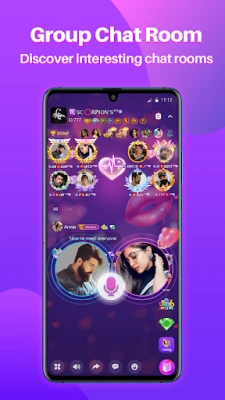
StarChat-Group Voice Chat Room is a free Android application that focuses on real‑time voice communication. Developed by PartyConn Group, the app creates virtual rooms where users can talk together, share ideas, and take part in casual conversations. It is designed for people who prefer speaking over typing and want a simple way to connect with others worldwide.
Main features
- Live voice rooms – Enter public or private rooms and speak with multiple participants at once.
- Easy room navigation – Browse categories or search by topic to find rooms that match your interests.
- Free to use – The app is offered without a purchase price or subscription fee.
- Localized interface – The user interface supports several languages, making it accessible to a broad audience.
How it works
After installing the app, you create a basic profile and can immediately explore available rooms. Selecting a room opens a voice channel; you can mute yourself, speak, or leave at any time. The app handles audio streaming in the background, so you can keep the conversation going while using other apps.
Practical uses
StarChat-Group Voice Chat Room can be useful in many everyday situations:
- Socializing – Meet people who share hobbies, languages, or cultural interests.
- Study groups – Organize voice sessions for collaborative learning or project work.
- Event coordination – Quickly gather participants for planning parties, games, or community events.
Installation information
The app is distributed through the standard Android package system. To install, open the Google Play Store (or a trusted alternative), search for StarChat-Group Voice Chat Room, and tap “Install.” The download size and Android version requirements are not publicly listed, so ensure your device runs a recent version of Android and has sufficient storage.
Things to know before installing
- Because the app connects you to public voice rooms, be prepared for a variety of speaking styles and background noise.
- Review the app’s permission requests during installation; typical permissions include microphone access and network connectivity.
- The free model means there are no hidden subscription fees, but optional in‑app purchases may be offered for cosmetic items.
Who may find it useful?
Anyone who enjoys spontaneous conversation can benefit from StarChat-Group Voice Chat Room. It is especially appealing to:
- Students looking for collaborative study sessions.
- Travelers who want to practice languages with native speakers.
- Community organizers needing a quick voice channel for event planning.
Frequently asked questions
Is the app safe to use?
The app requires microphone and internet access, which are standard for voice communication tools. Users should follow general safety practices, such as avoiding sharing personal information with strangers.
Can I create my own private room?
Yes, the interface includes an option to start a private room and invite selected participants via a shareable link or invitation.
Do I need an account?
A minimal profile is required to join rooms, but the registration process is straightforward and does not demand extensive personal data.
Rate the App
User Reviews















Popular Apps










 Games
Games Entertainment
 Communication
 E-mail
 Security
 Tools
Tools Media
Media Internet
 Finance
 Design
 Education
 Android Firmwares
 Travel & Local
 Android
 Windows
 Linux
Linux