

Latest Version
September 13, 2026
BYSL Global Technology Group
Education
Android
5
Free
com.ilyn.memorizealquran
Report a Problem
More About Memorize Quran – Free Quran Learning and Memorization App
What is Memorize Quran?
Memorize Quran is a free Android application designed to support anyone who wants to study the Holy Quran more deeply. Developed by BYSL Global Technology Group, the app combines text, audio and simple tools to make reading, listening and memorizing the Quran convenient on a mobile device.
Main features
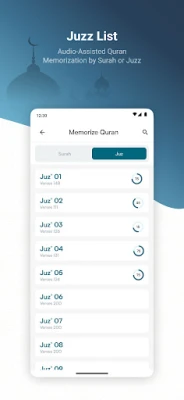
- Flexible memorization sections – Choose to work with whole chapters (Surahs) or smaller portions (Juz) according to your personal schedule.
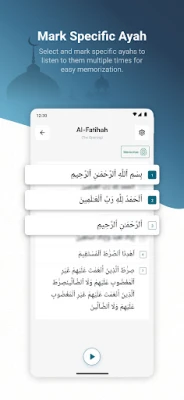
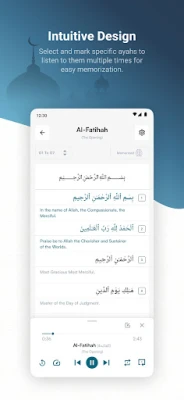
- Adjustable repetition – Set how many times each verse is repeated, helping reinforce memory and pronunciation.
- Audio recitations – Stream or download recitations of each Surah, allowing practice with a clear, authentic voice even when offline.
- Customizable appearance – Switch between light and dark themes, change text size and select from several Arabic fonts for comfortable reading.
- Built‑in quizzes – Test your recall with short quizzes that cover verses you have studied.
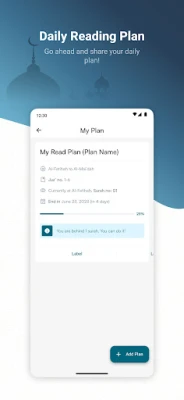
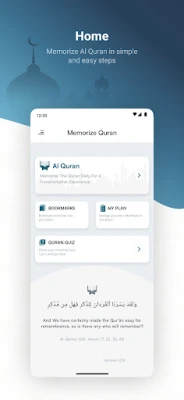
- Personal memorization plans – Create daily or weekly targets, track progress and stay motivated.
- Bookmarks – Mark verses you want to revisit quickly and organize them into custom lists.
- Multiple languages – Interface is available in a range of languages, making navigation easier for non‑Arabic speakers.
- Extensive translations – Access a collection of reputable translations to understand the meaning of each verse.
How it works
After installing the app, you can start by selecting a Surah or Juz you wish to memorize. The app displays the Arabic text alongside your chosen translation. You can then play the recitation, repeat it as many times as needed, and use the repetition counter to set how often the verse should be replayed. As you complete verses, you can mark them as memorized, add them to a bookmark list, or include them in a quiz to assess retention.
Practical uses
- Daily Quran study for personal spiritual growth.
- Structured memorization for students preparing for Hifz.
- Reference tool for teachers who need to assign verses and track progress.
- Convenient offline access during travel or in areas with limited internet.
Installation information
The app is available through the standard Android package name com.ilyn.memorizealquran. It can be downloaded from reputable Android app stores. Installation follows the usual process: tap “Install,” grant any required permissions for storage (to save audio files), and launch the app.
Things to know before installing
- The app is free to use; no in‑app purchases are required for core features.
- Audio files can be stored locally, so ensure you have sufficient device storage if you plan to download many recitations.
- Internet connectivity is needed for the initial download of recitations and translations; once saved, the content works offline.
Who may find it useful?
Anyone interested in reading, listening to, or memorizing the Quran will benefit—from beginners learning the basics to advanced students preparing for full memorization. The customizable interface also makes it suitable for users with visual preferences or those who prefer a dark reading mode.
Frequently asked questions
Do I need an internet connection to use the app?
Only for the first download of audio recitations and translation files. After they are saved on your device, you can use the app completely offline.
Can I change the font size?
Yes, the app offers several font size options and multiple Arabic fonts to improve readability.
Is there a way to track my memorization progress?
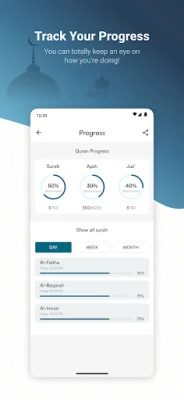
Yes, the built‑in plan manager lets you set daily or weekly goals and shows how many verses you have marked as memorized.
Are there any ads?
The application is ad‑free, providing an uninterrupted learning experience.
Rate the App
User Reviews















Popular Apps










 Games
Games Entertainment
 Communication
 E-mail
 Security
 Tools
Tools Media
Media Internet
 Finance
 Design
 Education
 IT Tools
 Travel & Local
 Android
 Windows
 Linux
Linux