



Latest Version
Latest
August 14, 2026
LEGO System A/S
Entertainment
Android
283
Free
com.lego.common.legoplay
Report a Problem
More About LEGO® Play – Creative Building and Storytelling App
What is LEGO® Play?
LEGO® Play is a free Android app from LEGO System A/S that provides a digital playground for anyone who loves building with LEGO bricks. The app combines drawing tools, 3D building, stop‑motion video creation and other creative activities in one place, giving users a way to explore ideas without needing physical bricks.
Main features
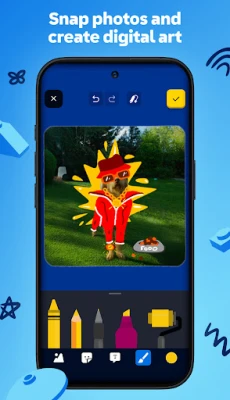
- Creative Canvas – A drawing surface where users can sketch, paint and add stickers, with brushes that mimic real‑world media.
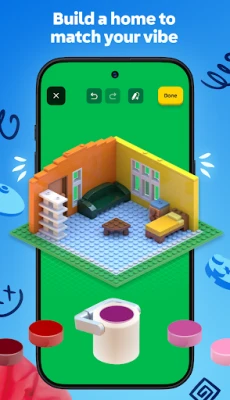
- Brick Builder – A simple 3D environment that lets users assemble virtual LEGO bricks into models, experiment with colors and shapes, and view their creations from any angle.
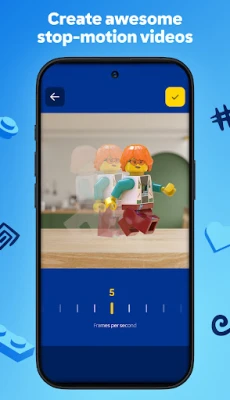
- Stop‑Motion Studio – Tools for capturing frame‑by‑frame animation using the device’s camera, allowing users to turn their LEGO builds into short movies.
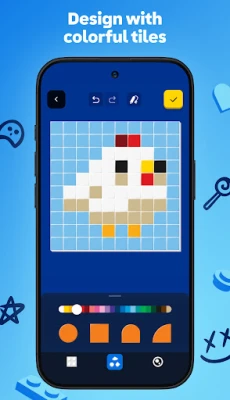
- Pattern Designer – A grid‑based editor for creating repeating patterns or custom textures that can be applied to virtual bricks.
- Avatar & Profile – Options to design a personal LEGO avatar, choose outfits, and showcase creations on a user profile.
How it works
After installing the app, users are guided through a brief tutorial that introduces each tool. The interface is organized into tabs, each representing a different creative mode. Selections are made with touch gestures, and the app provides undo/redo options, layer management for drawings, and a library of pre‑made brick elements for quick building.
Practical uses
- Kids can practice storytelling by creating comic‑style panels or stop‑motion scenes.
- Parents can encourage fine‑motor skills and spatial reasoning through virtual building.
- Educators may use the app for classroom projects that combine art and engineering concepts.
- Fans of LEGO can prototype designs before building them with physical bricks.
Installation information
The app is available for free on the Google Play Store. Simply search for "LEGO® Play" or use the package name com.lego.common.legoplay to locate it. Tap Install and follow the standard Android installation prompts.
Things to know before installing
- The app requires an Android device with sufficient storage for saved projects and media files.
- Internet access is needed for initial download and for optional content updates, but most creative tools work offline.
- All user‑generated content is stored locally unless the user chooses to share it through the app’s built‑in sharing options.
Who may find it useful?
LEGO® Play is designed for children aged 6 and up, but older fans and beginners in digital design can also benefit. It is especially helpful for anyone who wants a safe, ad‑free environment to experiment with LEGO‑themed creativity without the need for physical bricks.
Frequently asked questions
Do I need a LEGO account to use the app?
No. The app works without signing in, though creating a profile can help you organize and showcase your projects.
Can I export my creations?
Yes. Finished drawings, 3D models and stop‑motion videos can be saved to the device’s gallery or shared via standard Android sharing options.
Is there any cost for additional content?
The core app is free. Some optional content packs may be offered as in‑app purchases, but all primary creative tools are available without payment.
Rate the App
User Reviews















Popular Apps










 Games
Games Entertainment
 Communication
 E-mail
 Security
 Tools
Tools Media
Media Internet
 Finance
 Design
 Education
 Android Firmwares
 Travel & Local
 Android
 Windows
 Linux
Linux