

Latest Version
Latest
September 13, 2026
Al-Huda International
Education
Android
3
Free
com.alhuda.learnquran
Report a Problem
More About Learn Qur'an – Urdu Translation & Tafseer by Al‑Huda International
What is Learn Qur'an?
Learn Qur'an is a free Android application created by Al‑Huda International. It provides the Qur'an text together with a word‑by‑word Urdu translation and tafseer (explanation) by Dr. Farhat Hashmi. The app is designed for anyone who wants to read, listen to, and study the Qur'an in a structured, interactive way.
Main features
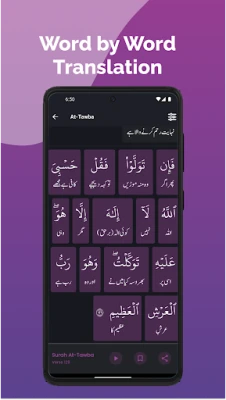
- Word‑by‑word Urdu translation and tafseer – Each verse is presented with a detailed translation and commentary, helping users understand the meaning of every word.
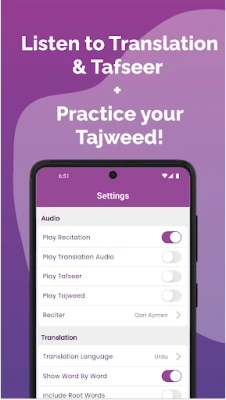
- Audio support – Users can tap a verse to hear its recitation, translation, or tafseer. Audio continues to play in the background, allowing hands‑free study.
- Multiple script options – The app offers Urdu, Roman Urdu, and Hindi scripts, making the text accessible to speakers of different linguistic backgrounds.
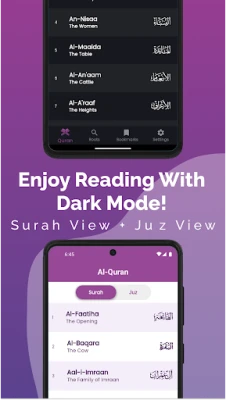
- Search and navigation – Fast scrolling, verse search, and quick jumps to any Surah or Juz simplify navigation through the entire Qur'an.
- Root‑word search – A built‑in tool lets users look up Arabic root words across the Qur'an for deeper linguistic study.
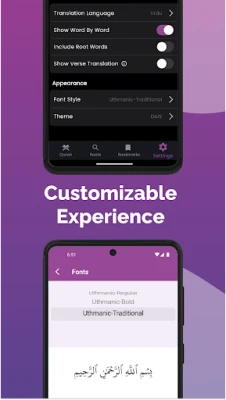
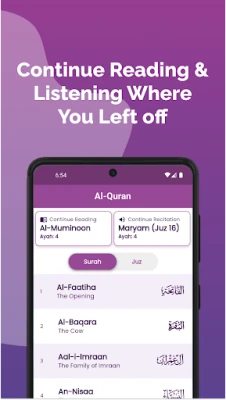
- Bookmarks and personalization – Automatic bookmarking remembers the last read or listened verse. Users can also add manual bookmarks, adjust font size, and switch to dark mode for low‑light reading.
- Sharing options – Verse text, translation, and audio can be shared with others through standard Android sharing mechanisms.
How it works
When the app is opened, the main screen displays the Qur'an organized by Surah. Selecting a verse expands it to show the Urdu translation and tafseer. A small audio icon beside each verse starts playback of the chosen audio track (recitation, translation, or tafseer). The playback continues even if the user navigates to another part of the app or switches to another app, thanks to Android’s background‑audio service.
Search functions are available from the toolbar. Users can type a word in Arabic to find all verses containing that root, or they can enter a verse reference to jump directly to it. Font size and display mode (light or dark) are adjustable in the settings menu.
Practical uses
- Daily reading – Follow a structured plan by bookmarking verses and resuming where you left off.
- Memorization – Listen to recitations while reading the translation to reinforce memorization.
- Study groups – Share specific verses and their explanations with peers during discussion.
- Language learning – Use the Roman and Hindi scripts to improve pronunciation and comprehension of Urdu.
Installation information
The app is available for free on the Google Play Store. Installation requires an Android device with sufficient storage and an internet connection for the initial download of audio files. Once installed, audio playback will need a data connection unless the user downloads the files for offline use, if that option is provided within the app.
Things to know before installing
- Internet access is required for streaming audio content.
- The app’s size and specific Android version requirements are not listed publicly; ensure your device has enough free space and runs a recent version of Android.
- All content is provided by Al‑Huda International; users seeking official certification should verify the source independently.
Who may find it useful?
Anyone interested in a deeper, verse‑by‑verse understanding of the Qur'an in Urdu will benefit from Learn Qur'an. It is especially helpful for students of Islamic studies, members of Urdu‑speaking communities, and anyone who prefers audio‑assisted learning.
Frequently asked questions
Do I need an internet connection to use the app?
Audio streaming requires a connection. The text and translation are stored locally, so they can be read offline.
Can I listen to the recitation while using other apps?
Yes. The app’s background audio service allows playback to continue when you switch to other applications.
Is there a way to adjust the font size?
Font size can be changed in the settings menu to suit personal reading preferences.
Is the app free?
The application is offered at no cost.
Rate the App
User Reviews















Popular Apps










 Games
Games Entertainment
 Communication
 E-mail
 Security
 Tools
Tools Media
Media Internet
 Finance
 Design
 Education
 IT Tools
 Travel & Local
 Android
 Windows
 Linux
Linux