


Latest Version
Latest
September 06, 2026
MohammadAnish Shaikh
Education
Android
4
Free
com.dailyduas.islamicdua
Report a Problem
More About Islamic Dua – Muslim Prayer
What is Islamic Dua – Muslim Prayer?
Islamic Dua – Muslim Prayer is a lightweight, free Android application designed to bring essential supplications and prayer‑time information to your device. Developed by MohammadAnish Shaikh, the app focuses on presenting authentic duas in Arabic alongside clear English translations, making it easy for users of all ages to incorporate regular supplication into their daily routine.
Main Features
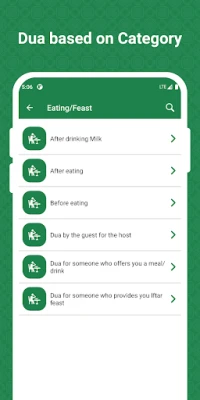
- Extensive Dua Library – Browse a broad selection of duas organized by occasion, such as morning and evening, travel, health, and special events.
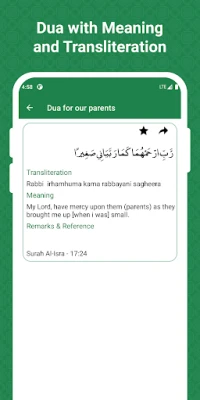
- Arabic Text with English Meaning – Each dua is displayed in its original Arabic script with a side‑by‑side English translation for better understanding.
- Favorites – Mark frequently used duas as favorites for quick access.
- Sharing Options – Easily share a chosen dua through messaging apps or email.
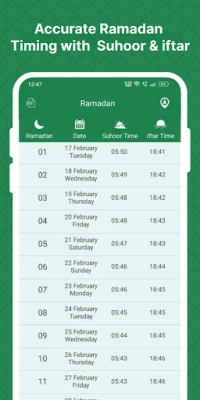
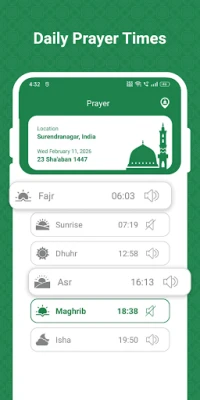
- Prayer Times – View the five daily prayer times (Fajr, Dhuhr, Asr, Maghrib, Isha) based on your location.
- Azan Alerts – Optional sound notifications remind you when a prayer time approaches.
- Widget Support – Add a home‑screen widget that shows the next prayer time at a glance.
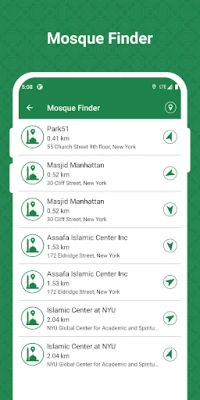
- Mosque Locator – Find nearby mosques with distance information, helping you locate a place for congregational prayer.
How It Works
After installing the app, grant location permission so the prayer‑time engine can calculate accurate timings for your area. The main screen presents a list of dua categories; tapping a category reveals the individual supplications. Selecting a dua opens a detail view where you can read the Arabic text, its English meaning, and use the share or favorite buttons.
Prayer times are displayed in a separate tab. You can adjust calculation methods, juristic preferences, and daylight‑saving settings to match local practice. The widget can be added from the Android widget menu, showing the upcoming prayer and remaining minutes.
Practical Uses
- Start your day with morning duas and end it with evening supplications.
- Use the built‑in prayer‑time schedule to plan work or study breaks around the five daily prayers.
- Locate a nearby mosque when traveling or when you are in an unfamiliar neighborhood.
- Share meaningful duas with family and friends during special occasions.
Installation Information
The app is available for free on the Google Play Store. Simply search for "Islamic Dua – Muslim Prayer" or use the package name com.dailyduas.islamicdua. Installation requires standard Android permissions for location and optional notification access.
Things to Know Before Installing
- The app does not collect personal data beyond what is needed for location‑based prayer calculations.
- All content is provided without charge; there are no in‑app purchases.
- Because the app relies on your device’s location services, accuracy improves when GPS is enabled.
Who May Find It Useful?
Muslims seeking a convenient, offline‑ready reference for daily duas and prayer times will benefit from this app. It is especially helpful for users who prefer a simple interface without excessive ads or complex settings.
Frequently Asked Questions
Do I need an internet connection to use the app?
Once installed, the dua texts and prayer‑time calculations work offline. An internet connection is only required for the initial download and for occasional updates.
Can I customize the prayer‑time calculation method?
Yes, the settings allow you to choose from common calculation methods and adjust the juristic angle to match local practice.
Is there a way to add my own duas?
The current version does not support user‑generated content, but you can suggest additions through the developer’s contact information on the Play Store page.
Rate the App
User Reviews















Popular Apps










 Games
Games Entertainment
 Communication
 E-mail
 Security
 Tools
Tools Media
Media Internet
 Finance
 Design
 Education
 IT Tools
 Travel & Local
 Android
 Windows
 Linux
Linux