

Latest Version
Latest
September 11, 2026
VoiceTube
Education
Android
9
Free
com.voicetube.lingr
Report a Problem
More About Dori Speak AI English Learning – Conversational Practice Made Personal
What is Dori Speak AI English Learning?
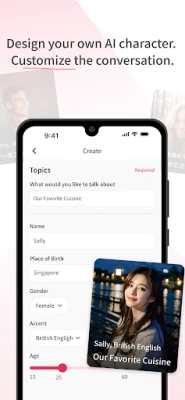
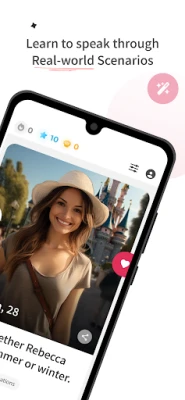
Dori Speak AI English Learning is a free language‑practice app from VoiceTube. It lets you converse with a variety of AI‑driven characters, each designed with a distinct personality, accent, and speaking style. The goal is to give you a safe, low‑pressure environment where you can practice speaking English (and other languages) as if you were chatting with a real person.
Main Features
- Varied AI personalities – Over 500 virtual conversation partners, each with unique looks and voices, simulate real‑life interactions.
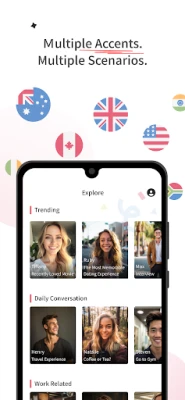
- Multiple accents – Choose from a range of English accents, such as American, British, Indian, Canadian and more, to train your ear and adapt your pronunciation.
- Conversation scenarios – The app includes hundreds of everyday situations, from casual small talk to interview practice, helping you prepare for real‑world use.
- Multilingual support – While the focus is English, the platform also offers practice in Chinese, Spanish, Japanese, Korean and Vietnamese, making it useful for learners of several languages.
- Display language options – You can switch the app’s interface between several languages, allowing beginners to navigate in their native tongue and advanced learners to immerse themselves fully.
How It Works
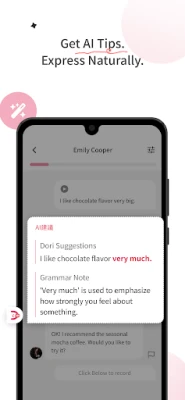
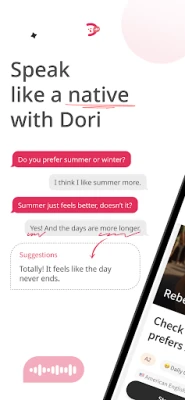
When you launch Dori, you select a character that matches the speaking style you want to practice. The chat interface works like a familiar messaging app: you type or speak your response, and the AI replies in real time. The system uses natural‑language processing to keep the conversation flowing, offering corrections or suggestions when appropriate. You can repeat dialogues, adjust the difficulty level, or explore new scenarios at any time.
Practical Uses
- Test preparation – Use the scenario library to rehearse speaking sections of TOEIC, IELTS, TOEFL or other language exams.
- Travel readiness – Practice ordering food, asking for directions, or checking into a hotel in a low‑stress setting.
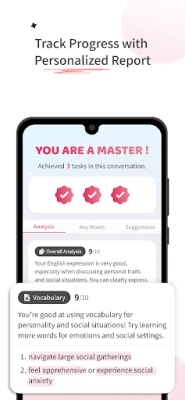
- Job interviews – Simulate common interview questions and receive feedback on clarity and confidence.
- Daily fluency – Build a habit of speaking daily by chatting with a character that matches your interests, whether it’s a barista, a tech support agent, or a travel guide.
Who May Find It Useful?
The app is designed for learners at any stage who want to improve spoken proficiency. Beginners benefit from the ability to navigate the interface in their native language, while intermediate and advanced speakers can challenge themselves by using English as the display language. Teachers and tutors may also use Dori as a supplemental tool for classroom activities or homework assignments.
Things to Know Before Installing
- The app is free to download and use, though some optional in‑app purchases may be offered for additional content.
- Because it relies on AI‑generated dialogue, occasional mismatches or unnatural responses can occur; the app encourages users to treat the experience as practice rather than a perfect simulation.
- Internet connectivity is required for real‑time conversation, as the AI processing happens on remote servers.
Installation Information
Search for “Dori Speak AI English Learning” in the Google Play Store, verify the developer name (VoiceTube), and tap Install. After installation, grant any necessary microphone permissions so you can speak directly to the AI characters.
Rate the App
User Reviews














Popular Apps










 Games
Games Entertainment
 Communication
 E-mail
 Security
 Tools
Tools Media
Media Internet
 Finance
 Design
 Education
 IT Tools
 Travel & Local
 Android
 Windows
 Linux
Linux