

Latest Version
September 07, 2026
Chattrly.AI Pvt Ltd
MEDICAL
Android
4
Free
ai.chattrly.patient
Report a Problem
More About Chattrly – Simple Personal Health Record App
What is Chattrly?
Chattrly is a free Android application designed to help users keep their health records organized. It provides a central location for medical reports, prescriptions, lab results and other health‑related documents, so you can locate them quickly during a doctor’s visit or an emergency.
Main features
- Document storage: Save PDFs, photos or scanned files of any medical document.
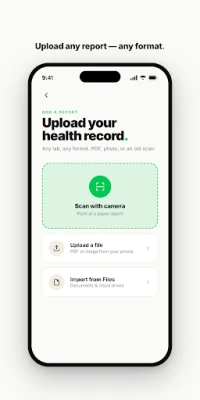
- Built‑in scanner: Capture paper reports with the phone’s camera; the scanner detects edges and corrects perspective.
- Chronological timeline: All uploaded files appear in a date‑ordered feed, making it easy to see the sequence of your health events.
- Searchable archive: Find a specific report by typing keywords, dates or provider names.
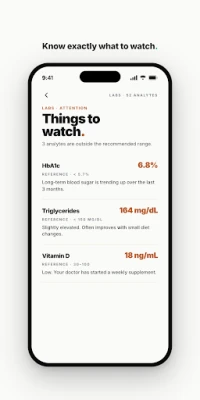
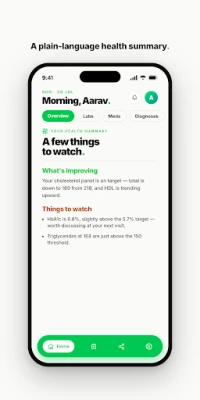
- Data extraction: The app reads key information such as lab values, medication details and appointment dates, presenting them in a concise summary.
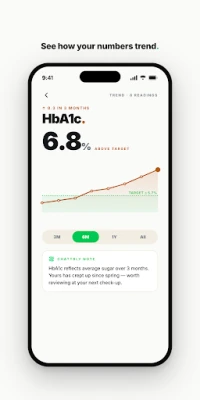
- Health trends: View changes in important lab results over time through simple charts.
- Sharing option: Export or share selected records with a healthcare professional directly from the app.
How it works
After installing Chattrly, you can create a personal health folder. Use the scanner to capture a paper report or import an existing file from your device. The app processes the document, extracts relevant data and adds the file to your timeline. You can add notes, tag the document, or mark it as a favorite for quick reference.
Practical uses
- Preparing for a specialist appointment – have all prior test results ready to show the doctor.
- Emergency situations – provide first‑responders with a concise health summary.
- Medication management – keep an up‑to‑date list of prescriptions and dosages.
- Long‑term health monitoring – observe trends in cholesterol, blood sugar or other lab values.
Installation information
Search for Chattrly in the Google Play Store, then tap Install. The app requires standard Android permissions for storage and camera access to save and scan documents.
Things to know before installing
- The app is free to download and use.
- It does not require an internet connection for basic document storage, though syncing and sharing may need connectivity.
- All data is stored locally on your device unless you choose to share it.
Who may find Chattrly useful?
Anyone who wants a personal, organized repository for health information – patients managing chronic conditions, families keeping records for children or elderly relatives, and anyone who prefers a digital alternative to paper folders.
Frequently asked questions
Can I import existing PDFs?
Yes. You can add PDFs directly from your device storage or cloud folders.
Is my information private?
All documents are stored on your device unless you actively share them. The app does not automatically upload data to external servers.
What types of documents are supported?
PDFs, photos taken with the camera, and multi‑page scans are all accepted.
Rate the App
User Reviews





Popular Apps










 Games
Games Entertainment
 Communication
 E-mail
 Security
 Tools
Tools Media
Media Internet
 Finance
 Design
 Education
 IT Tools
 Travel & Local
 Android
 Windows
 Linux
Linux