

Latest Version
Latest
September 06, 2026
Infinite Campus, Inc.
Education
Android
7
Free
com.infinitecampus.parent.campusportalhybrid
Report a Problem
More About Campus Parent – Stay Connected with Your Child’s School
What is Campus Parent?
Campus Parent is a free Android app from Infinite Campus, Inc. that gives parents and guardians direct access to the information their school records in the Infinite Campus student information system. By logging in with the credentials provided by the district, users can view real‑time data about their child’s academic life.
Main features
- Announcements – See school‑wide or class‑specific notices as soon as they are posted.
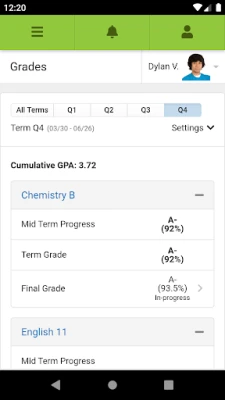
- Grades and assignment scores – Review current grades, recent assignment results and overall progress.
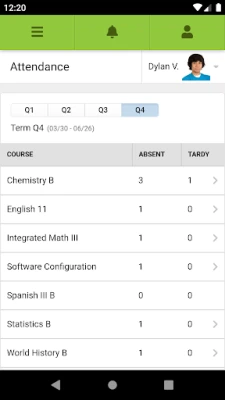
- Attendance tracking – Check daily attendance status and any recent changes.
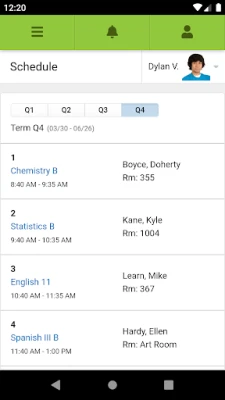
- Schedule overview – View class periods, lunch times and upcoming events.
- Push notifications – Opt‑in to receive alerts for new grades, attendance updates or important announcements, if the district enables them.
How it works
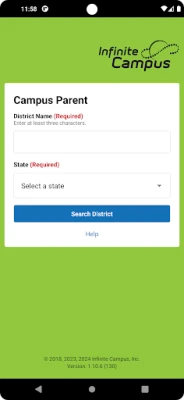
After installing the app, you select your district and state from a searchable list, then enter the username and password supplied by the school. The app communicates securely with the district’s Infinite Campus server, pulling the latest data each time you open it or when a notification is triggered.
Practical uses
Parents can quickly confirm whether a child was marked absent, check if a homework assignment has been posted, or stay informed about upcoming school events without logging into a web portal. The real‑time nature of the data helps families respond promptly to academic or attendance concerns.
Installation information
Search for “Campus Parent” in the Google Play Store, tap Install, and wait for the download to complete. The app requires an Android device that can run the Infinite Campus web services; specific version requirements are defined by each district.
Things to know before installing
- Your district must be using the Infinite Campus Student Information System.
- You need an active Infinite Campus account; the app does not create or manage login credentials.
- Privacy and security are handled by the school district; the app does not store passwords locally beyond what is needed for authentication.
Who may find it useful?
Parents, guardians, and other family members who want a convenient way to monitor a student’s academic record and school communications will benefit most from Campus Parent. It is also helpful for caregivers who need quick access to attendance or schedule changes.
Frequently asked questions
Do I need a separate account for the app?
No. Use the same username and password that your school provides for the web portal.
Can I receive notifications on a shared device?
Yes, if you enable the “Stay Logged In” option during sign‑in. This allows the app to push alerts even when it is not actively open.
What should I do if I forget my password?
Contact your school’s administrative office or district’s support team; the app does not manage password recovery.
Is the app compatible with all Android phones?
Compatibility depends on the Android version supported by your district’s Infinite Campus server. Most modern devices running recent Android releases will work.
Rate the App
User Reviews















Popular Apps










 Games
Games Entertainment
 Communication
 E-mail
 Security
 Tools
Tools Media
Media Internet
 Finance
 Design
 Education
 IT Tools
 Travel & Local
 Android
 Windows
 Linux
Linux