


Latest Version
Latest
August 28, 2026
Delta Air Lines, Inc.
Travel & Local
Android
149
Free
com.delta.mobile.android
Report a Problem
More About Fly Delta – Your Companion for Delta Flights
What is Fly Delta?
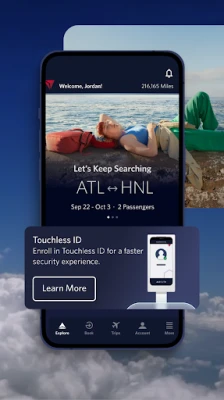
Fly Delta is the official mobile application from Delta Air Lines, designed to help passengers handle most aspects of their journey directly from an Android smartphone or tablet. Whether you are planning a domestic hop or an intercontinental adventure, the app provides a single place to view schedules, purchase tickets, and stay informed about your flight.
Main features
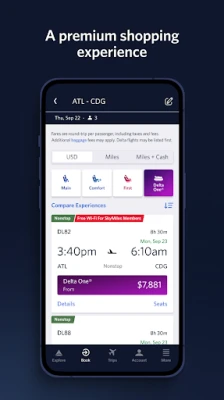
- Flight search and booking – Browse available Delta flights, compare times and fares, and complete purchases without leaving the app.
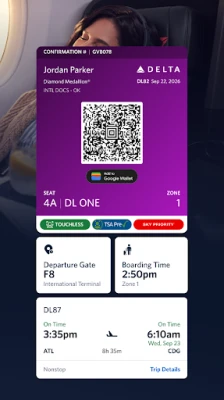
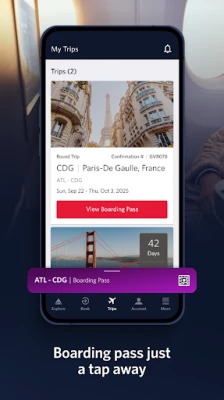
- Digital boarding passes – Check in, select seats, and receive a QR‑code boarding pass that can be stored offline for use at the gate.
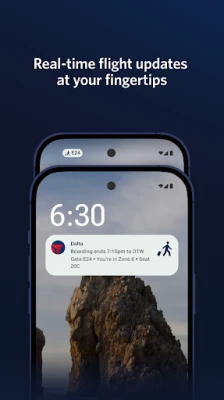
- Real‑time flight updates – Receive push notifications for gate changes, delays, and boarding announcements.
- Bag tracking – Monitor the status of checked luggage and get alerts when bags are loaded or delivered.
- Airport navigation – Access interactive maps that show terminals, security checkpoints, lounges, and other facilities.
- SkyMiles integration – View your mileage balance, earn or redeem miles, and track upgrade eligibility.
- Trip extras – Add services such as Wi‑Fi passes or priority boarding directly to an existing reservation.
How it works
After downloading Fly Delta from the Google Play Store, you create or sign in to a Delta account. The app then syncs with your profile, pulling in any existing reservations linked to your frequent‑flyer number. From the home screen you can start a new search, view upcoming trips, or explore airport information. The check‑in process follows a simple flow: select a flight, confirm passenger details, choose a seat, and generate a boarding pass that can be saved to the device’s secure storage.
Practical uses
- Before departure – Use the app to compare flight options, lock in a fare, and add any desired extras such as extra legroom or in‑flight Wi‑Fi.
- Day of travel – Check in early, store the boarding pass offline, and receive gate‑change alerts so you can move through the airport efficiently.
- During the flight – Track the aircraft’s progress on the map and stay updated on any in‑flight service announcements.
- After landing – Follow bag‑tracking notifications and locate the baggage claim area using the airport map.
Installation information
The app is free to download from the Google Play Store. It requires an Android device with a compatible version of the operating system; the exact minimum version is listed on the store page. Installation follows the standard process: tap “Install,” wait for the download to complete, and then open the app to begin setup.
Things to know before installing
- Internet connectivity is needed for booking, check‑in, and real‑time updates. Offline access is limited to stored boarding passes and previously downloaded airport maps.
- The app stores personal data such as flight itineraries and payment information. Review Delta’s privacy policy within the app to understand how this data is handled.
- Push notifications must be enabled if you want to receive timely flight alerts.
Who may find Fly Delta useful?
Frequent travelers who fly Delta regularly, occasional vacationers planning a single trip, and business passengers who need quick access to itinerary changes will all benefit from the app’s consolidated features. The integration with SkyMiles also makes it attractive for members looking to track and redeem miles on the go.
Frequently asked questions
Can I use the boarding pass without an internet connection?
Yes. Once you have checked in and saved the boarding pass, it is stored locally and can be displayed at the gate even if the device is offline.
What should I do if my flight is cancelled?
The app will push a notification with rebooking options. You can also open the reservation details and select an alternative flight directly from the interface.
Is it possible to add a companion to my reservation?
Companion details can be entered during the booking process or later by editing the reservation within the app.
Rate the App
User Reviews











Popular Apps










 Games
 Entertainment
 Communication
 E-mail
 Security
 Tools
 Media
 Internet
 Finance
 Design
 Education
 Android Firmwares
 Travel & Local
 Android
 Windows
 Linux