Latest Version
Latest
September 14, 2026
State Farm Insurance
Travel & Local
Android
26
Free
com.statefarm.dssb
Report a Problem
More About Drive Safe & Save® Business – State Farm
What is Drive Safe & Save® Business?
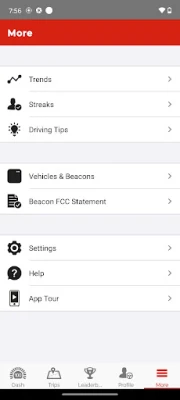
Drive Safe & Save® Business is a free Android app from State Farm Insurance designed for owners of business auto policies. It lets you monitor the driving behavior of vehicles covered under a State Farm business auto policy, providing location data, trip summaries and feedback that can help improve safety on the road.
Main features
- Real‑time vehicle location – See where each enrolled vehicle is on a map, useful for dispatch and oversight.
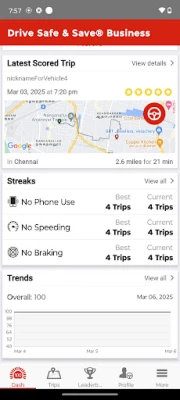
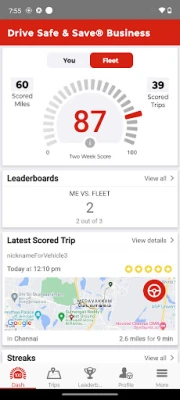
- Trip details – Review individual trips with start and end points, distance traveled and duration.
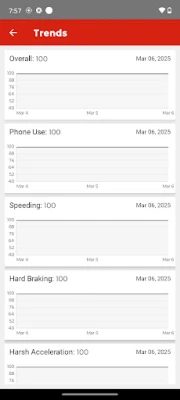
- Driving feedback – The app highlights events such as hard braking, rapid acceleration and speeding, giving you a clear picture of driver habits.
- Safety incentives – Eligible vehicles may qualify for a one‑time premium reduction when they are paired with a Bluetooth beacon and meet the program’s safety criteria.
How it works
After a State Farm agent adds the Drive Safe & Save Business program to a business auto policy, the business owner downloads the app and accepts the required agreements. The owner then invites drivers to join the program. Each driver installs the app on their Android device, pairs it with a Bluetooth beacon placed in the vehicle, and consents to receive SMS updates. Once set up, the app collects driving data from the vehicle’s telematics system and transmits it securely to State Farm for analysis.
Practical uses
Fleet managers can use the information to identify risky driving patterns, schedule targeted training, and reward safe drivers. Small business owners who rely on a few vehicles can keep an eye on usage, ensuring that vehicles are being driven responsibly and that mileage is accurately recorded for tax or reimbursement purposes.
Installation information
Search for "Drive Safe & Save Business" in the Google Play Store, then tap Install. The app requires a compatible Android device with Bluetooth capability for beacon pairing. After installation, follow the in‑app prompts to log in with the business owner’s State Farm credentials and to invite drivers.
Things to know before installing
- The app can only be used by businesses that have an active State Farm business auto policy with the Drive Safe & Save program enabled.
- Drivers must have a smartphone that supports Bluetooth Low Energy for beacon connection.
- Participation may involve receiving occasional SMS messages related to safety alerts or program updates.
Who may find it useful?
Any business that operates company vehicles—such as delivery services, sales teams, construction firms, or service technicians—can benefit from the visibility and safety insights the app provides. It is especially helpful for owners who want to encourage safe driving without relying solely on manual supervision.
Frequently asked questions
Do I need a State Farm agent to start using the app?
Yes. The program must be added to your business auto policy by a State Farm representative before the app can be activated.
Is driver data shared with anyone outside State Farm?
The app transmits data only to State Farm for the purpose of generating safety feedback and premium adjustments. It does not share personal driving information with third parties.
Can I use the app with multiple vehicles?
Each vehicle that is paired with a Bluetooth beacon can be added to the app, allowing you to monitor several fleet members from a single account.
What if a driver does not want to install the app?
Driver participation is optional, but only enrolled drivers will receive the safety feedback and potential premium discounts associated with the program.
Rate the App
User Reviews










Popular Apps










 Games
Games Entertainment
 Communication
 E-mail
 Security
 Tools
Tools Media
Media Internet
 Finance
 Design
 Education
 Android Firmwares
 Travel & Local
 Android
 Windows
 Linux
Linux