

Latest Version
Latest
August 15, 2026
READERA LLC
BOOKS AND REFERENCE
Android
155
$14.99
org.readera.premium
Report a Problem
More About ReadEra Premium – Advanced eBook Reader for Android
What is ReadEra Premium?
ReadEra Premium is a paid Android application developed by READERA LLC. It is designed to serve as a comprehensive eBook and document reader, offering tools for organizing your library, customizing your reading experience, and accessing content offline.
Main features
- Broad format support – Handles popular eBook and document types such as EPUB, PDF, MOBI, AZW3, DOC/DOCX, TXT, and comic formats like CBZ/CBR.
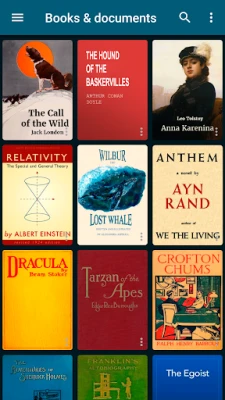
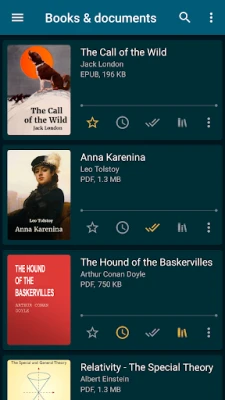
- Automatic library detection – Scans your device storage to locate supported files and adds them to a unified library.
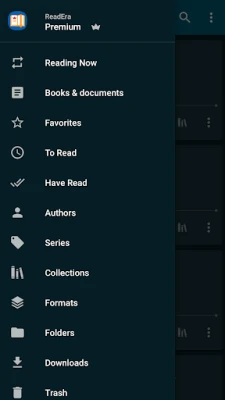
- Search and filter – Quickly find a title or author using a built‑in search bar; filter by format, author, or custom collections.
- Reading customization – Adjust font size, line spacing, margins, and switch between day/night themes to suit your comfort.
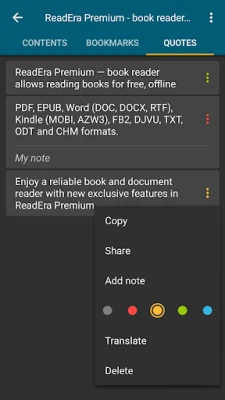
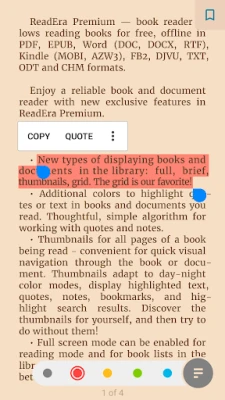
- Bookmarks, notes, and highlights – Mark pages, add personal notes, and highlight passages; all annotations are stored within the app.
- Text‑to‑speech (TTS) – Listen to books and documents using the device’s TTS engine, even when the screen is off.
- Cloud sync (Premium) – Sync reading progress, bookmarks, and notes across devices via Google Drive.
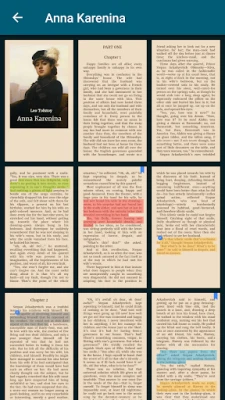
- Library organization – Create collections, sort by author or series, and view items as lists, grids, or thumbnails.
How it works
After installation, ReadEra Premium scans internal and external storage for files in supported formats. Detected items appear in the main library view, where you can tap any title to open it. The reader interface provides navigation controls, a table of contents (when available), and options for adjusting visual settings. For supported formats, the TTS feature reads the text aloud, allowing hands‑free consumption.
Practical uses
- Students can keep lecture notes, PDFs, and eBooks in one place and annotate them for study.
- Avid readers can build custom collections (e.g., “Sci‑Fi”, “Travel Guides”) and switch between them effortlessly.
- Commuters can enable TTS to listen to novels while traveling without needing to look at the screen.
Installation information
The app is available for purchase through the Google Play Store for $14.99. After purchase, download and install the APK directly from the store. No additional setup is required beyond granting storage access so the app can locate your files.
Things to know before installing
- ReadEra Premium requires permission to read and write to device storage in order to locate and manage your eBooks.
- The premium subscription unlocks cloud sync and removes any ads that may appear in the free version.
- Because the app works offline, an internet connection is only needed for initial download, license verification, and optional cloud sync.
Who may find it useful?
Anyone who maintains a personal digital library—students, professionals, casual readers, and comic enthusiasts—will benefit from the unified management and reading tools that ReadEra Premium provides.
Frequently asked questions
- Can I import my own fonts? Yes, the app allows you to add custom fonts for a personalized reading experience.
- Is there a limit to the number of books I can store? No, the library size is limited only by the storage capacity of your device.
- Does the app support password‑protected PDFs? The reader can open standard encrypted PDFs, provided you enter the correct password when prompted.
Rate the App
User Reviews














Popular Apps










 Games
Games Entertainment
 Communication
 E-mail
 Security
 Tools
Tools Media
Media Internet
 Finance
 Design
 Education
 Android Firmwares
 Travel & Local
 Android
 Windows
 Linux
Linux