

Latest Version
Latest
August 17, 2026
S.Mustafa
LIFESTYLE
Android
62
Free
com.smustafa.praytimes
Report a Problem
More About Prayer Times – Simple Daily Prayer Schedule
What is Prayer Times?
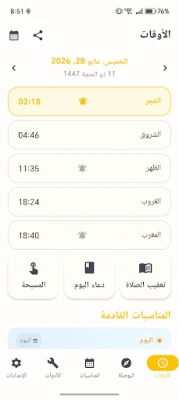
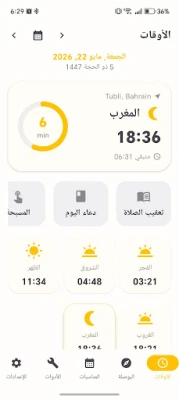
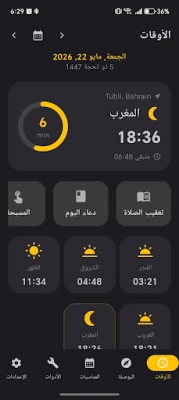
Prayer Times is a free Android application developed by S.Mustafa that helps Muslims keep track of the five daily prayers. By using the device’s location services, the app calculates accurate prayer times for any place in the world and provides the direction of the Qibla.
Main features
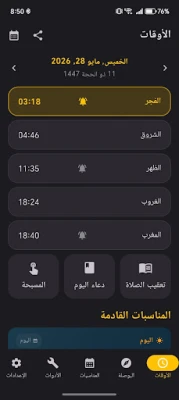
- Location‑based prayer schedule – The app determines your current position via GPS or network location and shows the times for Fajr, Dhuhr, Asr, Maghrib and Isha.
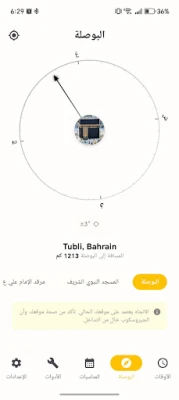
- Qibla compass – A built‑in compass points toward the Kaaba, allowing you to orient yourself quickly wherever you are.
- Islamic calendar – Important dates such as Ramadan, Eid al‑Fitr and Eid al‑Adha appear in a simple calendar view, with optional reminders.
- Adhan alerts – You can enable a sound notification for each prayer. The alert tone can be chosen from the device’s media library.
- Monthly overview – A month‑at‑a‑glance screen lists all prayer times for the selected month, useful for planning travel or work schedules.
- Prayer duaas – Short collections of duaas for each prayer are included for quick reference.
How it works
When you first launch the app, it asks for permission to access your location. Once granted, the app retrieves the latitude and longitude, selects a calculation method that matches the regional practice, and displays the five daily times. You can switch calculation methods in the settings if you follow a specific school of thought.
Practical uses
- Daily reminders keep you aware of each prayer window without needing to check a printed timetable.
- The Qibla compass is handy when you are traveling, at work, or in a new city.
- The monthly view helps you plan fasting days, travel, or work commitments around prayer times.
- Integrated duaas let you recite the recommended supplications right after each prayer.
Installation information
The app is distributed as a free download from the Appitika store. Installation follows the standard Android process: tap “Install,” grant location permission when prompted, and the app will be ready to use.
Things to know before installing
- The app requires location access to calculate prayer times accurately.
- Adhan sounds are disabled by default; you can enable them in the Settings screen.
- No in‑app purchases or ads are mentioned, keeping the experience straightforward.
Who may find it useful?
Anyone who observes the five daily prayers and wants a reliable, offline‑capable reference will benefit from Prayer Times. It is especially convenient for travelers, students, and professionals who need quick access to prayer schedules and Qibla direction.
Frequently asked questions
Do I need an internet connection?
Only the initial location lookup may use the network. Once the coordinates are obtained, prayer times are calculated locally, so the app works without continuous internet access.
Can I change the calculation method?
Yes. The Settings menu includes a list of common methods (e.g., Muslim World League, Umm al‑Qura) so you can select the one that aligns with your community.
Is the app compatible with all Android versions?
The developer has not specified a minimum Android version, but the app runs on standard Android devices that support location services.
Rate the App
User Reviews















Popular Apps










 Games
Games Entertainment
 Communication
 E-mail
 Security
 Tools
Tools Media
Media Internet
 Finance
 Design
 Education
 Android Firmwares
 Travel & Local
 Android
 Windows
 Linux
Linux