

Latest Version
September 18, 2026
Happy-verse
LIFESTYLE
Android
89
Free
com.happyverse.tasbih
Report a Problem
More About Tasbih Counter: Dhikr & Zikr – Simple Digital Prayer Beads
What is Tasbih Counter: Dhikr & Zikr?
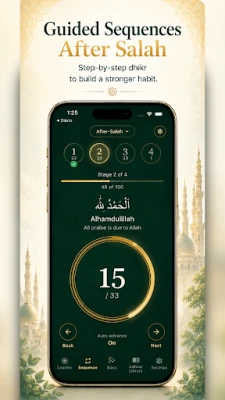
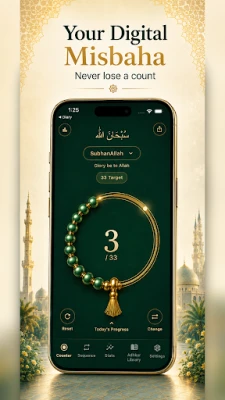
Tasbih Counter is a lightweight Android tool designed for anyone who wants to keep track of dhikr, zikr, or any repetitive supplication. It replaces physical prayer beads with a digital interface that records each tap, remembers your progress, and offers gentle feedback through vibration or sound.
Main features
- Persistent counting – Your current tally is stored automatically, so closing the app or restarting the device never erases your work.
- Reset protection – Accidental resets are avoided; clearing a count requires a deliberate action and can be undone.
- Custom targets – Choose from common milestones such as 33, 99, 100, or define any number that suits your practice.
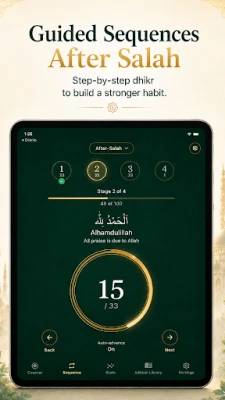
- Round progression – The app can guide you through escalating rounds (for example 33 → 99 → 100) to match traditional prayer‑bead sequences.
- Personalized dhikr entries – Add, name, and set a target for your own supplications, giving each a separate counter.
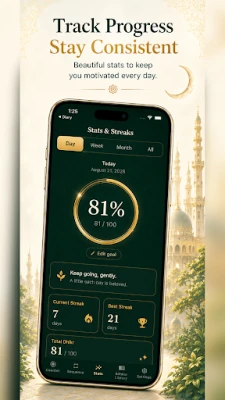
- Daily habit tracking – Simple statistics show how many days you have counted, helping you maintain a consistent routine.
- Offline operation – No internet connection is required; all data stays on the device.
- Light and dark themes – Choose a visual style that fits the time of day or personal preference.
- Vibration and optional sound – Immediate tactile feedback confirms each tap, while a quiet sound can be enabled for low‑light environments.
How it works
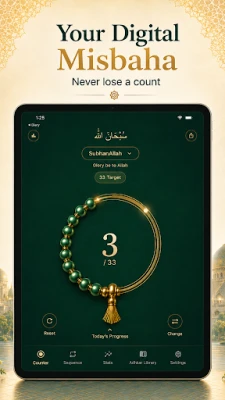
When you open the app, the main screen displays a large tap area and the current count. Each tap increments the number and triggers a short vibration. If you have enabled sound, a soft click is played. The count is saved in real time, so you can switch apps, lock the screen, or power off the phone without losing progress.
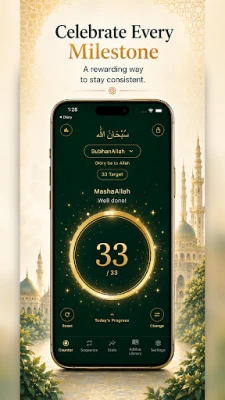
To set a target, tap the settings icon, choose a predefined value or enter a custom number, and confirm. When the counter reaches the target, the app provides a visual cue and, if you wish, a brief vibration pattern to signal completion.
Resetting a session requires opening the reset menu, confirming the action, and then optionally using the undo button to restore the previous count. This two‑step process prevents accidental loss of long counting sessions.
Practical uses
- Counting traditional phrases such as SubhanAllah, Alhamdulillah, Allahu Akbar, or Astaghfirullah after prayers.
- Working through the 99 Names of Allah with individual counters for each name.
- Maintaining a personal dhikr routine during the day, on a walk, or before sleep.
- Tracking progress for memorization or recitation goals that rely on repeated repetitions.
Who may find it useful?
Anyone who prefers a digital alternative to physical prayer beads will benefit from Tasbih Counter. It is especially helpful for users who want:
- Accurate, automatically saved counts.
- A simple interface without ads or unnecessary notifications.
- Customizable targets and the ability to create personal dhikr entries.
- Offline access while traveling or in areas with limited connectivity.
Installation information
The app is distributed as a free download from the Google Play Store. Installation follows the standard Android process: tap “Install,” grant any required permissions (typically storage for saving counts), and launch the app from your app drawer.
Things to know before installing
- The application does not require an internet connection after installation.
- All count data is stored locally; the app does not sync to cloud services.
- Because the app is free, it may include optional in‑app purchases for additional themes or features, but the core counting functionality remains fully functional without payment.
Frequently asked questions
Can I export my counts?
Currently the app keeps data on the device only. Export options are not built in, but you can manually note important totals if needed.
Is there a way to hide the app’s activity?
The app does not display notifications while counting, allowing discreet use. You can also enable the dark theme for low‑light situations.
What happens if the app crashes?
Because the count is saved after each tap, a crash will not erase your progress. When you reopen the app, the last saved number is displayed.
Rate the App
User Reviews













Popular Apps










 Games
Games Entertainment
 Communication
 E-mail
 Security
 Tools
Tools Media
Media Internet
 Finance
 Design
 Education
 Android Firmwares
 Travel & Local
 Android
 Windows
 Linux
Linux