

Latest Version
Latest
September 18, 2026
Meypod
LIFESTYLE
Android
118
Free
com.github.meypod.al_azan
Report a Problem
More About Al‑Azan – Prayer Times & Qibla
What is Al‑Azan?
Al‑Azan is a lightweight Android application that provides daily Islamic prayer times and a Qibla direction tool. Developed by Meypod, the app is free and open‑source, focusing on privacy and simplicity. It works without an internet connection, making it suitable for use in areas with limited connectivity.
Main features
- Ad‑free and privacy‑focused – the app does not request internet access or embed any trackers.
- Accurate prayer calculations – supports a range of calculation methods and allows you to choose the one that matches your local practice.
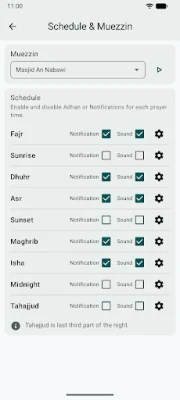
- Customizable Adhan audio – you can select any sound file on your device, with a separate option for the Fajr call.
- Offline location handling – search for a city or use GPS to set your location without needing a network connection.
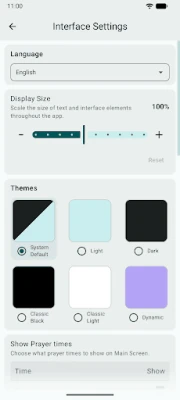
- Light, dark and Material You themes – the interface adapts to system colors and offers both classic light and dark modes.
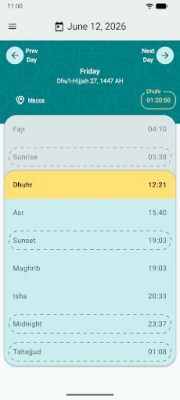
- Monthly view – see the entire month’s prayer schedule at a glance.
- Reminders and Do‑Not‑Disturb – set alerts before or after a prayer and optionally silence the phone for a chosen period.
- Widgets – add a homescreen or notification widget to keep the next prayer time visible.
- Qibla finder – a map‑based compass helps you locate the direction of Mecca.
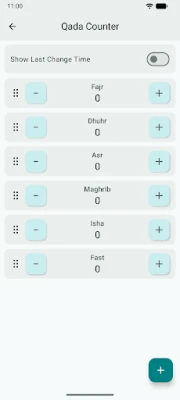
- Qada counter – track missed prayers and mark them as performed.
- Backup & restore – save your settings and restore them on a new device.
How it works
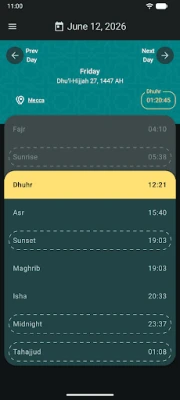
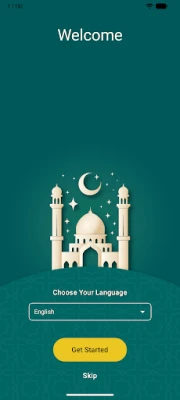
When you first launch Al‑Azan, you can either type the name of your city or enable GPS to detect your location. The app then calculates the five daily prayer times based on the selected method and displays them in the main screen. You can tap any entry to see additional information such as sunrise, sunset, and night‑time (Tahajjud) times.
Audio files for the Adhan are stored locally, so the call plays instantly at the scheduled moment. If you enable the reminder option, a notification appears a few minutes before the prayer, and you can choose whether the phone should enter Do‑Not‑Disturb mode after the Adhan.
Practical uses
- Daily prayer planning – keep track of each prayer without needing to consult a printed timetable.
- Travel – the offline location search lets you quickly set a new city when you are abroad.
- Quiet environments – use the automatic silence feature to avoid interruptions during worship.
- Learning – the Qibla compass helps new users find the correct direction for prayer.
Installation information
The app is distributed as an APK that can be installed from trusted sources. Because it does not require internet permission, the installation process is straightforward and does not involve background data collection.
Things to know before installing
- The application does not request any network permissions, so all features work offline after the initial install.
- Since it is open‑source, you can review the code on GitHub if you wish to verify its privacy claims.
- Custom audio files must be stored on the device; the app does not download sounds from the web.
Who may find it useful?
Muslims who prefer a privacy‑respecting, ad‑free solution for prayer times and Qibla direction will benefit from Al‑Azan. It is also a good fit for users who travel frequently or live in regions with unreliable internet access.
Frequently asked questions
Does Al‑Azan need an internet connection?
No. All calculations and data are performed locally. You only need an internet connection to download the APK initially.
Can I change the calculation method?
Yes. The settings include a list of common methods (e.g., Muslim World League, Umm Al‑Qura) and allow you to select the one that matches your local practice.
Is my data shared with third parties?
The app does not request any permissions that would allow data transmission, and it contains no analytics or tracking libraries.
How do I back up my settings?
Use the built‑in backup feature to export your preferences to a file, which can later be imported on the same or a different device.
Rate the App
User Reviews















Popular Apps










 Games
Games Entertainment
 Communication
 E-mail
 Security
 Tools
Tools Media
Media Internet
 Finance
 Design
 Education
 Android Firmwares
 Travel & Local
 Android
 Windows
 Linux
Linux