





Latest Version
Latest
August 15, 2026
Prayer Now By App Rocks For Tech Solutions
LIFESTYLE
Android
217
Free
com.AppRocks.now.prayer
Report a Problem
More About Prayer Now – Azan & Prayer Times
What is Prayer Now?
Prayer Now is a free Android application developed by Prayer Now By App Rocks For Tech Solutions. It is designed to help Muslims keep track of the five daily prayers, listen to the call to prayer (Azan), find the Qibla direction, and access basic Quran features—all from a single, easy‑to‑use interface.
Main features
- Prayer times – Calculates daily prayer times for any location using GPS or manual city selection. The app supports the most common calculation methods, including the Hanafi method for Asr.
- Azan notifications – Optional alerts remind you when it is time to pray. You can choose from a selection of well‑known reciters for the Azan sound.
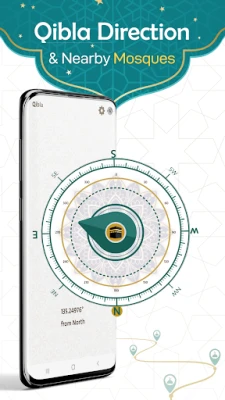
- Qibla finder – Uses the device’s compass and location services to point you toward the Kaaba in Mecca, even without an internet connection.
- Quran access – Browse the Holy Quran with verse search and bookmarking. Audio playback of popular reciters is available for those who prefer listening.
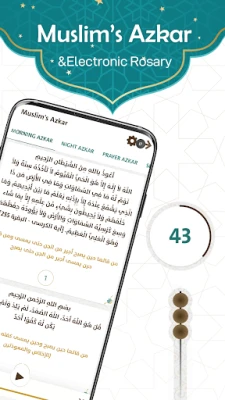
- Daily Azkar – A collection of common supplications for morning, evening, before sleep and during prayer can be read or played.
How it works
When you first open Prayer Now, the app asks for permission to access your location. This enables automatic calculation of prayer times based on your exact coordinates. If you prefer, you can also select a city manually and the app will use the appropriate time zone.
Azan alerts are configurable in the settings; you can enable or disable them, set a reminder offset, and pick the reciter whose voice you prefer. The Qibla compass works offline after the initial location is set, making it useful in areas with limited connectivity.
Practical uses
- Set up reliable prayer reminders to stay punctual throughout the day.
- Use the Qibla compass when traveling or when you are away from a mosque.
- Read or listen to Quran verses during commute or quiet moments.
- Incorporate daily Azkar into your routine without needing separate books or recordings.
Installation information
The app is available for free on the Google Play Store. Installation requires Android devices that support the standard Google Play services. No additional purchases are required to access the core features described above.
Things to know before installing
- Location permission is needed for accurate prayer times and Qibla direction.
- Internet access is required only for the initial download of reciter audio files; once cached, playback works offline.
- The app does not collect personal data beyond what is necessary for location‑based services.
Who may find it useful?
Any Muslim who wants a straightforward tool for daily prayer management will benefit from Prayer Now. It is especially handy for travelers, students, and professionals who need quick access to prayer times and Qibla direction without switching between multiple apps.
Frequently asked questions
Do I need an internet connection for prayer times?
Prayer times can be calculated offline once your location is set. An internet connection is only needed to download optional audio files.
Can I change the calculation method?
Yes, the settings include several widely used calculation methods, including the Hanafi method for Asr.
Is the app ad‑free?
The app is free to download; any advertising present is limited to non‑intrusive banners within the interface.
Rate the App
User Reviews















Popular Apps










 Games
Games Entertainment
 Communication
 E-mail
 Security
 Tools
Tools Media
Media Internet
 Finance
 Design
 Education
 Android Firmwares
 Travel & Local
 Android
 Windows
 Linux
Linux