




Latest Version
Latest
September 03, 2026
Novum Media FZCO
BOOKS AND REFERENCE
Android
5
Free
com.dailyquran
Report a Problem
More About Noor Quran: Prayer Times – Free Quran & Salah App
What is Noor Quran?
Noor Quran is a free Android application that brings the full text of the Qur’an together with practical tools for daily worship. Developed by Novum Media FZCO, the app lets users read, listen to, and reflect on the Qur’an while staying informed about prayer times and the direction of the Kaaba.
Main features
- Complete Qur’an text – Arabic script is presented in a clear, distraction‑free layout. Users can navigate by Surah, Juz or Ayah and bookmark favorite verses.
- Mushaf mode – For those who prefer the traditional page‑by‑page view, a Mushaf layout mimics the printed Qur’an.
- Audio recitation – Built‑in recitations can be played with adjustable speed, allowing users to follow along with the text.
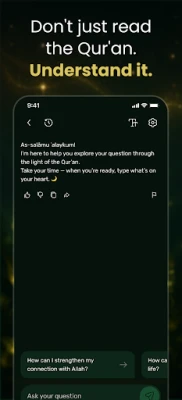
- English translation & tafsir – Selected verses include English translation and brief tafsir notes to aid understanding.
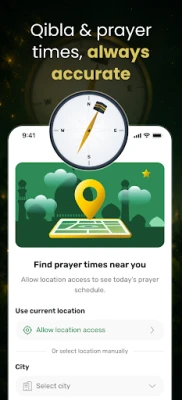
- Prayer times – Accurate Salah times are calculated based on the user’s location, with optional Adhan notifications.
- Qibla compass – A simple compass points toward the Kaaba, helping users find the correct direction for prayer.
- Daily goals and reminders – Users can set reading targets, receive gentle reminders, and track progress over time.
How it works
After installing the app, users can immediately start reading the Qur’an offline. The navigation pane lets you jump to any Surah or Juz, while the bookmark feature saves your place. To listen to a recitation, select the audio icon next to a verse; the playback speed can be increased or decreased to match your preference.
Prayer‑time settings are configured automatically using your device’s location services. You may customize the calculation method, adjust the notification sound, or disable alerts altogether. The Qibla compass appears on a dedicated screen and updates as you move.
Practical uses
- Read or listen to the Qur’an during travel, where internet access may be limited.
- Set daily reading goals to build a consistent habit.
- Receive timely Adhan alerts without needing a separate clock app.
- Use the Qibla compass in unfamiliar locations to ensure accurate prayer direction.
Installation information
The app is available for free on the Google Play Store. Simply search for “Noor Quran: Prayer Times” or use the package name com.dailyquran. No additional in‑app purchases are required to access the core features.
Things to know before installing
- The app works offline after the initial download of the Qur’an text and audio files.
- Location services are needed for accurate prayer‑time calculation and Qibla direction.
- All content is provided without advertisements.
Who may find it useful?
Anyone looking for a single, lightweight tool to read the Qur’an, listen to recitations, and stay aware of prayer times will benefit from Noor Quran. It is especially handy for travelers, students, and anyone who prefers an ad‑free experience.
Frequently asked questions
Do I need an internet connection to use the app?
After the initial download, the Qur’an text, translations and audio files are stored locally, so you can read and listen offline.
Can I customize the Adhan sound?
Yes. The settings menu lets you choose from the built‑in sounds or mute the alerts entirely.
Is there a way to track my reading progress?
The app includes a simple progress tracker that shows verses read, time spent and streaks.
Rate the App
User Reviews















Popular Apps










 Games
Games Entertainment
 Communication
 E-mail
 Security
 Tools
Tools Media
Media Internet
 Finance
 Design
 Education
 IT Tools
 Travel & Local
 Android
 Windows
 Linux
Linux