

Latest Version
Latest
September 06, 2026
Nintendo Co., Ltd.
LIFESTYLE
Android
4
Free
com.nintendo.znma
Report a Problem
More About Nintendo Switch Parental Controls – Manage Play Time & Settings
What is Nintendo Switch Parental Controls?
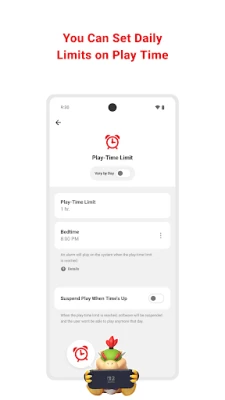
Nintendo Switch Parental Controls is a free companion app that works with a Nintendo Switch or Nintendo Switch 2 console. It gives parents a convenient way to set daily play‑time limits, view what games are being played, and adjust communication and age‑based restrictions from an Android device.
Main features
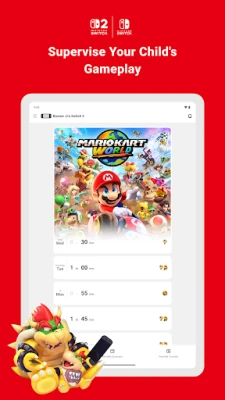
- Daily play‑time limits – Choose how many minutes a child may play each day. Limits can be set individually for each day of the week, and the console will pause gameplay automatically when the limit is reached.
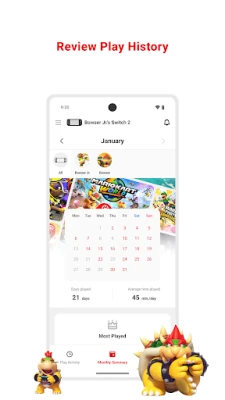
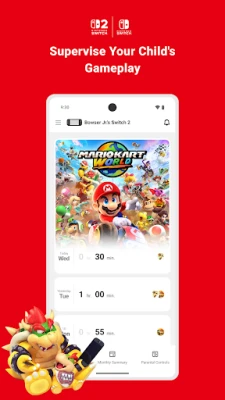
- Game activity overview – The app shows a list of recently played titles, total time spent on each game, and a monthly summary that helps parents spot patterns.
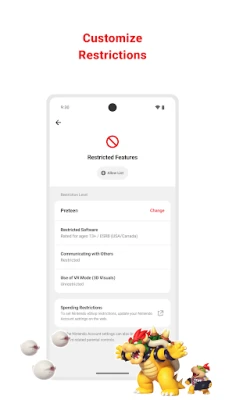
- Age‑based content filters – Based on the child’s age, you can restrict access to games that exceed a certain rating and disable features that may not be appropriate.
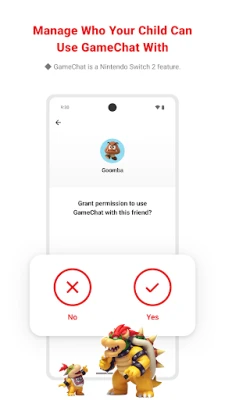
- GameChat management – If the console supports GameChat, the app lets you approve which friends can chat with your child and control when video chat is allowed.
How it works
To use the app, a parent or guardian must have a Nintendo Account and link the console to that account. Once linked, the Android app communicates with the Switch over the internet, syncing settings and activity data. Changes made in the app are applied to the console in near real‑time, so you can adjust limits or permissions without needing to be near the device.
Practical uses
- Set a consistent bedtime routine by limiting evening play.
- Monitor new game releases and see if they fit your family’s guidelines.
- Control online communication, ensuring your child only talks with approved friends.
- Get a quick snapshot of weekly gaming habits before discussing screen time with your child.
Installation information
Search for “Nintendo Switch Parental Controls” in the Google Play Store, then tap Install. The app requires an Android device with a Nintendo Account; no additional permissions beyond network access are needed for basic functionality.
Compatibility and requirements
The app works with any Nintendo Switch or Nintendo Switch 2 console that is linked to a Nintendo Account. For full feature support, the console should be running the latest system software. The Android device should be running a recent version of the operating system, though the exact minimum version is not specified by Nintendo.
Things to know before installing
- A Nintendo Account is required for the parent or guardian; the child does not need a separate account.
- Purchasing restrictions, such as limits on eShop purchases, are managed through the Nintendo Account settings, not directly in the app.
- All linked consoles must be updated to the current system version to use the full set of controls.
Who may find it useful?
Parents, guardians, and caregivers who want a simple way to supervise and limit gaming sessions on a Nintendo Switch will benefit from this app. It is also helpful for families that share a console and need clear boundaries around play time and online interaction.
Frequently asked questions
Do I need a Nintendo Switch to use the app?
Yes. The app only manages settings for a linked Switch console; it does not provide any gaming functionality on its own.
Can I change the play‑time limit after it’s set?
Absolutely. Limits can be adjusted at any time from the app, and the new setting takes effect immediately on the console.
Is the app free?
Yes, Nintendo provides the Parental Controls app at no cost.
What happens when the daily limit is reached?
The console will automatically pause the current game and display a notification that the allotted time has been used.
Rate the App
User Reviews














Popular Apps










 Games
Games Entertainment
 Communication
 E-mail
 Security
 Tools
Tools Media
Media Internet
 Finance
 Design
 Education
 IT Tools
 Travel & Local
 Android
 Windows
 Linux
Linux