

Latest Version
August 25, 2026
Devxhub Limited
LIFESTYLE
Android
105
Free
com.devxhub.muslimtimespro
Report a Problem
More About Muslim Times Pro – Prayer Times, Quran & Ramadan Tools
What is Muslim Times Pro?
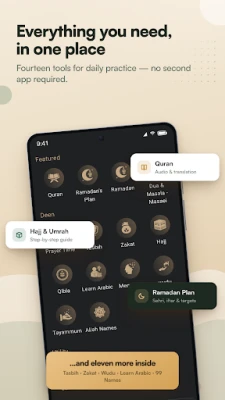
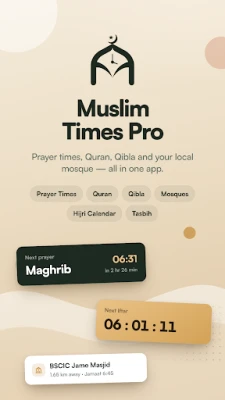
Muslim Times Pro, developed by Devxhub Limited, is a free Android application that brings together several daily tools useful for Muslims. It combines prayer‑time calculations, an audio‑enabled Quran, a Qibla finder, and a set of resources for Ramadan and daily supplications, all within a single, easy‑to‑navigate interface.
Main features
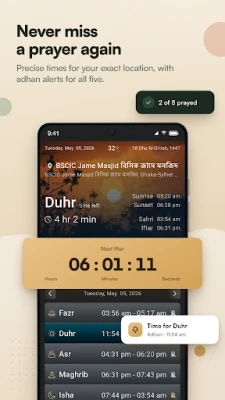
- Prayer times and alerts – The app calculates the five daily prayers (Fajr, Dhuhr, Asr, Maghrib, Isha) based on the user’s location. It supports multiple calculation methods and allows selection of different madhabs.
- Azan notifications – Users can enable audible alerts for each prayer, with options to customize the sound and repetition.
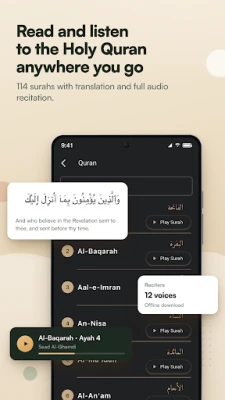
- Quran with translation – The full Arabic text of the Quran is available together with English translation. Audio recitations from well‑known reciters can be streamed or downloaded for offline listening.
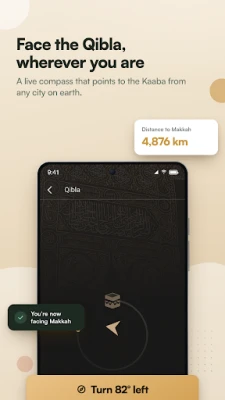
- Qibla compass – A built‑in compass points toward the Kaaba, helping users find the correct direction for prayer wherever they are.
- Ramadan calendar – The app includes a calendar that shows Sehri (pre‑dawn) and Iftar (sunset) times for many regions, along with a countdown to each.
- Daily duas and dhikr – A collection of common supplications is provided, with the ability to bookmark favorites or create personal lists.
- Islamic calendar – Hijri dates are displayed alongside Gregorian dates, making it easy to track Islamic holidays.
- Customization – Light and dark themes, adjustable text size, and the choice between GPS‑based or manual city selection give users control over the experience.
How it works
When the app is first opened, it asks for permission to access the device’s location. This information is used to fetch the appropriate prayer‑time data for the current city. If location services are disabled, users can manually enter a city or select a predefined location from a list.
Prayer times are calculated using the selected method and displayed in a clear list. Users can tap any prayer to view the exact start and end times, as well as optional reminders. The Quran section lets readers swipe between chapters; tapping a verse opens the translation and, if desired, starts the audio recitation.
The Qibla compass uses the device’s magnetometer to show a real‑time direction arrow. For Ramadan, the calendar automatically adjusts to the user’s region, showing local Sehri and Iftar times based on sunrise and sunset calculations.
Practical uses
- Set up reliable prayer reminders for work or travel.
- Read or listen to the Quran without needing an internet connection after the initial download.
- Find the correct Qibla direction when outdoors or in unfamiliar places.
- Plan daily fasting during Ramadan with accurate Sehri and Iftar times.
- Access a curated list of duas for personal worship or group study.
Installation information
The application is distributed as a free download from the Google Play Store. Installation follows the standard Android process: tap “Install,” grant location permission when prompted, and launch the app from the home screen.
Things to know before installing
- The app requires Android devices capable of providing location data; older devices without GPS may need manual city entry.
- Audio recitations consume data if streamed; users can download files for offline use to avoid additional data charges.
- All content is provided by the developer; users should verify any religious rulings with qualified scholars if needed.
Who may find it useful?
Muslim Times Pro is suited for anyone who wants a consolidated tool for daily worship practices—students, professionals, travelers, and families alike. Its offline capabilities make it especially handy for users in areas with limited internet access.
Frequently asked questions
Do I need an internet connection to use the app?
Location lookup and the latest prayer‑time data require an internet connection initially. Once the data is cached, the app can operate offline, and Quran audio files can be downloaded for later listening.
Can I change the calculation method for prayer times?
Yes. The settings menu includes a list of common calculation methods and madhab options, allowing users to select the one that matches their local practice.
Is there a way to hide the app’s notifications?
Notification preferences can be adjusted in the Android system settings or within the app’s own notification options.
Rate the App
User Reviews















Popular Apps










 Games
 Entertainment
 Communication
 E-mail
 Security
 Tools
 Media
 Internet
 Finance
 Design
 Education
 Android Firmwares
 Travel & Local
 Android
 Windows
 Linux