
Latest Version
August 28, 2026
State Farm Insurance
LIFESTYLE
Android
95
Free
com.sureify.statefarm.consumer
Report a Problem
More About Life Enhanced by State Farm – Wellness & Rewards App
What is Life Enhanced?
Life Enhanced is a wellness‑focused mobile application offered by State Farm Insurance. It is designed for State Farm life‑insurance customers who want to incorporate healthier habits into their daily routine while receiving incentives for progress.
Main features
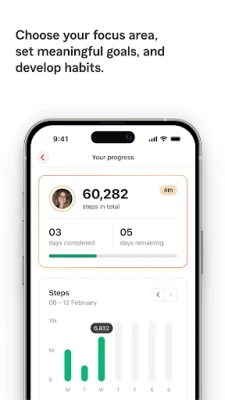
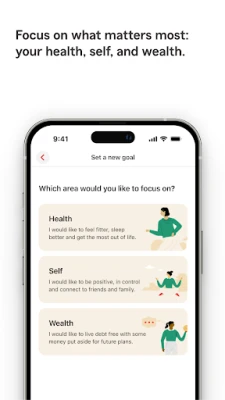
- Goal setting and habit tracking – Create personal health or financial goals and monitor your progress over time.
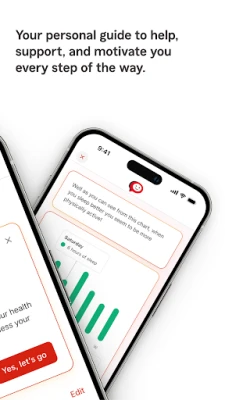
- Digital coaching – Receive brief tips and reminders from a built‑in coach that adapts to the goals you set.
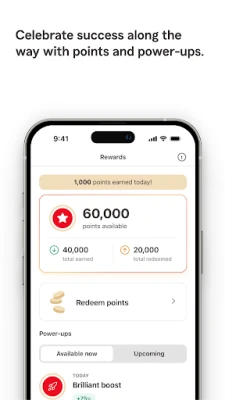
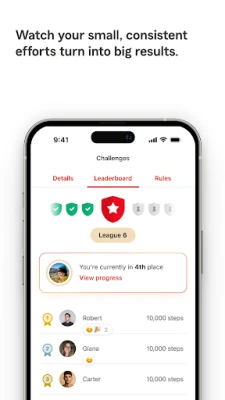
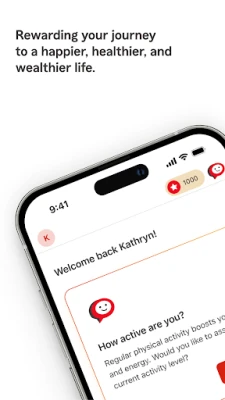
- Challenges and incentives – Join optional challenges that encourage activity, nutrition, or mindfulness and earn points for completing them.
- Device integration – Connect a compatible smartphone or wearable to import step counts, heart‑rate data, or other activity metrics automatically.
- Resource library – Access articles, short videos, and audio guides covering topics such as stress management, budgeting, and basic insurance information.
- Reward marketplace – Accumulated points can be exchanged for gift cards, discounts, or charitable donations, subject to eligibility.
How it works
After installing the app, you sign in with the information provided by State Farm. The onboarding flow guides you through selecting a few initial goals—such as walking a certain number of steps each day or reviewing a budgeting tip weekly. If you have a compatible wearable, you can pair it during setup; otherwise, the app uses the phone’s built‑in sensors for basic activity tracking.
Each day the app records your activity, updates your goal progress, and presents a short coaching tip. Completing a goal or participating in a challenge adds points to your account. Points accumulate in a personal balance that you can later redeem through the in‑app rewards catalog.
Practical uses
- Stay motivated to move more by seeing real‑time step totals.
- Build a habit of regular financial check‑ins using the budgeting resources.
- Earn tangible rewards for consistent healthy behavior, which can offset everyday expenses.
- Explore State Farm’s life‑insurance options in a low‑pressure environment.
Installation information
The app is available for free on the Google Play Store. Search for “Life Enhanced by State Farm” or use the package name com.sureify.statefarm.consumer. Tap Install and follow the standard Android installation prompts.
Things to know before installing
- The app is intended for users who are 18 years or older and who hold an eligible State Farm life‑insurance policy to access the full rewards program.
- Some features, such as point redemption, may be restricted if you do not meet the eligibility criteria.
- Data synchronization is optional; you can disconnect any linked device at any time from the settings menu.
Who may find it useful?
Current State Farm life‑insurance customers who want a simple way to track wellness goals and receive occasional incentives will benefit most. The app also appeals to anyone looking for a basic habit‑tracker that combines health tips with financial education.
Frequently asked questions
Do I need a State Farm policy to use the app?
You can download and explore the basic features without a policy, but full access to rewards and certain insurance‑related content requires an eligible life‑insurance account.
Can I use the app without a wearable?
Yes. The app works with the phone’s built‑in sensors for step counting and basic activity tracking. Wearable integration simply provides more detailed data.
Is my personal data safe?
The app lets you control which data is shared. You can review and revoke permissions at any time through the app’s settings.
How are points redeemed?
Points are exchanged within the app’s rewards section. Options typically include gift‑card selections, discount codes, or charitable donations, subject to availability.
Rate the App
User Reviews















Popular Apps










 Games
 Entertainment
 Communication
 E-mail
 Security
 Tools
 Media
 Internet
 Finance
 Design
 Education
 Android Firmwares
 Travel & Local
 Android
 Windows
 Linux