



Latest Version
August 15, 2026
Kobo Books
BOOKS AND REFERENCE
Android
126
Free
com.kobobooks.android
Report a Problem
More About Kobo – eBooks & Audiobooks
What is Kobo?
Kobo is a mobile reading platform that lets you access eBooks and audiobooks from a single, cloud‑based library. After creating a free Kobo account, your purchases and any free titles you add are synced across devices, so your collection travels with you.
Main features
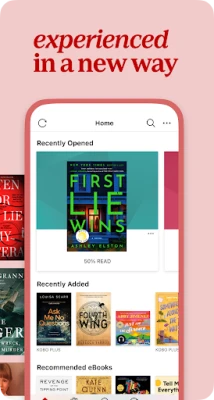
- Unified library – All of your eBooks and audiobooks appear together, making it easy to switch between reading and listening.
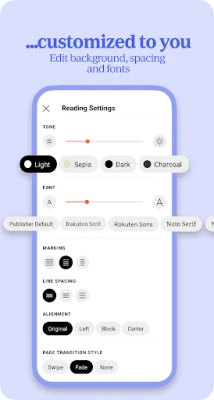
- Customizable reading experience – Adjust font size, style, line spacing, and margins. Night mode and a portrait/landscape toggle help reduce eye strain.
- Integrated audiobook player – Simple controls for play, pause, skip, and a progress bar let you enjoy narrated titles without leaving the app.
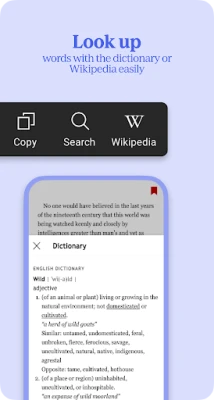
- Search and browse – Find titles by author, title, genre, or keyword. The app also highlights popular and newly released books.
- Sync across devices – Your last page, bookmarks, and notes are saved to the cloud, so you can pick up where you left off on another Android device.
How it works
After installing the app, sign in with your Kobo account or create a new one. Once logged in, you can browse the Kobo store, purchase titles, or add free books. Purchased items are automatically added to your library. When you open a book, the reader loads the file locally while keeping your progress synced online.
Practical uses
- Carry an entire personal library on a phone or tablet, ideal for commuting or travel.
- Switch between reading and listening for the same title, useful for multitasking or when your eyes need a break.
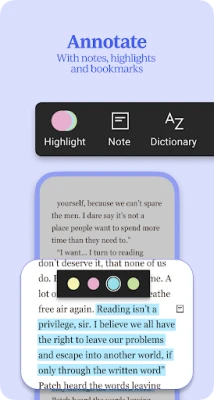
- Take notes, highlight passages, and export them for study or reference.
Installation information
The app is available through the Google Play Store. Search for "Kobo – eBooks & Audiobooks" and tap Install. The download size varies with updates, so a stable internet connection is recommended.
Things to know before installing
- A Kobo account is required to purchase or download books.
- Some titles may require an additional purchase or subscription; the app itself is free to install.
- Storage usage depends on the number and size of downloaded books.
Who may find it useful?
Anyone who enjoys digital reading or listening will benefit from Kobo. The app is especially handy for students, commuters, and avid readers who want a single place to manage both eBooks and audiobooks.
Frequently asked questions
Do I need an internet connection to read?
Books can be downloaded for offline reading. An internet connection is only needed for initial download, syncing progress, or purchasing new titles.
Can I import my own ePub files?
Kobo supports personal ePub files. You can add them via the device’s file manager or by using the "Add to Kobo" option in supported file browsers.
Is there a limit to how many books I can store?
The library size is limited only by the device’s available storage.
Rate the App
User Reviews













Popular Apps










 Games
Games Entertainment
 Communication
 E-mail
 Security
 Tools
Tools Media
Media Internet
 Finance
 Design
 Education
 Android Firmwares
 Travel & Local
 Android
 Windows
 Linux
Linux