

Latest Version
September 08, 2026
FBReader.ORG Limited
BOOKS AND REFERENCE
Android
4
Free
org.fbreader.plugin.library
Report a Problem
More About FBReader Bookshelf – Custom Library View for FBReader
What is FBReader Bookshelf?
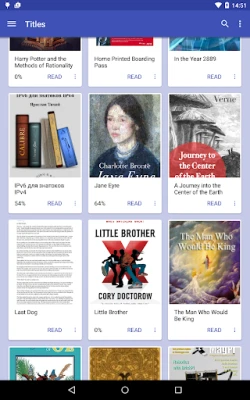
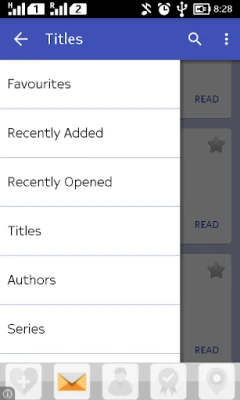
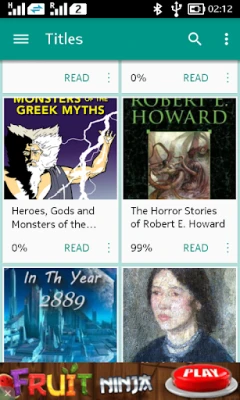
FBReader Bookshelf is an optional plugin for the FBReader e‑reading app. It replaces the default list‑style library with a visual, thumbnail‑based layout, giving you a more graphic way to browse the books stored on your device.
Main features
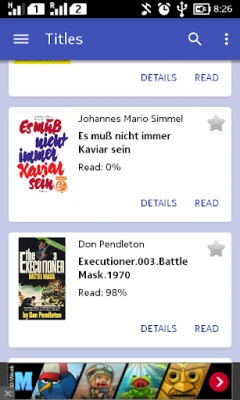
- Thumbnail view – Books appear as cards with cover images, making it easy to spot the title you want.
- Custom shelves – Create your own shelves and drag books onto them to organise your collection the way you prefer.
- Recently added list – A dedicated section shows the books you have added most recently.
- Editable recent list – Remove items from the recent‑books list if you prefer a cleaner view.
- Adjustable appearance – Choose from several colour schemes and card sizes (wide, small or tiny) to match your screen size and personal taste.
How it works
After installing the plugin, FBReader detects it and offers to switch the library view. The plugin works only with FBReader version 3.0 and earlier; newer FBReader releases include a built‑in library that supersedes this plugin. Once activated, the library screen shows the thumbnail layout and the additional controls described above.
Practical uses
The visual layout is especially helpful for readers who prefer to recognise books by cover art rather than by title alone. Custom shelves let you separate genres, reading status (e.g., "To Read", "Finished") or any personal categorisation without leaving the reading app.
Installation information
1. Ensure you have FBReader 3.0 or an earlier version installed.
2. Download the FBReader Bookshelf plugin from the Appitika store.
3. Open FBReader; the app will prompt you to enable the new library view.
4. Follow the on‑screen instructions to customise shelves, colour scheme and card size.
Compatibility
The plugin is designed for Android devices that can run FBReader 3.0. It does not specify a minimum Android version, but it requires the same platform support as the host FBReader app.
Things to know before installing
- The plugin does not work with FBReader 3.1 or later, as those versions already contain an integrated library view.
- Some features, such as an ad‑free experience or additional customisation options, may be available only through the FBReader Premium offering, which is separate from this plugin.
- Because the plugin modifies the library UI, any existing library settings in FBReader may be reset when you first enable it.
Who may find it useful?
Anyone who uses FBReader 3.0 or earlier and prefers a visual representation of their e‑book collection will benefit from FBReader Bookshelf. It is also handy for users who like to organise books into personal shelves without switching to a separate catalogue app.
Frequently asked questions
Does FBReader Bookshelf work with the latest FBReader?
No. The plugin is compatible only with FBReader 3.0 and earlier. Newer FBReader versions include their own library UI.
Can I use the plugin on tablets?
Yes, as long as the underlying FBReader version is supported. The adjustable card sizes help adapt the layout to larger screens.
Is there a way to remove the plugin?
You can disable or uninstall the plugin from the Android app settings or directly within FBReader’s plugin manager.
Rate the App
User Reviews















Popular Apps










 Games
Games Entertainment
 Communication
 E-mail
 Security
 Tools
Tools Media
Media Internet
 Finance
 Design
 Education
 IT Tools
 Travel & Local
 Android
 Windows
 Linux
Linux