

Latest Version
August 14, 2026
Prestigio development team
BOOKS AND REFERENCE
Android
267
Free
com.prestigio.ereader
Report a Problem
More About eReader Prestigio: Book Reader – Free e‑book and audio reader
What is eReader Prestigio?
eReader Prestigio is a free Android application developed by the Prestigio development team. It provides a unified environment for reading digital books and documents in a variety of formats, and it includes optional text‑to‑speech playback for hands‑free listening.
Main features
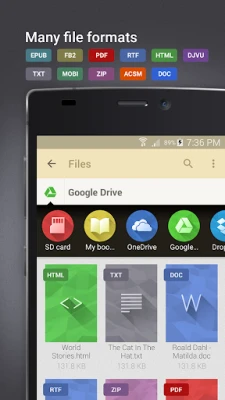
- Broad format support – The app can open common e‑book and document types such as EPUB, PDF, MOBI, TXT, FB2, HTML and DJVU.
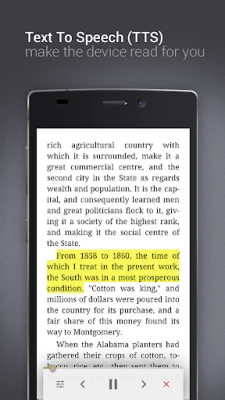
- Text‑to‑speech (TTS) – When a TTS engine is available on the device, eReader Prestigio can read the text aloud, which is handy for multitasking or for younger readers.
- Multilingual interface – The user interface is available in more than 25 languages, making navigation comfortable for a global audience.
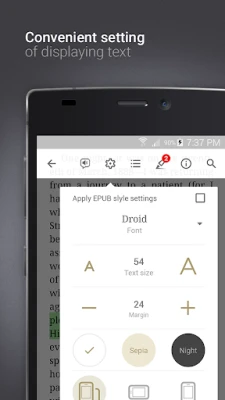
- Customizable reading experience – Users can choose from several fonts, font sizes, line spacing and background themes, including a night mode for low‑light conditions.
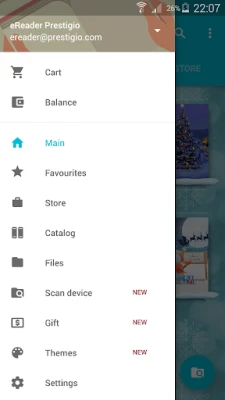
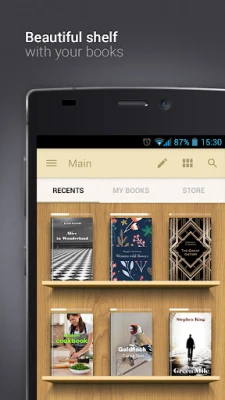
- Library organization – Books can be grouped into collections, sorted by author, title, genre or date added, and displayed as covers or list items.
- Built‑in dictionary – A simple lookup tool is included for quick word definitions while reading.
- File manager integration – The app can scan the device storage for supported files, allowing easy addition of new titles.
- Cloud sync basics – Users may link cloud services such as Google Drive, OneDrive or Dropbox to import files directly into the app.
How it works
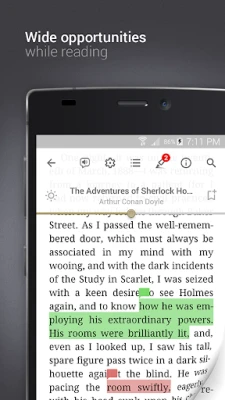
After installing the app, you can open e‑books from the internal file manager or from any third‑party file explorer. The reader presents a clean toolbar with navigation controls, a progress bar and quick access to font and theme settings. If your device has a TTS engine installed, a speaker icon appears, enabling you to start or pause audio playback of the current page.
Practical uses
- Reading novels, textbooks or reference material on the go.
- Listening to long‑form content while commuting, using the TTS feature.
- Helping children with bedtime stories by turning the text into spoken narration.
- Studying documents in PDF or EPUB format with adjustable fonts and night mode to reduce eye strain.
Installation information
The application is distributed as a free download from the Google Play Store. No registration is required to start reading, although creating a Prestigio account can enable optional cloud synchronization of reading positions.
Things to know before installing
- The app does not include a built‑in store of books; you need to supply your own files or import them from cloud storage.
- Text‑to‑speech depends on a compatible TTS engine installed on the device; the app itself does not provide a voice engine.
- Performance may vary with very large PDF files or high‑resolution images, as the app focuses on text‑centric formats.
Who may find it useful?
Anyone who reads digital books on Android devices can benefit from eReader Prestigio. Its multilingual UI appeals to non‑English speakers, while the TTS option is valuable for users who prefer listening or have visual impairments. Students, casual readers, and parents looking for a simple way to present stories to children will all find the core features relevant.
Frequently asked questions
Can I read DRM‑protected books?
eReader Prestigio does not include DRM removal capabilities; it can open only files that are not protected by digital rights management.
Is there an in‑app purchase?
The base application is free. Any additional services, such as cloud sync beyond basic import, may be offered as optional purchases, but the core reading functions remain free.
How do I change the reading theme?
Tap the theme icon in the toolbar to select from light, dark or custom background colors. Font and size adjustments are available in the same menu.
Rate the App
User Reviews














Popular Apps










 Games
Games Entertainment
 Communication
 E-mail
 Security
 Tools
Tools Media
Media Internet
 Finance
 Design
 Education
 Android Firmwares
 Travel & Local
 Android
 Windows
 Linux
Linux