
Latest Version
Latest
September 10, 2026
Librera
BOOKS AND REFERENCE
Android
5
Free
epub.reader
Report a Problem
More About EPUB Reader for all books – Free e‑book viewer by Librera
What is EPUB Reader for all books?
EPUB Reader for all books is a free Android application developed by Librera. It is designed to let you open and enjoy digital books in a wide range of formats without needing separate apps for each type.
Main features
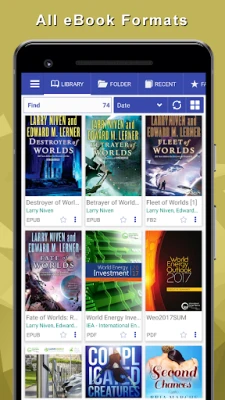
- Broad format support – Open EPUB, PDF, MOBI, DJVU, FB2, TXT, RTF, AZW, DOC, DOCX, ODT and common archive files such as ZIP or RAR.
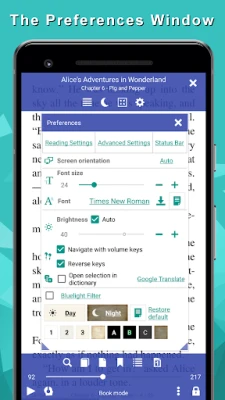
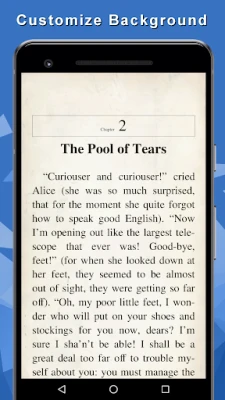
- Reading customization – Choose from several fonts, adjust font size, line spacing, margins and background colors. Night theme reduces eye strain in low‑light environments.
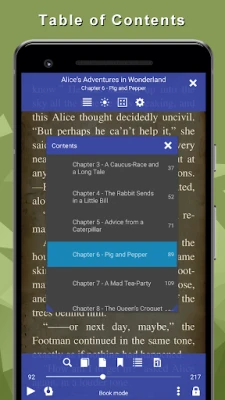
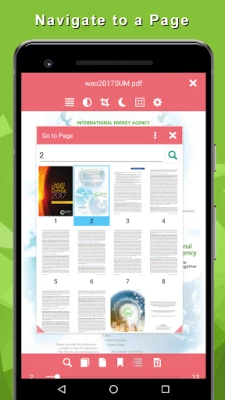
- Navigation tools – Use bookmarks, a searchable table of contents, and a quick‑search function to locate words or phrases anywhere in the text.
- Dictionary lookup – Tap a word or sentence to open a built‑in dictionary for instant definitions.
- Text‑to‑speech – Listen to books read aloud with the integrated TTS engine, useful for multitasking or accessibility.
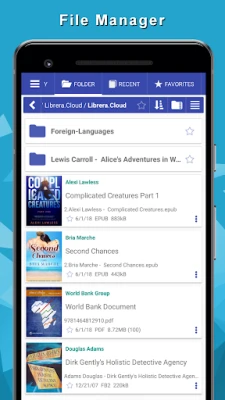
- Library management – Organize titles into favorites, tags or custom collections, and browse files through an internal file manager.
- Reading modes – Switch between continuous scrolling and page‑flipping, or view two pages side‑by‑side on larger screens.
- Brightness and rotation control – Adjust screen brightness with a swipe gesture and lock orientation to suit your reading posture.
How it works
After installing the app, you can import books from your device storage, cloud folders or by sharing a file from another app. The built‑in file manager lets you locate files quickly, while the OPDS catalog integration provides access to public e‑book repositories. Once a book is opened, the toolbar offers options for font settings, night mode, bookmarking and TTS playback.
Practical uses
- Students can load textbooks in PDF or EPUB and annotate them with notes and bookmarks.
- Avid readers can keep a single library for novels, comics and reference manuals, switching formats seamlessly.
- Travelers can enable night mode and TTS to read or listen without draining the battery.
Installation information
The app is available as a free download from the Appitika store. No additional purchases are required to access the core reading functions. After download, follow the standard Android installation prompts.
Things to know before installing
- The application does not require a specific Android version to run, but newer devices will provide a smoother experience.
- All reading features are offline; an internet connection is only needed for OPDS catalog browsing or dictionary updates.
- Permissions are limited to storage access for opening and saving books.
Who may find it useful?
Anyone who reads digital books on Android – from casual readers and students to professionals who need to consult PDFs and technical manuals – will benefit from the all‑in‑one approach of EPUB Reader for all books.
Frequently asked questions
Can I read DRM‑protected books?
The app handles standard, non‑DRM files. DRM‑protected titles need to be removed or opened with a compatible reader.
Is there a way to export my bookmarks?
Bookmarks can be shared as plain text via Android’s share menu, allowing you to email or store them elsewhere.
Does the app support cloud storage?
While the app itself does not include built‑in cloud sync, you can open files stored in any cloud folder that is accessible through Android’s file picker.
Rate the App
User Reviews











Popular Apps










 Games
Games Entertainment
 Communication
 E-mail
 Security
 Tools
Tools Media
Media Internet
 Finance
 Design
 Education
 IT Tools
 Travel & Local
 Android
 Windows
 Linux
Linux