

Latest Version
September 10, 2026
eBooks.com Pty Limited
BOOKS AND REFERENCE
Android
2
Free
com.ebooks.reader.app
Report a Problem
More About eBooks.com – Your Personal e‑book Library
What is eBooks.com?
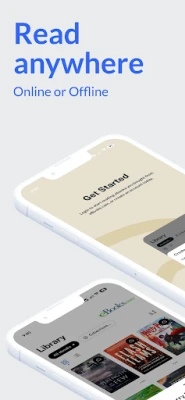
eBooks.com is the official Android companion for the eBooks.com store. It lets you access the e‑books you have bought, read them on your phone or tablet, and keep your library organized in one place.
Main features
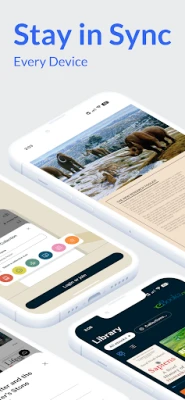
- Sync across devices – Your reading position, bookmarks and notes are automatically updated on every device linked to your eBooks.com account.
- Offline reading – Download titles to your device so you can continue reading without an internet connection.
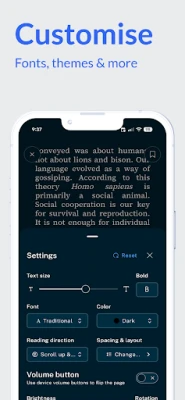
- Customizable reading experience – Adjust font size, style, colors, line spacing and choose between page‑flip or scrolling layouts.
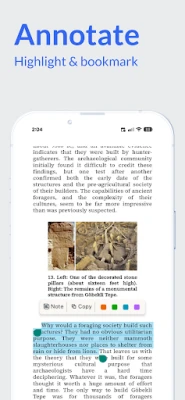
- Annotation tools – Highlight text in several colors, add margin notes and create bookmarks that travel with you.
- Library organization – Create collections, switch between grid and list views, and sort by title, author or recent activity.
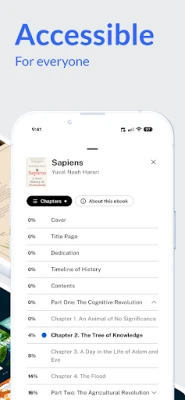
- Accessibility support – Compatible with TalkBack, high‑contrast modes and other accessibility features.
How it works
After installing the app, sign in with the same eBooks.com account you use on the website. Your purchased titles appear automatically. Tap a book to start reading; the app remembers where you left off, even if you switch to another device later. To read offline, simply download the book while you have a connection.
Practical uses
- Travel – Load several books before a flight and read without needing Wi‑Fi.
- Commute – Use the app on a phone or tablet while on a train or bus.
- Study – Highlight passages and add notes that stay synced across devices.
- Night reading – Switch to a dark background and adjust text size for comfortable reading in low light.
Installation information
The app is available for free from the Google Play Store. Search for "eBooks.com" or use the package name com.ebooks.reader.app to locate it. Installation follows the standard Android process.
Things to know before installing
- You need an active eBooks.com account and at least one purchased e‑book to see content in the app.
- Downloaded books occupy storage space; manage downloads to avoid filling your device.
- Sync requires an internet connection, but reading does not once a book is downloaded.
Who may find it useful?
Anyone who purchases e‑books from eBooks.com and wants a dedicated Android reader will benefit. The app is especially handy for frequent travelers, students, and readers who like to annotate and organize their collection.
Frequently asked questions
Can I read books purchased from other stores?
No. The app only displays titles bought through eBooks.com and linked to your account.
Is there a limit to how many books I can download?
There is no explicit limit, but the number of downloads you can keep offline depends on your device’s available storage.
How do I back up my annotations?
Annotations are stored in the cloud and sync automatically when you are online.
What if I lose my device?
Sign in on a new device with the same eBooks.com credentials; your library, progress and notes will reappear.
Rate the App
User Reviews












Popular Apps










 Games
Games Entertainment
 Communication
 E-mail
 Security
 Tools
Tools Media
Media Internet
 Finance
 Design
 Education
 IT Tools
 Travel & Local
 Android
 Windows
 Linux
Linux