


Latest Version
Latest
September 09, 2026
eBooks.com Pty Limited
BOOKS AND REFERENCE
Android
8
Free
com.ebooks.ebookreader
Report a Problem
More About Ebook Reader – eBooks.com
What is Ebook Reader?
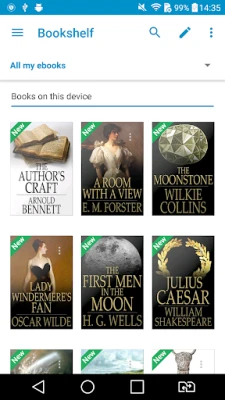
Ebook Reader is a free Android application developed by eBooks.com Pty Limited. It provides a dedicated environment for opening and reading digital books that you have purchased or borrowed through the eBooks.com platform.
Main features
- Library access – Connect with your eBooks.com account to view the full catalogue of titles you own.
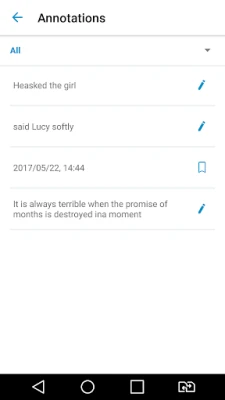
- Sync across devices – Your reading position, highlights, notes and bookmarks are stored online and appear on any Android device where you sign in.
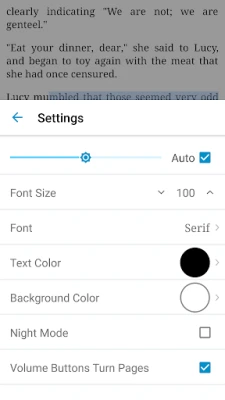
- Customizable reading view – Adjust font size, line spacing and switch to night mode for comfortable reading in different lighting conditions.
- Orientation support – Read in portrait or landscape, depending on your preference.
How it works
After installing the app, launch it and sign in with the same credentials you use on the eBooks.com website. The app then pulls your online bookshelf and presents the titles in a simple list. Selecting a book opens it in a built‑in viewer that supports common ebook formats used by the service. Any changes you make – such as adding a bookmark or highlighting a passage – are automatically uploaded to the cloud.
Practical uses
This reader is useful for anyone who reads on the go and wants their progress to follow them. Students can keep research notes synchronized, professionals can annotate reference material, and casual readers can enjoy novels without worrying about losing their place when switching phones.
Installation information
The app is available for free on the Google Play Store. Search for "Ebook Reader" by eBooks.com Pty Limited, tap Install, and wait for the download to complete. No additional files are required.
Things to know before installing
- You need an active eBooks.com account to access purchased titles.
- The app relies on an internet connection for initial library sync and for downloading books that are not already stored locally.
- Storage usage depends on how many books you choose to keep offline.
Who may find it useful?
Anyone with an eBooks.com subscription or a collection of eBooks purchased from that store will benefit from a dedicated Android reader that keeps their library organized and their reading data consistent across devices.
Frequently asked questions
- Can I read books without an internet connection? Yes, after a title is downloaded you can open it offline. Sync features require connectivity.
- Does the app support PDF files? The reader works with the formats provided by eBooks.com, which typically include EPUB and PDF where available.
- Is there a limit to how many devices can sync? The service allows you to sign in on multiple Android devices, but each device must use the same eBooks.com account.
Rate the App
User Reviews










Popular Apps










 Games
Games Entertainment
 Communication
 E-mail
 Security
 Tools
Tools Media
Media Internet
 Finance
 Design
 Education
 IT Tools
 Travel & Local
 Android
 Windows
 Linux
Linux