


Latest Version
August 14, 2026
Dua and Adhkar Team
BOOKS AND REFERENCE
Android
239
Free
com.ls.arabic
Report a Problem
More About Dua & Azkar – Daily Supplications and Remembrances
What is Dua & Azkar?
Dua & Azkar is a lightweight Android application created by the Dua and Adhkar Team. It gathers a selection of supplications (duas) and remembrances (azkar) that Muslims commonly recite throughout the day. The app is designed to be simple to navigate, making it easy to find the right prayer at the right moment.
Main Features
- Curated content: A set of carefully chosen chapters, each focusing on a specific aspect of daily life.
- Audio recitations: Listen to native‑language recordings to help with pronunciation.
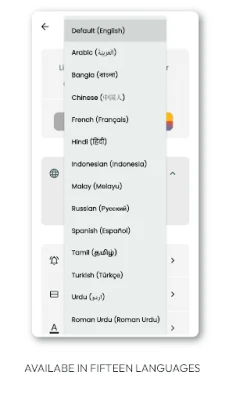
- Transliteration and translations: Read the Arabic text alongside transliteration and translations in several languages.
- Hadith references: Relevant prophetic traditions are provided where applicable.
- Customizable reminders: Set daily notifications to remember key azkar.
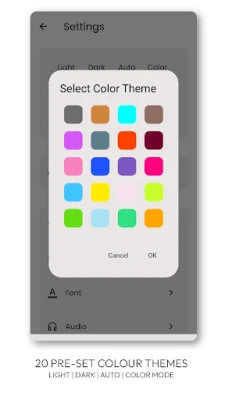
- Theme options: Choose from multiple colour schemes to suit personal taste.
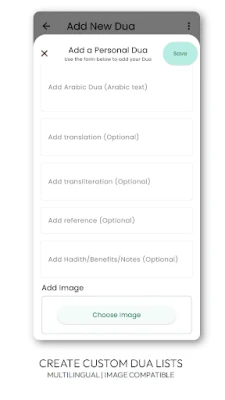
- Personal dua list: Add your own supplications that are not included in the default collection.
How It Works
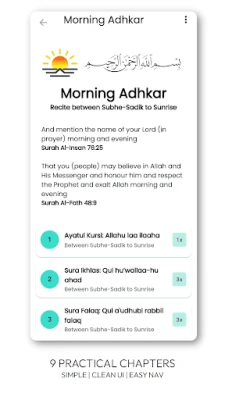
When you open the app, the home screen presents the main categories. Tapping a category opens a list of individual duas. Each entry shows the Arabic script, a transliteration line, and a translation. A play button starts the audio recitation, and a small icon lets you add the dua to your personal list for quick access later.
Practical Uses
- Morning and evening routines – use the reminder feature to incorporate regular azkar.
- Travel – offline audio ensures you can recite correctly without an internet connection.
- Learning – the transliteration helps non‑Arabic speakers practice proper pronunciation.
- Personal reflection – the ability to create a custom list lets you keep prayers that are meaningful to you.
Installation Information
The app is distributed as a free download from the Google Play Store. Installation follows the standard Android process: tap “Install,” grant any required permissions, and launch the app from your app drawer.
Things to Know Before Installing
- The app does not require an internet connection after the initial download, making it suitable for use in areas with limited connectivity.
- It does not collect personal data beyond what is necessary for reminder scheduling.
- Updates are released periodically to improve stability and add minor content enhancements.
Who May Find It Useful?
Anyone looking for a convenient, offline‑ready source of authentic duas and azkar will benefit from this app. It is particularly helpful for:
- New Muslims seeking guidance on daily prayers.
- Students and professionals who want quick access to short supplications.
- Travelers who need reliable audio recitations without relying on network access.
Frequently Asked Questions
Do I need an internet connection to use the app?
All core content, including audio files, is stored on the device after installation, so you can use the app offline.
Can I add my own duas?
Yes. The “Add Your Own Dua” feature lets you create a personal list with custom text in any language.
Is the content verified?
The developers state a commitment to authenticity and encourage users to report any discrepancies via email.
How do I set a reminder?
Open the settings menu, choose “Daily Adhkar reminders,” and select the time(s) you wish to be notified.
Rate the App
User Reviews















Popular Apps










 Games
Games Entertainment
 Communication
 E-mail
 Security
 Tools
Tools Media
Media Internet
 Finance
 Design
 Education
 Android Firmwares
 Travel & Local
 Android
 Windows
 Linux
Linux