



Latest Version
September 02, 2026
Deen Studios LLC-FZ
LIFESTYLE
Android
9
Free
com.mobilexsoft.ezanvakti
Report a Problem
More About Azan Time Pro – Prayer Times
What is Azan Time Pro?
Azan Time Pro is a free Android application developed by Deen Studios LLC-FZ that helps Muslims keep track of the five daily prayers. It combines location‑based prayer‑time calculations with tools such as an Azan alarm, Quran reader and Qibla direction finder, all in a single package.
Main features
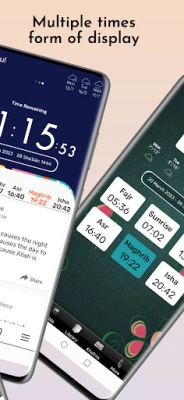
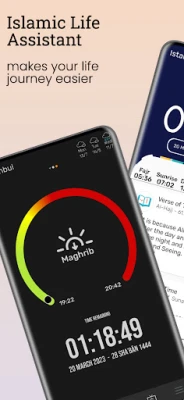
- Automatic prayer‑time calculation – The app uses your device’s GPS to determine the correct times for Fajr, Dhuhr, Asr, Maghrib and Isha based on a variety of recognized calculation methods.
- Customizable Azan notifications – You can set individual alerts for each prayer, choose different call‑to‑prayer sounds, and silence the phone automatically during the prayer window.
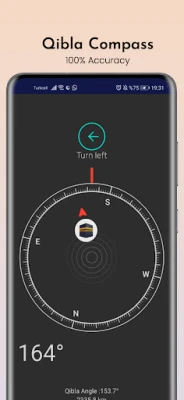
- Qibla compass and map – A built‑in compass points toward the Kaaba, while a map view shows the exact direction from any location.
- Full Quran access – The app includes the entire Quran with recitations, translations in multiple languages and Tajweed colour‑coding to aid proper pronunciation.
- Ramadan support – Suhoor and Iftar times are displayed automatically, and a dedicated Suhoor alarm helps users wake up for the pre‑dawn meal.
- Additional utilities – Features such as a Hijri calendar, Dhikr counter, mosque finder and basic weather information are also available.
How it works
When you launch Azan Time Pro, the app requests permission to access your location. Using GPS coordinates, it selects the appropriate calculation method (e.g., ISNA, MWL, Umm al‑Qura) and generates the day's prayer schedule. All times are stored locally, so you can view them even without an internet connection. The Azan alarm runs in the background and can be customized per prayer, allowing you to choose volume, sound and vibration settings.
Practical uses
- Set up daily reminders so you never miss a prayer, even when you are traveling.
- Use the Qibla compass to find the correct direction for prayer in unfamiliar places.
- Read or listen to the Quran with translations that match your language preference.
- Plan your Ramadan routine with automatically calculated Suhoor and Iftar times.
Installation information
The app is distributed as a free download from the Google Play Store. Installation follows the standard Android process: tap “Install,” grant location permission when prompted, and the app will configure itself based on your current position.
Things to know before installing
- Location access is required for accurate prayer‑time calculation and Qibla direction.
- The app stores prayer data locally; no internet connection is needed after the initial setup.
- All core features are available without in‑app purchases.
Who may find it useful?
Anyone who observes the five daily prayers and wants a reliable, offline‑capable tool for timing, reminders and Quran study will benefit from Azan Time Pro. It is especially handy for travelers, students and anyone who prefers a single app that covers multiple Islamic utilities.
Frequently asked questions
Do I need an internet connection to get prayer times?
No. After the initial location detection, the app calculates and stores the times locally, allowing offline access.
Can I change the calculation method?
Yes. The settings include several widely used methods such as ISNA, MWL and Umm al‑Qura, letting you select the one that matches your local practice.
Is the Quran text and audio included?
The app provides the complete Quran with recitations and translations in multiple languages, all bundled within the application.
How does the Qibla compass work?
The compass uses your device’s orientation sensors combined with your GPS location to point toward the Kaaba in Mecca.
Rate the App
User Reviews















Popular Apps










 Games
Games Entertainment
 Communication
 E-mail
 Security
 Tools
Tools Media
Media Internet
 Finance
 Design
 Education
 IT Tools
 Travel & Local
 Android
 Windows
 Linux
Linux