

Latest Version
Latest
August 31, 2026
Zoho Corporation
Communication
Android
8
Free
com.zoho.zohopulse
Report a Problem
More About Zoho Connect – Team Collaboration & Communication
What is Zoho Connect?
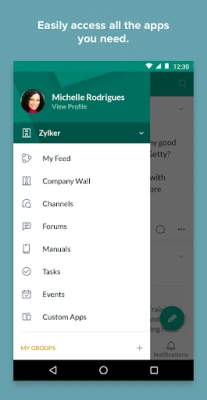
Zoho Connect is a mobile extension of Zoho’s enterprise collaboration platform. It brings together chat, forums, task management, and a searchable knowledge repository so teams can communicate, share ideas, and keep work organized from their Android devices.
Main features
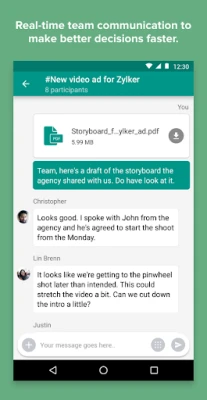
- Channels and chat – Create dedicated channels for projects, departments, or topics and exchange instant messages with teammates.
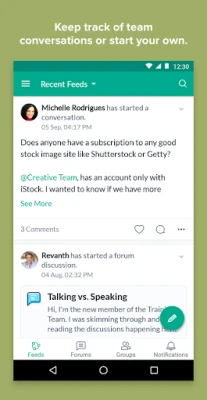
- Forums and discussions – Participate in company‑wide forums, follow threads that interest you, and contribute to ongoing conversations.
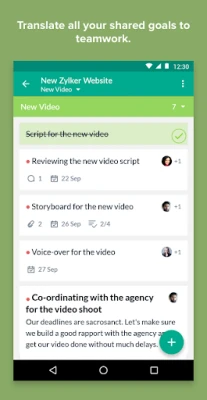
- Task boards – Build simple boards to track personal to‑dos or team tasks, organize work into sections, and assign items to colleagues.
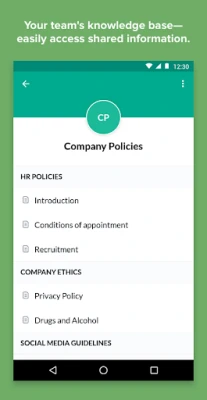
- Knowledge base – Access manuals, documents, and other shared resources through a searchable archive, and start discussions around any piece of content.
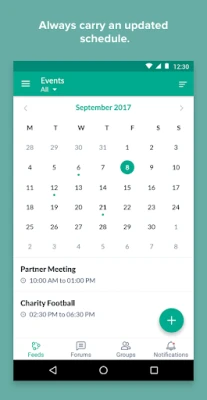
- Calendar integration – View personal appointments, team meetings, and other events; create new events and invite participants directly from the app.
- Real‑time notifications – Receive push alerts for new messages, mentions, task updates, and forum activity so you stay informed.
How it works
After installing the app, you sign in with your Zoho account. The home screen presents a feed of recent activity across your channels, forums, and boards. From there you can:
- Start a new conversation by selecting a channel or creating a private chat.
- Post a question or share an update in a forum, then follow the thread for future replies.
- Open the knowledge base, type a keyword, and instantly locate relevant manuals or documents.
- Use the board view to add tasks, set due dates, and assign them to team members.
- Tap the calendar icon to see upcoming events and add new ones with optional invitations.
Practical uses
Zoho Connect is useful for:
- Remote teams that need a single place for quick chat and longer‑form discussions.
- Project managers who want to keep task status visible to all stakeholders.
- HR or operations groups building a living knowledge base of policies and procedures.
- Anyone who prefers to receive work‑related updates on a mobile device rather than switching between multiple apps.
Installation information
The app is available for free on the Google Play Store. Search for “Zoho Connect” or use the package name com.zoho.zohopulse to locate it. Installation follows the standard Android process: tap Install, grant any required permissions, and launch the app.
Things to know before installing
- The app requires a Zoho account; it does not provide a standalone sign‑up flow.
- Features such as channel creation or board management depend on the permissions set by your organization’s Zoho Connect administrator.
- Data synchronization occurs over the internet, so a stable connection is recommended for real‑time updates.
Who may find it useful?
Any organization that already uses Zoho’s suite of business tools can extend its collaboration capabilities to mobile. Small businesses, mid‑size companies, and large enterprises all benefit from having a unified place for conversation, knowledge sharing, and task tracking.
Frequently asked questions
Do I need a separate license for the mobile app?
No. The mobile app is free for users who already have access to Zoho Connect through their organization.
Can I receive notifications when I’m offline?
Push notifications are delivered as long as the device has an internet connection. Offline activity will appear in the feed once you reconnect.
Is my data stored securely?
Zoho Connect follows Zoho’s standard security practices for data encryption and access control, which apply to both the web and mobile versions.
Rate the App
User Reviews











Popular Apps










 Games
Games Entertainment
 Communication
 E-mail
 Security
 Tools
Tools Media
Media Internet
 Finance
 Design
 Education
 IT Tools
 Travel & Local
 Android
 Windows
 Linux
Linux