


Latest Version
Latest
August 31, 2026
Zoho Corporation
Communication
Android
6
Free
com.zoho.zdialer
Report a Problem
More About ZDialer by Zoho Voice – Business Calling on Android
What is ZDialer by Zoho Voice?
ZDialer is a mobile companion for Zoho Voice, the cloud‑based telephony service offered by Zoho Corporation. It turns your Android phone into a business‑grade softphone, allowing you to place and receive calls that are routed through your Zoho Voice account.
Main features
- Integrated dialer – A clean interface with a full‑screen dialpad, call logs and notification panel.
- Call handling – Make outbound calls, answer inbound calls, and record conversations directly from the app.
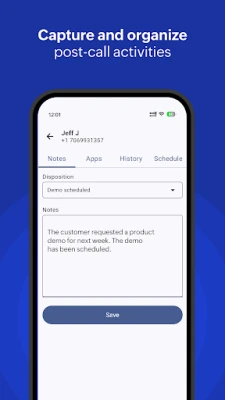
- Notes and dispositions – After each call you can add short notes or select a disposition to track outcomes.
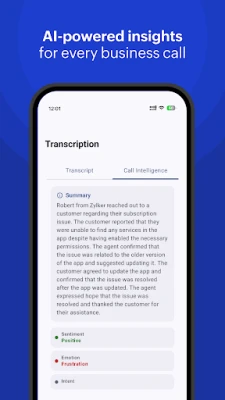
- Transcription – Recorded calls and voicemails can be converted into readable text for quick reference.
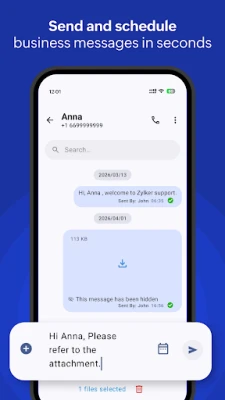
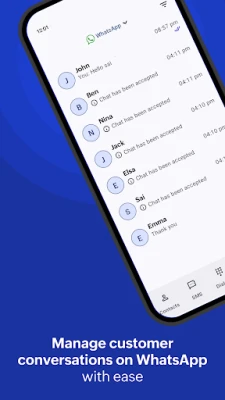
- Messaging support – Send custom text messages or use predefined templates; the app also integrates with popular instant‑messaging channels such as WhatsApp and Telegram for unified conversation management.
- Access to contacts – Sync with your phone’s address book to dial business contacts without leaving the app.
- Call history – View detailed logs, listen to recordings, and replay voicemails without switching to a web console.
How it works
After installing ZDialer, you log in with the same credentials you use for Zoho Voice on the web. The app establishes a secure internet connection (typically via Wi‑Fi or mobile data) and registers your device as a softphone endpoint. Once registered, any call routed to your Zoho Voice number appears in the app, and you can initiate outbound calls using the dialpad or by tapping a contact.
During a call you can tap a button to start recording; the recording is stored in the app and can be transcribed automatically. After the call ends, a screen prompts you to add a note or select a disposition, helping you keep track of follow‑up actions.
Practical uses
- Field sales teams can log calls and outcomes while on the road, eliminating the need to switch to a desktop.
- Support agents can access call recordings and transcriptions for quality assurance and training.
- Remote workers can stay connected to the company’s main phone number without a physical desk phone.
Installation information
Search for ZDialer by Zoho Voice in the Google Play Store, tap Install, and wait for the download to complete. The app size and Android version requirements are not listed publicly, so ensure your device runs a recent version of Android and has sufficient storage.
Things to know before installing
- You need an active Zoho Voice subscription; the app itself is free but does not provide telephony services on its own.
- A stable internet connection is required for call quality; cellular data usage may apply.
- Call recordings and transcriptions are stored locally on the device; consider device security and backup policies.
Who may find ZDialer useful?
Any professional who relies on Zoho Voice for business communication can benefit—sales representatives, customer‑support agents, remote consultants, and small‑business owners who need a mobile extension of their office phone system.
Frequently asked questions
Do I need a separate phone number?
No. ZDialer uses the phone number assigned to your Zoho Voice account.
Can I use the app without an internet connection?
Calls require an active data connection; the app cannot place or receive calls offline.
Are call recordings automatically uploaded?
Recordings are saved on the device. Uploading or sharing them depends on your Zoho Voice settings and any integration you have configured.
Is the app compatible with tablets?
The app is designed for Android phones; it may run on tablets but the interface is optimized for smaller screens.
Rate the App
User Reviews















Popular Apps










 Games
Games Entertainment
 Communication
 E-mail
 Security
 Tools
Tools Media
Media Internet
 Finance
 Design
 Education
 IT Tools
 Travel & Local
 Android
 Windows
 Linux
Linux