

Latest Version
Latest
September 01, 2026
WEVERSE COMPANY Inc.
Communication
Android
3
Free
co.benx.weverse
Report a Problem
More About Weverse: Connect with Artists – Fan Community App
What is Weverse?
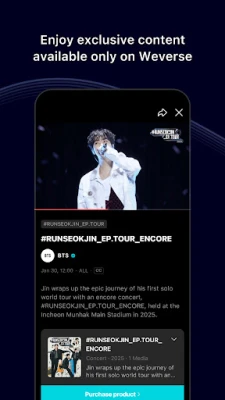
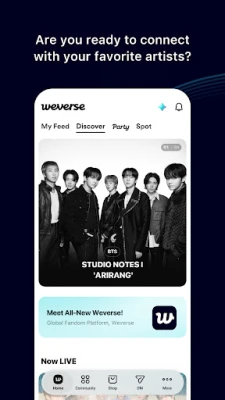
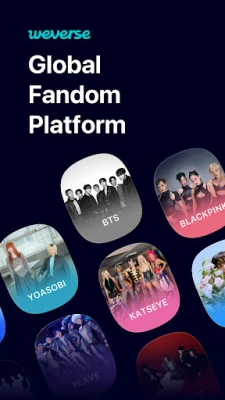
Weverse is a mobile community platform that brings fans and artists together in one space. Developed by WEVERSE COMPANY Inc., the app offers a dedicated feed where artists share updates, photos, videos and live broadcasts. Fans can engage by liking, commenting and sending virtual hearts, creating a shared experience that goes beyond traditional social media.
Main Features
- Artist feeds – Follow official accounts to receive daily posts, stories and announcements.
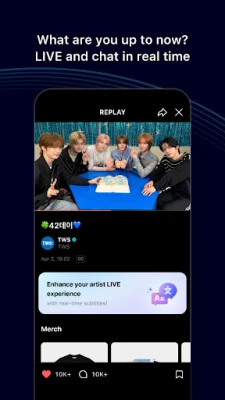
- Live streaming – Watch real‑time broadcasts from artists and interact with messages and hearts during the stream.
- Auto‑translation – Posts and comments can be translated into the language you select, helping fans from different regions communicate.
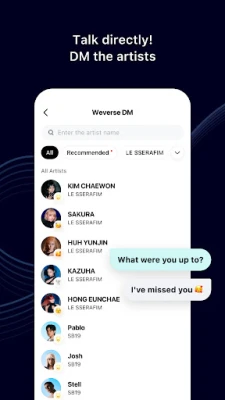
- Direct messaging – Subscribe to artist‑to‑fan messages for a more personal connection.
- Merchandise shop – Browse official merchandise and albums within the app and keep track of orders.
- Event hub – Find details about concerts, pop‑up stores and exhibitions, and use tools such as QR codes and stamp rallies to enhance offline experiences.
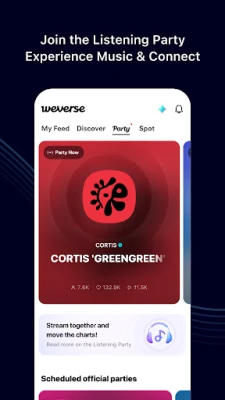
- Listening parties – Link a streaming service, listen to music together with other fans and chat in real time.
How It Works
After installing the app, you create a simple profile and can start following the artists you like. The home screen displays a chronological feed of posts from those artists. Tapping a post opens the full content, where you can like, comment or share a reaction. If a post is in a language you don’t understand, the built‑in translation button provides an instant version in your chosen language.
Live streams appear in a dedicated LIVE tab. When an artist goes live, a notification is sent (if you enable push notifications). During the broadcast you can type messages that appear on screen as hearts or comments, creating a shared moment with other viewers.
For fans who want a more private interaction, the DM (direct message) feature allows you to subscribe to artist messages. Subscriptions are managed through the app’s digital currency, Jelly, which can be purchased in‑app.
Practical Uses
- Stay up‑to‑date with the latest news, release dates and tour announcements from your favorite groups.
- Participate in live Q&A sessions or concerts without leaving your phone.
- Connect with an international fan community using the translation tools.
- Buy official merchandise directly, avoiding third‑party sellers.
- Plan attendance at offline events by checking schedules, maps and QR‑based entry passes.
Installation Information
The app is available for free on the Google Play Store. Search for "Weverse: Connect with Artists" or the package name co.benx.weverse. Installation follows the standard Android process: tap Install, grant the requested permissions, and launch the app.
Things to Know Before Installing
- The app requires an internet connection for streaming, posting and shop transactions.
- Some features, such as direct messaging or purchasing Jelly, involve in‑app purchases.
- Push notifications can be enabled to receive alerts about new posts, live streams and shop updates.
Who May Find It Useful?
Fans of K‑pop, indie musicians and other artists who maintain an official Weverse presence will benefit most. The translation feature also makes it attractive for non‑English speaking fans who want to follow global artists.
Frequently Asked Questions
- Is Weverse free to use? Yes, downloading and basic interaction are free. Some optional services, like purchasing Jelly or merchandise, require payment.
- Can I watch live streams without a subscription? Live streams are generally accessible to all followers, but certain exclusive events may require a paid ticket or subscription.
- How does the auto‑translation work? The app uses built‑in translation to convert posts and comments into the language you select in settings. Accuracy varies by language.
- Is my personal data safe? Weverse follows standard Android privacy practices. Review the app’s permission list during installation to understand what data is accessed.
Rate the App
User Reviews















Popular Apps










 Games
Games Entertainment
 Communication
 E-mail
 Security
 Tools
Tools Media
Media Internet
 Finance
 Design
 Education
 IT Tools
 Travel & Local
 Android
 Windows
 Linux
Linux