

Latest Version
September 04, 2026
MEGMAA Dev
Communication
Android
3
Free
com.vybe.app
Report a Problem
More About Vybe – Second Phone Number for Calls & Texts
What is Vybe?
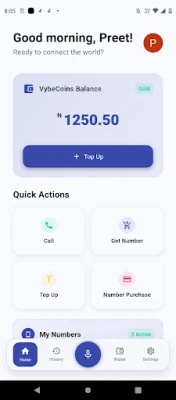
Vybe is a free Android app that provides a separate, fully functional phone number that works alongside your existing mobile line. The extra number can receive and make voice calls and send or receive text messages without the need for a second SIM card or a separate device.
Main features
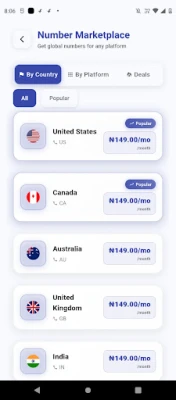
- Real phone numbers – Choose from a range of country codes such as the United States, United Kingdom, Canada, India and others.
- VoIP calling – Make and receive calls over Wi‑Fi or mobile data with clear audio quality.
- SMS support – Send and receive standard text messages to any carrier.
- Call recording – One‑tap recording for important conversations, stored only for you.
- Voicemail – Missed calls are captured as voicemail that you can listen to inside the app.
- Encrypted chat & video – End‑to‑end encrypted messaging and video calls between Vybe users.
- Do Not Disturb & business hours – Schedule when your Vybe number rings, keeping work and personal time separate.
- Call control – Forward, block, or set custom rules for incoming calls.
- Multiple numbers – Manage several secondary numbers from a single account.
How it works
After installing Vybe, you select a country code and request a new number. The number is allocated instantly and appears in the app’s dialer. All calls and messages are routed through Vybe’s servers and delivered to your device using your internet connection. Because the service uses VoIP, you do not need to change SIM cards or wait for physical delivery.
Practical uses
- Freelancers and small businesses – Keep client communications on a dedicated line without exposing your personal number.
- Side‑hustlers and creators – Separate customer inquiries from personal chats.
- Classified sellers – Provide a private contact number to buyers.
- Travelers – Obtain a local number in a destination country for easier contact and lower messaging costs.
- Privacy‑focused users – Protect your primary number while still using a real phone line.
Installation information
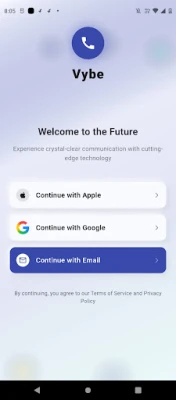
Vybe is available as a free download from the Google Play Store. Search for the package name com.vybe.app or the app title “Vybe”. After downloading, grant the permissions required for phone and SMS handling, then follow the in‑app setup wizard to choose your number.
Things to know before installing
- The app relies on an active internet connection (Wi‑Fi or mobile data) for calls and messages.
- Voice quality and call reliability depend on network speed and stability.
- Some features, such as call recording or voicemail, may be subject to local regulations.
- Vybe is developed by MEGMAA Dev and is offered free of charge; any optional in‑app purchases are not required for basic functionality.
Who may find Vybe useful?
Anyone who needs a second line without the hassle of extra hardware can benefit from Vybe. This includes entrepreneurs, remote workers, frequent travelers, online sellers, and anyone who values keeping personal and professional communications separate.
Frequently asked questions
Do I need a second SIM card?
No. Vybe works entirely over data, so a single SIM is sufficient.
Can I make international calls?
Yes, as long as you have an internet connection. Call rates follow Vybe’s pricing model, which is displayed in the app.
Is my data private?
Vybe uses end‑to‑end encryption for chats and video calls between Vybe users. Call recordings and voicemails are stored locally on your device and are not shared.
Can I use Vybe on multiple devices?
The app is designed for a single Android device per account. Switching devices requires re‑installing and logging in.
Rate the App
User Reviews















Popular Apps










 Games
Games Entertainment
 Communication
 E-mail
 Security
 Tools
Tools Media
Media Internet
 Finance
 Design
 Education
 IT Tools
 Travel & Local
 Android
 Windows
 Linux
Linux