


Latest Version
Latest
September 15, 2026
PT vivo mobile Indonesia
Communication
Android
28
Free
com.vivo.browser
Report a Problem
More About Vivo Browser – Free Web Browser by PT Vivo Mobile Indonesia
What is Vivo Browser?
Vivo Browser is a lightweight web browser developed by PT Vivo Mobile Indonesia for Android devices. It is offered at no cost and aims to provide a straightforward way to surf the web, view multimedia content, and manage everyday browsing tasks.
Main Features
- Standard web browsing – Load websites quickly with a clean interface.
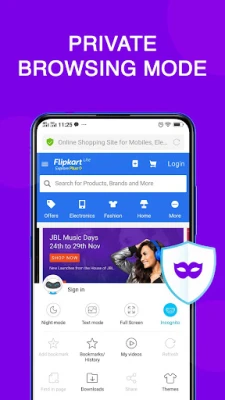
- Private/Incognito mode – Browse without storing history, cookies or form data on the device.
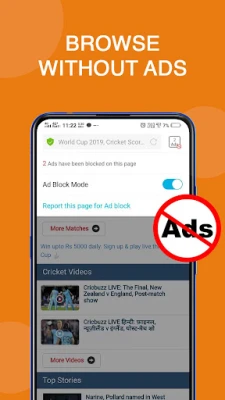
- Basic ad‑blocking – Reduce the appearance of intrusive pop‑ups and banner ads while navigating.
- Night mode – Switch to a darker color scheme for comfortable reading in low‑light environments.
How It Works
The browser uses the Android WebView component to render pages, which means it benefits from the underlying system’s rendering engine. When you open a link, the address bar appears at the top, and navigation controls let you move forward, backward, or refresh the page. Enabling private mode creates a temporary session that is cleared when you close the tab.
Practical Uses
- Checking news sites, social media feeds, or any everyday web content.
- Watching videos or listening to music streams without needing a separate app.
- Searching for information while on the go, with the option to keep the session private.
Installation Information
Vivo Browser can be installed directly from the Google Play Store. Search for the package name com.vivo.browser or the app title, then tap “Install.” The download size and required Android version are not specified, so the Play Store will indicate whether your device meets the minimum requirements.
Compatibility
The app is designed for Android smartphones. While it is marketed by Vivo, the browser can be installed on devices from other manufacturers, though some Vivo‑specific shortcuts or integrations may not be available.
Things to Know Before Installing
- Because the app is free, it may include optional ads or promotional content, though it also offers a basic ad‑blocking option.
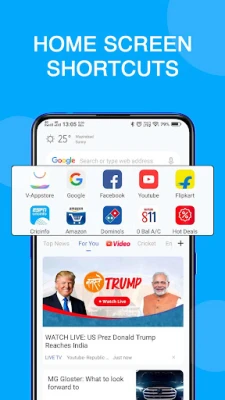
- Features such as home‑screen shortcuts or specialized news feeds are not guaranteed on non‑Vivo devices.
- Check the permissions requested during installation to ensure they align with your privacy preferences.
Who May Find It Useful?
Anyone looking for an alternative to the default Android browser or Chrome may appreciate Vivo Browser’s simple layout and private‑browsing option. Users who prefer a lightweight app with minimal setup will also benefit.
Frequently Asked Questions
Is Vivo Browser safe to use?
The app is distributed through the official Google Play Store, which applies standard security checks. As with any browser, keep it updated to benefit from the latest security patches.
Can I sync bookmarks across devices?
Vivo Browser does not advertise a built‑in sync feature, so bookmarks are stored locally on the device.
Does the private mode keep my activity completely hidden?
Private mode prevents the browser from saving history, cookies, and form data on the device. However, it does not hide traffic from your network provider or the websites you visit.
Rate the App
User Reviews















Popular Apps










 Games
Games Entertainment
 Communication
 E-mail
 Security
 Tools
Tools Media
Media Internet
 Finance
 Design
 Education
 Android Firmwares
 Travel & Local
 Android
 Windows
 Linux
Linux