



Latest Version
September 08, 2026
Innometrics Enterprise
Communication
Android
25
Free
com.online.meeting.livevideoconference
Report a Problem
More About Video Meeting – Free Video Conferencing App
What is Video Meeting?
Video Meeting, developed by Innometrics Enterprise, is a free Android application that lets you start or join video conferences with a single tap. The app focuses on simplicity: you don’t need to create an account, and there are no imposed time limits on calls. It is designed for anyone who wants a quick, reliable way to connect face‑to‑face over the internet.
Main features
- Instant access – Create or join a meeting by entering a link or a short code; no registration required.
- HD video and clear audio – The app streams high‑definition video and supports crystal‑clear voice communication.
- Low‑bandwidth friendly – Optimized for slower connections, the interface remains responsive even on modest networks.
- In‑meeting chat – A built‑in text chat lets participants share short messages, links, or notes without leaving the call.
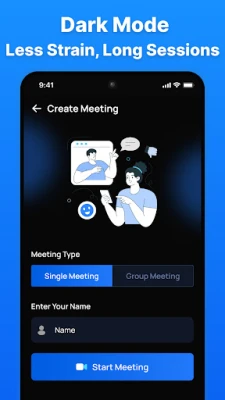
- Theme support – Light and dark themes are available to suit different lighting conditions.
How it works
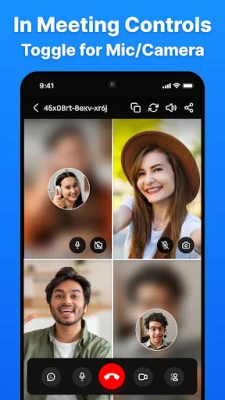
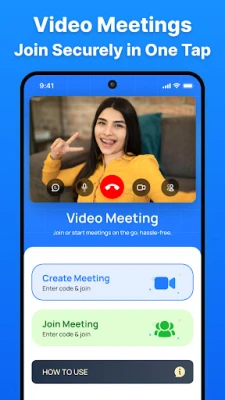
When you open Video Meeting, you are presented with two primary options: start a new meeting or join an existing one. Starting a meeting generates a unique identifier that you can share via any messaging platform. To join, simply enter the identifier or click a shared link. Once inside, you can toggle your microphone and camera, switch between front and rear cameras, and use the chat window for text communication. The interface is kept minimal to reduce distractions and keep the focus on the conversation.
Practical uses
The app is suitable for a range of scenarios:
- Remote work – Teams can hold quick stand‑up meetings or longer project discussions without scheduling overhead.
- Online education – Teachers can create virtual classrooms, share screens, and interact with students in real time.
- Family and friends – Stay connected with loved ones across distances, using a simple link that works on any Android device.
Installation information
Video Meeting is distributed as a free download from the Google Play Store. The installation process follows the standard Android procedure: tap “Install,” wait for the download to complete, and then open the app. No additional configuration is required before the first use.
Compatibility
The app runs on Android devices that meet the basic system requirements for Google Play applications. Because the developer has not published specific version or hardware constraints, it is advisable to ensure your device runs a recent version of Android and has a functional camera and microphone.
Things to know before installing
- Since no account is needed, all meeting data is generated locally and shared only through the meeting link you distribute.
- The app does not store recordings or transcripts; any saved content must be handled outside the application.
- Network performance will affect video quality; a stable Wi‑Fi or cellular connection is recommended for the best experience.
Who may find it useful?
Anyone who values quick, hassle‑free video communication will benefit from Video Meeting. Small businesses, educators, freelancers, and casual users looking for a straightforward way to host virtual gatherings will appreciate the lack of sign‑up steps and the unlimited call duration.
Frequently asked questions
Do I need an internet connection?
Yes. The app requires an active internet connection (Wi‑Fi or mobile data) to transmit video and audio.
Is there a limit to the number of participants?
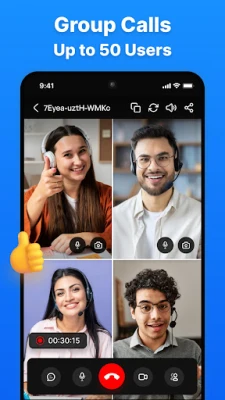
The developer has not published a specific participant cap, so the practical limit will depend on network bandwidth and device performance.
Can I record a meeting?
Video Meeting does not include a built‑in recording feature. Users who need recordings must use a separate screen‑recording tool.
Is the app safe to use?
The app does not request unnecessary permissions beyond camera, microphone, and network access, which are typical for video‑calling tools. As with any communication app, share meeting links only with trusted participants.
Rate the App
User Reviews















Popular Apps










 Games
Games Entertainment
 Communication
 E-mail
 Security
 Tools
Tools Media
Media Internet
 Finance
 Design
 Education
 Android Firmwares
 Travel & Local
 Android
 Windows
 Linux
Linux