

Latest Version
Latest
September 04, 2026
Video Downloader & Fast Saver
Media
Android
4
Free
videodownloader.instagram.videosaver
Report a Problem
More About Video Downloader & Story Saver – Save Social Media Content
What is Video Downloader & Story Saver?
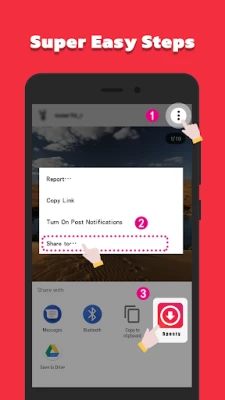
Video Downloader & Story Saver is an Android utility that lets you store videos, stories and short‑form clips from social media apps onto your phone. The app focuses on a straightforward workflow: copy a link or use the share menu, and the content is saved to your gallery for offline viewing.
Main features
- Link‑based download: Paste a URL or select the app from the Android share sheet to start a download.
- Story saving: Capture temporary stories from supported platforms while they are still available.
- High‑quality output: Files are saved in the original resolution whenever possible.
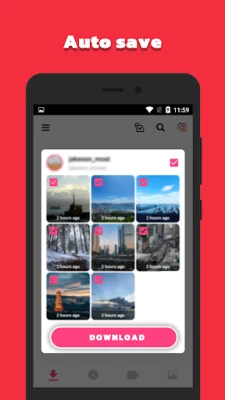
- Automatic gallery storage: Downloaded media appears in your device’s photo gallery without extra steps.
- Multi‑download support: Queue several items and let the app handle them sequentially.
How it works
The process is designed for minimal interaction. First, locate the video or story you want to keep. Copy its link from the social media app or tap the share button and choose Video Downloader & Story Saver from the list. The app reads the link, extracts the media file, and begins downloading. Progress is shown in a simple notification, and once complete the file is placed in a dedicated folder inside your gallery.
Practical uses
- Keep a favorite tutorial or recipe video for offline reference.
- Archive a friend's story before it disappears.
- Collect short‑form clips for personal projects or inspiration.
- Save travel or event footage when you have limited connectivity.
Installation information
The application is available as a free download from the Appitika store. Tap the install button, grant the standard permissions required for storage access, and the app will appear in your app drawer ready for use.
Things to know before installing
- The app requires permission to read and write to external storage so it can place files in your gallery.
- Download speed depends on your internet connection and the source platform’s policies.
- Content from private accounts can be saved only when the platform permits it.
Who may find it useful?
Anyone who regularly watches videos or stories on social media and wants a simple way to keep them locally. This includes students saving educational clips, creators gathering reference material, and casual users who prefer offline access.
Frequently asked questions
Do I need to be logged into the social platform?
For public content, no login is required. Private content may require you to be logged in to the source app, as the download follows the same access rules.
Where are the downloaded files stored?
Files are saved in a folder named after the app inside your device’s default picture/video directory, and they appear automatically in the gallery.
Can I download multiple items at once?
Yes, you can add several links to the queue; the app will process them one after another.
Is there a limit on the number of downloads?
There is no built‑in limit; the only constraints are device storage and network conditions.
Rate the App
User Reviews















Popular Apps










 Games
Games Entertainment
 Communication
 E-mail
 Security
 Tools
Tools Media
Media Internet
 Finance
 Design
 Education
 IT Tools
 Travel & Local
 Android
 Windows
 Linux
Linux