


Latest Version
Latest
August 14, 2026
TypeApp LLC
Communication
Android
282
Free
com.trtf.blue
Report a Problem
More About TypeApp Mail – Unified Email for Android
What is TypeApp Mail?
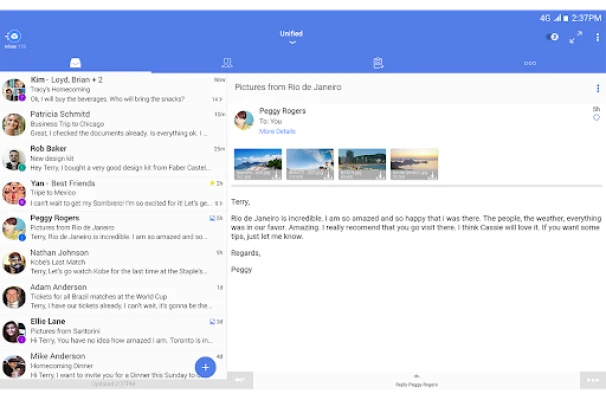
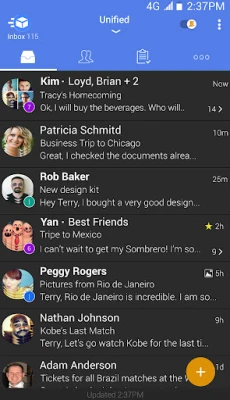
TypeApp Mail is a free Android email client developed by TypeApp LLC. It lets you add several email accounts—whether they use IMAP, POP3, or Exchange—into a single, unified inbox. The app focuses on a streamlined design, allowing you to read, reply, and organize messages without juggling multiple native clients.
Main Features
- Unified Inbox – All of your accounts appear together, while each account can still be accessed separately if you prefer.
- Smart Push Notifications – Receive instant alerts for new mail, with options to customize sounds, vibration patterns, LED colors, and quiet‑hours settings per account.
- Conversation View – Messages from the same thread are grouped, making it easier to follow ongoing discussions.
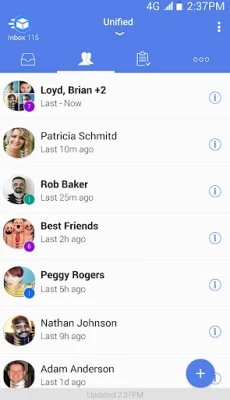
- People‑Centric Tools – Quickly locate messages from important contacts and set VIP notifications for priority senders.
- Cluster Management – Similar messages are automatically grouped into expandable clusters, helping you keep the inbox tidy.
- Customizable Themes – Choose from light, dark, or custom color schemes to match your preferences.
- Widget Support – Home‑screen widgets show unread counts and let you preview recent messages at a glance.
How It Works
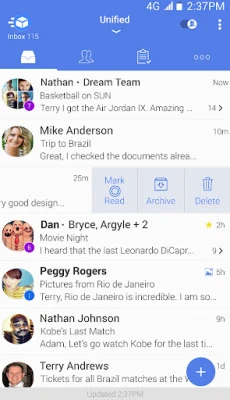
When you add an account, TypeApp Mail attempts automatic configuration based on the email address domain. If the automatic setup fails, you can manually enter server details for IMAP, POP3, or Exchange. Once configured, the app syncs messages in the background and presents them in the unified view. You can swipe to archive, delete, or mark messages as read, and long‑press to select multiple items for batch actions.
Practical Uses
- Professionals who need to monitor a work Exchange account alongside personal Gmail or Yahoo accounts.
- Students managing several school‑related email addresses without switching apps.
- Anyone who prefers a single inbox with visual separation (color‑coding) for each account.
Installation Information
The app is available for free on the Google Play Store. Search for "TypeApp Mail" or use the package name com.trtf.blue to locate it. Installation follows the standard Android process: tap Install, grant the requested permissions for email access, and launch the app to begin adding accounts.
Things to Know Before Installing
- The app requires internet access to sync messages; a data plan or Wi‑Fi connection is recommended.
- Permissions include access to your accounts and storage for attachments; these are typical for email clients.
- Because the app supports Exchange, it can sync calendar and contact data if the server allows it.
Who May Find It Useful?
TypeApp Mail is suited for users who want a single, visually consistent place to read and organize email from multiple providers. It appeals to people who appreciate customization options—such as theme selection and per‑account notification settings—without needing a complex enterprise solution.
Frequently Asked Questions
Can I use TypeApp Mail with my corporate Exchange account?
Yes. The app supports Exchange protocols, allowing you to sync mail, calendar, and contacts if your server permits it.
Does the app work on Android tablets?
TypeApp Mail runs on any Android device that meets the Play Store’s minimum requirements, including tablets.
Is there a way to back up my email settings?
Settings are stored locally on the device. You can export account configurations through the app’s settings menu, if needed.
Can I customize the notification sound for each account?
Yes. The notification settings let you assign distinct sounds, vibration patterns, and LED colors per account.
Rate the App
User Reviews















Popular Apps










 Games
Games Entertainment
 Communication
 E-mail
 Security
 Tools
Tools Media
Media Internet
 Finance
 Design
 Education
 Android Firmwares
 Travel & Local
 Android
 Windows
 Linux
Linux